
Category: Tech tips

End-of-Year Tips: 22 Steps To A Speedier Computer
 This week, I’ll share three holiday activities that will get your computers, technology, and social media ready for the new year. Here’s what you’ll get:
A note: The links won’t work until the articles publish!
Today: 22 Steps to a Speedier Computer
There are two ‘speed’ problems that arise when using computers:
- the computer itself is slow, for lots of reasons
- you are slow–meaning: You have too much to do. We’ll deal with this later…
Here’s what you need to do:
- Make sure your firewall is working. Windows comes with a built-in one. Maybe Mac does too. Leave it active. It’s under Control Panel>Administrative Tools. Sometimes, they seem to turn off by themselves (I have no idea why). Check to be sure it is active. This will keep viruses and malware out that slow your computer.
- Keep your antivirus software active. If you’re paranoid like me, run an antivirus scan weekly to be sure nothing is missed.

- Sort through your Documents and get rid of those you don’t need anymore. It’s intimidating, like a file cabinet that hasn’t been opened in months–or years and is covered with dust, even spider webs. Do it, though. If you don’t, every time you search, the computer must finger through those unused and worthless files. It doesn’t understand the difference between ‘unused’ and ‘important’. Plus, they distract you from finding the documents you really want. If you don’t use files anymore, but don’t want to toss them, make an ‘Old’ file and put them all in there.
- Back up your files to an external drive or cloud storage. If you have an automated system, skip this. If you don’t, consider getting Carbonite or similar. If you use Windows, try their backup program. It’s easy to find: Click the Start Button and search ‘backup’.
- Empty the trash. Don’t even look in it. If you haven’t missed a file by now, it won’t matter if you throw it out.
- Learn to use that program you’ve been promising you would or delete it. Evernote is a great example. Use it (and you won’t be sorry) or delete the email from your best friend exhorting you to try it. Move on.
- Go through your programs and delete the ones you no longer use–or never used (like the ones that come pre-installed on a new computer). Here’s what you do:
- go to Control Panel>Programs and Features
- peruse the list and pick the programs you downloaded by mistake, meaning to use, or used to use and no longer do
- uninstall
- don’t look back
- Update any software that needs it. I don’t mean BUY a newer version. I mean click the free update that’s been nagging at you (Adobe Reader and Windows, for example)
- Clean the junk off your desktop. Put it in folders or create a folder for ‘Working on’. Don’t know how to create a desktop folder? Just right click on the desktop and select ‘New>folder’
- Clean up your Start Button. Remove shortkeys you no longer use (with a right click>delete). Add those that have become daily go-to sites
- Clean out your subscriptions. This slows YOU down as you sit to work. They usually arrive via email. Dragging through dozens of emails a day when you know you aren’t interested in a lot of them slows you down. Me, I have over 200 every day. I regularly purge blog and newsletter subscriptions that didn’t work out as planned.
- Make notifications weekly instead of daily. If you get Google alerts, set them for weekly (unless you really must know when someone posts on the term ‘Labrador puppies’). If you have social media, let them notify you of activity once a week instead of daily. If you get reports on Twitter usage or Google Adwords, schedule those weekly.
- Change your browser to Chrome. When I did, it doubled my surfing speed. And it’s not just me. Among those-who-know, it’s considered the fastest browser (and IE the slowest).
- Slim down your start-up process. Only have the programs you really need start when you boot (or reboot). Skip the rest. How? Click Start, type msconfig in the search bar and press Enter. In the System Configuration window, click the Startup tab. From the list of programs that appears, untick the box next to those you don’t need to launch automatically at startup. Only deselect programs that you don’t use regularly or know that you don’t need.

- Add more RAM. That’s the stuff that lets you keep more stuff open on the desktop (including tabs in your browser). If you don’t have enough, it’s like having a postage-stamp-size desk for planning your lesson plans. Upgrade yours to the max your system will take.
- Clean out your temp files ***
- Empty your recycle bin. When your computer starts up, it must bring all that trash to life in case you want to revisit it. The less that’s in there, the less you have to rejuvenate.
- Delete unneeded fonts. Like the recycle bin, when you start up, your computer must bring all those fonts out so you can use them. They’re small files, but not miniscule and take measurable time to activate. Who needs a thousand fonts? Settle for a hundred.
- This one’s a bit geeky: Install an SSD start-up drive. An SSD drive is one of those super-fast, expensive hard-drives. Get one just large enough to boot up your computer. You won’t store files on it or data–just use it to start your computer in about a third of the time it normally would. I did this to my desktop and no longer have time for a cuppa or a shower while the computer starts up. A warning: A lot of saving defaults to the start-up drive so reset where your auto-saves go (like temp files, images, and similar).
- Clean your computer. With a mini vacuum. Get all that grunge and dust out so it doesn’t get into the computer parts that will not only slow you down but stop you in your virtual tracks.
- Unsubscribe to stuff you no longer read. You know–the emails that come in and are deleted without a glance. Get rid of them. If they don’t have an ‘unsubscribe’ (which by law, they should), label them ‘junk’.
- From Andrew over at Andrew’s View of the Week: Consider the age of your current computer. Typically the expected useful life of a computer is no more that 5-6 years. In the high-tech business, we replace them every 3-4 years. If your system is approaching 5 years, consider budgeting for a new one next year. In addition to being a risk for increased risk of hardware failure, you’ll find the new systems to be faster, cheaper and filled with tons of new feathers.



How to Use Google Forms in the Classroom
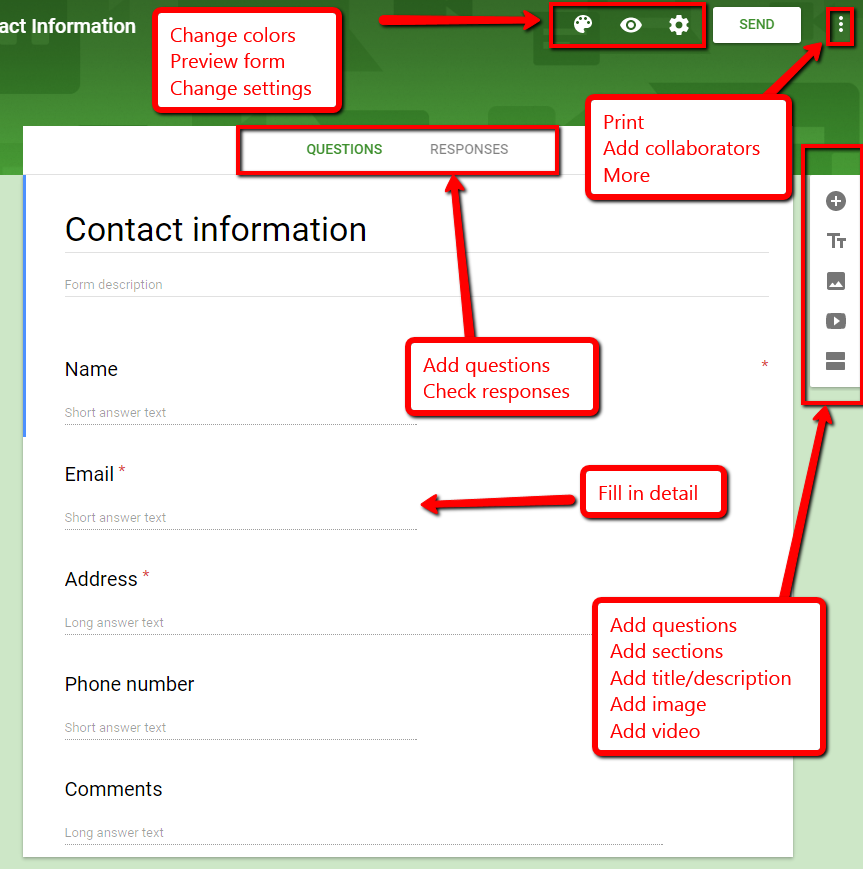 There are lots of free survey and polling sites (two popular options are PollDaddy and Survey Monkey), but often they limit the number of surveys you can create or how many questions you can include without ‘leveling up’ to a premium version. Among the teachers I know who are always looking for ways to save their limited pennies, Google Forms is a run-away favorite. It is intuitive, flexible, professional, can be adapted to school colors and images, and can be shared as a link or an embed. You can work alone or with colleagues and there are a wide variety of options that tweak the form to your needs.
Using available templates, a customized form can be completed in under five minutes. Responses are collected to a Google Spreadsheet that can be private or shared with participants and can be sorted and analyzed like any other spreadsheet.
Google Forms integrates well with Google Apps for Education, Google Classroom and many LMSs such as Blackboard.
How to use it
Google Forms is simple to use. Just follow these steps:

169 Tech Tip #128–Top 10 Chromebook Shortkeys
 In these 169 tech-centric situations, you get an overview of pedagogy—the tech topics most important to your teaching—as well as practical strategies to address most classroom tech situations, how to scaffold these to learning, and where they provide the subtext to daily tech-infused education.
Today’s tip #128–Top Ten Chromebook Shortkeys
Category: CHROMEBOOKS
Sub-category: Keyboarding
Here’s a poster with ten Chromebook shortkeys popular in classrooms:

169 Tech Tips–Two Great Chromebook Shortkeys
In these 169 tech-centric situations, you get an overview of pedagogy—the tech topics most important to your teaching—as well as practical strategies to address most classroom tech situations, how to scaffold these to learning, and where they provide the subtext to daily tech-infused education.
Today’s tip: #121–Chromebook Caps Lock and #122–Chromebook Delete Key
Category: CHROMEBOOKS
Sub-category: Keyboarding

10 Digital Citizenship Articles You Don’t Want to Miss
 Here are ten of the top digital citizenship resources according to Ask a Tech Teacher readers:
- 19 Topics to Teach in Digital Citizenship–and How
- Teach Digital Citizenship with … Minecraft
- How to Teach 3rd Graders About Digital Citizenship
- How the Internet Neighborhood is Like Any Other Community
- Image Copyright Do’s and Don’ts
- What a Teacher Can Do About Cyberbullying
- 120+ Digital Citizenship Links on 22 Topics
- Dear Otto: Should I stick with age limits on websites?
- How to Thrive as a Digital Citizen
- Book Review: Savvy Cyberkids at Home
Click for a K-8 digital citizenship curriculum

169 Tech Tips #160–14 Assessment Strategies
In these 169 tech-centric situations, you get an overview of pedagogy—the tech topics most important to your teaching—as well as practical strategies to address most classroom tech situations, how to scaffold these to learning, and where they provide the subtext to daily tech-infused education.
Today’s tip: #160–14 Assessment Strategies
Category: ASSESSMENTS
Sub-category: NA
These fourteen strategies are well-suited to formative assessment:
169 Tech Tip #151: 8 Popular Year-long Assessments
In these 169 tech-centric situations, you get an overview of pedagogy—the tech topics most important to your teaching—as well as practical strategies to address most classroom tech situations, how to scaffold these to learning, and where they provide the subtext to daily tech-infused education.
Today’s tip: #151–8 Popular Year-long Assessments
Category: ASSESSMENTS
Sub-category: Classroom management
169 Tech Tip #146: 18 Ideas for Warm-ups, Exit Tickets
In these 169 tech-centric situations, you get an overview of pedagogy—the tech topics most important to your teaching—as well as practical strategies to address most classroom tech situations, how to scaffold these to learning, and where they provide the subtext to daily tech-infused education.
Today’s tip: #146–18 Ideas for Warm-ups, Exit Tickets
Category: ASSESSMENTS
Sub-category: Classroom Management, Writing, Differentiation
Here are eighteen ideas for class warm-up and exit tickets:
169 Tips That Easily and Quickly Integrate Tech into Your Class
A decade ago, in an effort to buttress technology prowess in my classes and with colleagues, I started tracking how often I got the same tech questions from students, teachers, and even parents. Turns out, 70% of the time, it was the same finite group of problems.
That was a relief because—as you probably know–using technology in the classroom can be frightening, whether you’re a grade-level teacher or in charge of the lab. What if there’s a problem you don’t know how to solve, or a question you can’t answer? What if the computers break? What if they all break at once? The truth that all of us who use tech in class know is: You only have to know the big stuff. The rest you can learn with students.
The result was my popular 98 Tech Tips and my weekly tech tip column from that book. I won’t share the link because I’ve retired that book.
Why? Here’s what’s happened to technology in education in the past decade. It’s no longer enough for teachers to know how to keep the hardware working. Now, they need to understand using tech as a tool, where and how to integrate it. Tech-in-ed has grown from a tool that substitutes technology for paper and pencil. Now, it’s about using tech to redesign and modify tasks. It has as much to do with the underlying pedagogy as the overarching skills.
Turns out–while that sounds complicated, it’s not. That’s what’s in 169 Tech Tips. In these tech-centric situations, you get an overview of pedagogy—the tech topics most important to your teaching—as well as practical strategies to address most classroom tech situations, how to scaffold these to learning, and where they provide the subtext to so many daily tech-infused education. For example: Often, the solution to a problem is either
… reboot, restart …
… close-reopen …
or
Google it!

10 Tips About Using Images in the Classroom You Don’t Want to Miss
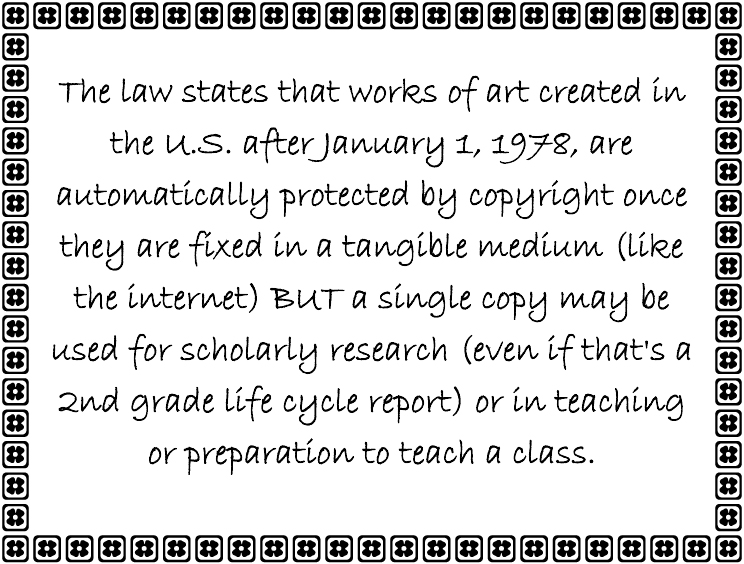 Here are ten of the top image tips according to Ask a Tech Teacher readers:
- Photos For Class–Robust, Student-safe with built in citations
- Quick Search for Plagiarized Images
- What Online Images are Free?
- Where Can I Find Kid-safe Images?
- 5 Image Apps for your Classroom
- My Picture’s a TIFF and the Program Needs a JPG
- Wrap Text Around an Image
- How to Move Pics Around in Documents
- Easy Photo Editing in MS Word
- Images (curated list by category)
Click for a lesson plan on Image Copyright Do’s and Don’ts.





