
Year: 2026

How Behaviorism Can Turn Your Classroom Around

I first ran into Behaviorism in child psychology classes I took for my Early Childhood Education credential (ECE). It was developed by a renowned psychologist named John B. Watson and formed into the Theory of Behaviorism by another famous psychologist, B.F. Skinner. The technical definition they provide is:
“…scientific and objective methods of investigation concerned with observable stimulus-response behaviors; all behaviors are learned through interaction with the environment.”
They used the infamous example of Pavlov’s Dogs. No surprise, with this gobbledegook definition that used dog training as the example, I laughed, rejected it, and forgot it.
Fast forward a decade, to a time I was studying for my teaching credential. One of my classes reviewed education pedagogies such as Purpose-driven Learning, the Socratic Method, Depth of Knowledge, Unschooling, and Behaviorism. Applied to education, Behaviorism focuses on:
“… conditioning student behavior with various types of reinforcements and consequences…”
I still cringe at words like “conditioning” and “consequences”, but in the fullness of the class, I came to understand that whether teachers know it or not, they use Behaviorism as an effective, reliable teaching tool. I’ll get back to that later but first, I want to deconstruct how a theory that started with training dogs is now a cornerstone in education pedagogy.
Note: I have posted about this before. If it sounds familiar, that’s why.
What is Behaviorism in Education?
Behaviorism in the classroom revolves around observable measurable behaviors. This is actions, not thoughts or feelings. Since its introduction to education in the 1950’s, it has become a teacher’s best friend in helping her/him to define classroom behaviors that shape order and enhance learning. It establishes boundaries for students, provides expectations that they can rely on, and offers a reliable way to self-assess student achievement of class goals:
According to Skinner, behavior is a learned response reinforced by the consequences resulting from that behavior. For instance, if students are rewarded for doing extra work, they’re more likely to repeat that behavior.
It accomplishes much of what B.F. Skinner predicted when he suggested it as an effective methodology for revolutionizing an education system that didn’t seem to work anymore. It has become popular in education theory by other names such as PBIS (Positive Behavioral Intervention and Supports) and through the use of apps like Too Noisy or Hero K12.
Why use Behaviorism Strategies in Teaching?
The short answer is, for many, Behaviorism works. Because of its clear guidelines and easy-to-understand cause-and-effect relationships, it improves student performance and discourages classroom behavior that interferes with education goals. It manages to quantify responses to notoriously subjective issues (like the student who needs to entertain classmates) and encourages objective and measurable metrics that provide a win-win in the difficult area of student assessment. Students appreciate an even-handed approach which favors no one and everyone at the same time. Teachers appreciate an unbiased framework that is defensible when discussing issues with parents, grade-level team members, and/or administrators. When stringently applied in an objective manner, students get more out of class lessons, get better grades, and classroom behavior is more conducive to everyone’s learning.
So, if you’ve tried other classroom management strategies to no avail, try this one for three months. In many cases, it will be exactly what you need.
How to use it
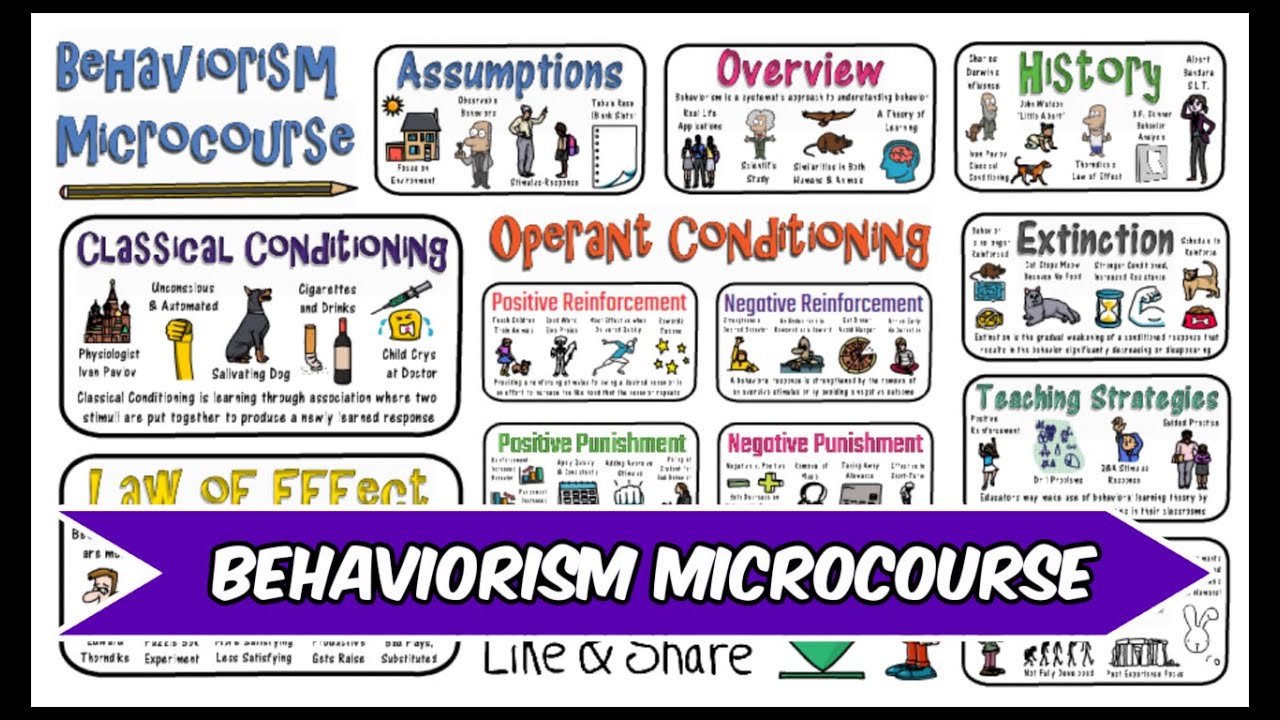
The application of Behaviorism relies on observable behavior, nothing else. It rewards the positive, punishes the negative, and in that way shapes student actions. It’s unbiased, without opinion, must be consistently enforced, and can’t be influenced by thoughts or emotions. Most teachers already use this strategy and appreciate the results without even knowing that’s what they’re doing. For example, when they thank students for sitting down quickly upon entering class or for starting a warm-up activity without being told to, the teacher is using a behavioral strategy. When homework is assigned with the expectation that students will return to class the next day with it completed, teachers are training student learning behavior. If your school uses positive reinforcement tools like Class Dojo, Empatico, Hero K12, or Sown to Grow, they are acknowledging the effectiveness in education ecosystems of Skinner’s Behaviorism.
There are four types of reinforcement:
- Positive reinforcement concentrates on applauding good behavior
- Negative reinforcement punishes the unacceptable
- Presentation punishment applies a negative outcome in response to a behavior that is not desired
- Removal reinforcement simply eliminates the negative stimuli.
Each of these can be equally effective in helping students achieve their learning goals.
How you already use it
Here are ways you already use it without thinking about it:
- grading papers and then accumulating the grades for a summative report (such as report cards)
- keeping kids in class instead of releasing them to recess to give them time to finish work they didn’t do
- providing treats for right answers
- applying consequences for the use of cellphones in class when they aren’t allowed
- setting classroom rules at the beginning of the school year
- using award systems like Classroom Dojo or Hero K12
- awarding badges for achievements and/or the completion of specific skills, tasks, or units
- timing a test or another classroom activity, expecting students to complete the task within the time parameters
- providing rubrics that spell out expectations for a project
- modeling appropriate behavior as an encouragement for students to do the same
- sharing samples of projects students will be completing as examples of what you expect
- expecting students who are late for class to get notes from parents or a teacher before being admitted to class
- expecting student athletes to maintain a C average (or whatever your school requires) to participate in sports
You can start the application of Behaviorism by applauding good behavior but include evidence to support it as well as making clear your willingness to use logical consequences that don’t embarrass the student if behavior is unacceptable.
Conclusion
Applying Behaviorism to your classes could be one of the easiest changes you make to your classroom management with the greatest chance for success. I’d love to hear your experiences with this pedagogy.

Here’s the list of articles:

Here’s the sign-up link if the image above doesn’t work:
https://forms.aweber.com/form/07/1910174607.htm
“The content presented in this blog are the result of creative imagination and not intended for use, reproduction, or incorporation into any artificial intelligence training or machine learning systems without prior written consent from the author.”
Jacqui Murray has been teaching K-18 technology for 30 years. She is the editor/author of over a hundred tech ed resources including a K-12 technology curriculum, K-8 keyboard curriculum, K-8 Digital Citizenship curriculum. She is an adjunct professor in tech ed, Master Teacher, freelance journalist on tech ed topics, and author of the tech thrillers, To Hunt a Sub and Twenty-four Days. You can find her resources at Structured Learning.

Tech Tip #157: 5 Tips to Stay on Top of Technology

In these 169 tech-centric situations, you get an overview of pedagogy—the tech topics most important to your teaching—as well as practical strategies to address most classroom tech situations, how to scaffold these to learning, and where they provide the subtext to daily tech-infused education.
Today’s tip: 5 Tips to Stay on Top of Technology
If you’re like most teachers, it’s a struggle to stay on top of technology. Here are five suggestions:
- Keep up-to-date on trends.
- Use up-to-date devices at home.
- Surround yourself with technophiles.
- Build your own app.
- Read articles and books about new and future technologies.
For more, visit “5 Ways Teachers Can Stay on Top of Technology” on Ask A Tech Teacher. (more…)

22 Back To School Websites

We write about back to school often on Ask a Tech Teacher. Here are some articles I think you’ll like:
- 3 Apps to Help Brainstorm Next Year’s Lessons
- 5 FREE Web Tools for a New School Year
- 5 Tech Ed Tools to Use this Fall
- 5 Top Ways to Integrate Technology into the New School Year
- 5 Ways Teachers Can Stay on Top of Technology
- 5 Ways to Involve Parents in Your Class
- 6 Tech Best Practices for New Teachers
- 8 Tech Tools to Get to Know Your Students for Back to School
- 11 Back-to-school Activities for the First Month of School
- Back to School–Tech Makes it Easy to Stay On Top of Everything
- Back to School Survival Kits
- Dear Otto: I need year-long assessments
- Great Activities for the First Week of School
- Great Back to School Classroom Activities
- How to Build Your PLN
- New School Year? New Tech? I Got You Covered
- Plan a Memorable Back to School Night
- Ready To Go Back To School? 7 Fun Lesson Ideas To Start The New Year

–image credit Deposit Photos (https://depositphotos.com/)

Tech Ed Resources for your Class–Digital Citizenship
I get a lot of questions from readers about what tech ed resources I use in my classroom so I’m going to take a few days this summer to review them with you. Some are edited and/or written by members of the Ask a Tech Teacher crew. Others, by tech teachers who work with the same publisher I do. All of them, I’ve found well-suited to the task of scaling and differentiating tech skills for age groups, scaffolding learning year-to-year, taking into account the perspectives and norms of all stakeholders, with appropriate metrics to know learning is organic and granular.
Today: K-8 Digital Citizenship Curriculum
Overview
K-8 Digital Citizenship Curriculum––9 grade levels. 17 topics. 46 lessons. 46 projects.
A year-long digital citizenship curriculum that covers everything you need to discuss on internet safety and efficiency, delivered in the time you have in the classroom.
Digital Citizenship–probably one of the most important topics students will learn between kindergarten and 8th and too often, teachers are thrown into it without a roadmap. This book is your guide to what children must know at what age to thrive in the community called the internet. It blends all pieces into a cohesive, effective student-directed cyber-learning experience that accomplishes ISTE’s general goals to:
- Advocate and practice safe, legal, and responsible use of information and technology
- Exhibit a positive attitude toward using technology that supports collaboration, learning, and productivity
- Demonstrate personal responsibility for lifelong learning
- Exhibit leadership for digital citizenship

5 Ways to Involve Parents in Your Class

In fifteen years of teaching K-8, one factor provides a reliable barometer for student success: Parent involvement. In fact, it’s crucial. According to the National Coalition for Parent Involvement in Education Research Review and Resources, no matter income or background, students with involved parents are more likely to have higher grades and test scores, attend school regularly, have better social skills, show improved behavior, and adapt well to school. According to the School Community Journal, “There is a sizable body of research literature supporting the involvement of parents in educational settings and activities”.
The data is so overwhelming, one of our important jobs as teachers must be to facilitate the involvement of parents in their child’s education. There are as many ways to do that as there are parents who need alternatives to the traditional parent-teacher conference and back-to-school night. Here are some of my favorites:
What is Constructivism and How Does it Fit Your Class?

Constructivism is a student-centered philosophy that emphasizes hands-on learning and active participation in lessons. Constructivists believe that learning is an active process so the most effective way to learn is through discovery. New information is blended into prior knowledge. Learning is constructed, not acquired, and is based on the fullness of a person’s individual lifetime of learning. It is continuously tested as new ideas are added, either causing long-held beliefs to evolve or be replaced.
Constructivism is not a pedagogy or a theory. It is a mindset — a way of thinking used to guide learners.

How to Use Excel to Teach Math Arrays
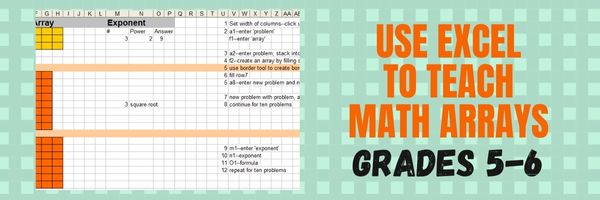 Grade Level: 5th (or whichever grade you teach arrays)
Background: None. This is an intro to MS Excel or spreadsheets
Time: About 30 minutes
Steps

Navajo Code Talkers and US Security in WWII

August 14 as National Navajo Code Talkers Day.
During WWI, the Choctaw language had been used to transmit U.S. military messages. With this thought in mind, Philip Johnston, the son of a missionary grew up on a Navajo reservation and spoke the Diné tongue fluently, brought the suggestion of a similar code to General Clayton Vogel early in 1942. The Diné language has no alphabet, uses no symbols and one sound may hold an entire concept. The idea was tested and proved to be faster and more reliable than the mechanized methods. The language has more verbs than nouns, that helps to move the sentences along and makes it far more difficult for outsiders to learn – making it the most ingenious and successful code in military history.
[gallery type="square" size="medium" ids="77547,77548,77549"]
Tech Tip #50: The Easiest Way to Outline
In these 169 tech-centric situations, you get an overview of pedagogy—the tech topics most important to your teaching—as well as practical strategies to address most classroom tech situations, how to scaffold these to learning, and where they provide the subtext to daily tech-infused education.
Today’s tip: The Easiest Way to Outline
Q: My fifth graders are learning to outline. Can technology make it easier?
A: Outlining can’t be easier than doing it in MS Word or Google Docs. Here’s what you do:
- Select the Numbered List or the Bullet List in the program toolbar. They’re usually grouped together.
- Once you press it, your first bullet or number appears on the screen. Type your item.
- When finished, push enter to add another number or bullet.
- Use the ‘indent’ tool or push tab to create a subpoint.
- Use the exdent tool or Shift+tab to push a subpoint up a level.
That’s it–three keys: 1) bullet list or numbered list 2) indent, and 3) exdent. (more…)

Tired of Paperwork–The Easiest Ways to Requisition School Supplies Online

Tired of Paperwork? The Easiest Ways to Requisition School Supplies Online
Back-to-school season brings a long to-do list for educators and administrators. Between preparing classrooms, coordinating with staff and ensuring students have the resources they need, paperwork shouldn’t slow you down. The last thing you want is to spend hours navigating forms just to order basic supplies. Online school supply requisition systems offer a faster, more organized way to manage purchasing and free up time for what matters most.

https://www.pexels.com/photo/coloring-pencils-in-green-and-yellow-containers-8441845/
The Hidden Costs of Paper-Based Procurement
Many schools still depend on paper-based workflows or disconnected systems for ordering classroom supplies, and while these methods may feel familiar, they often create unnecessary holdups and frustration. The traditional procurement process involves multiple handoffs, manual signatures and physical forms that can easily get lost between departments.
Common challenges include tracking down missing approval forms and deciphering unclear handwriting on requisition sheets. Orders can sit for days or weeks waiting to move through the approval chain. Paper-based systems also make it difficult to maintain accurate budget records or ensure compliance with district purchasing policies. The result is wasted time and energy that could otherwise support student learning and engaging classroom environments. (more…)





