Year: 2026

Is a Liberal Studies Degree Online Actually Worth It?
Here’s the next in our series addressing topics of college education–its importance in today’s changing work environment, how it translates to success in the classroom, and more. From the Ask a Tech Teacher team: “Is a Liberal Studies Degree Online Actually Worth It?”

If you’re looking at college options and feeling boxed in by rigid majors, an online liberal studies degree can look surprisingly practical. You get flexibility, room to explore multiple subjects, and a path that fits around work, family, or a schedule that refuses to behave. The bigger question isn’t whether the degree sounds interesting. It’s whether it can help you build real skills, qualify for jobs, and move forward without wasting time or money.
What a liberal studies degree online really includes
A liberal studies degree online usually blends courses from several disciplines instead of locking you into one narrow track. You might study communication, social science, history, business, writing, and problem-solving in the same program. (more…)

From Reform Policy to Classroom Practice: How Education Leaders Can Make Change Work
Here’s the second in our series addressing college education topics–its importance in today’s changing work environment, how it translates to success in the classroom, and more. From the Ask a Tech Teacher team: “From Reform Policy to Classroom Practice: How Education Leaders Can Make Change Work”:

School reform often begins with ambitious language: improve achievement, modernize instruction, close learning gaps, make classrooms more inclusive. The difficult part comes afterward. Administrators have to translate those goals into decisions about teaching, assessment, technology, staffing, and resources without creating another initiative that disappears after a few semesters. Effective educational administration therefore requires more than managing schools. Leaders need to understand how instructional systems work and how thoughtful reform can move from policy documents into everyday classroom practice.

Source: Pexels
Connect Administrative Decisions With What Students Actually Learn
Administrators can easily become separated from the instructional consequences of their decisions. Budgets, staffing, compliance, schedules, and reporting demand attention, yet changes in those areas eventually affect what teachers can do with students.
Understanding curriculum design gives education leaders a way to examine that connection systematically. Youngstown State University addresses these skills through its fully online M.S.Ed. Teacher Education – Curriculum and Instruction – Digital Teaching and Learning program, which is designed for working professionals. Its approach emphasizes practical application and covers curriculum design models, technology integration, student-centered strategies, assessment, and the alignment of learning objectives with instruction.
For administrators, that knowledge can make reform decisions more grounded. A new instructional policy is easier to evaluate when leaders understand how objectives, classroom activities, and assessments fit together. (more…)

Why an Ed.S. Degree Is Getting More Attention in Education Reform
We received multiple requests from readers to address topics of college education–its importance in today’s changing wrk environment, how it translates to success in the classroom, and more. We’ve put together a series of six articles based on the sorts of questions we received, from “Is a Liberal Studies Degree Online Actually Worth it?” to “Should You Study Computer Science in 2026?” and a lot in between. These will be a few a day. We hope you enjoy the conversation.
Here’s our first: “Why an Ed.S Degree is Getting More Attention in Education Reform”.

If you follow education reform, you’ve probably noticed a pattern: schools need leaders who understand teaching, policy, data, and day-to-day reality all at once. That’s a tough mix. Teachers, instructional coaches, and administrators are being asked to solve bigger problems with tighter timelines. An Ed.S. degree sits right in that pressure zone, offering advanced training for educators who want to lead change without stepping away from the field for years.
Where an Ed.S. Fits in the Education Reform Conversation
Education reform often sounds abstract until you’re the one dealing with attendance drops, uneven literacy scores, or teacher burnout. At that point, broad policy talk turns into a very practical question: who has the skills to fix systems without losing sight of students?
An education specialist degree usually lands between a master’s and a doctorate. Northwest Missouri State University offers advanced education programs designed for professionals who want to strengthen their leadership and instructional expertise. It’s built for educators who want advanced expertise without committing to a full Ph.D. or Ed.D. track. That makes it especially relevant when districts need people who can lead curriculum planning, school improvement, professional development, and data-informed decision-making.
You’re not just studying leadership theory for the sake of it. You’re learning how institutions actually change, where resistance shows up, and what meaningful improvement looks like in real schools. Reform work needs more than slogans and strategic plans with glossy covers. (more…)

How Parents Can Inspire Curiosity and Spark Lifelong Learning in Kids

How Parents Can Inspire Curiosity and Spark Lifelong Learning in Kids
Parents of young children often start out with a front-row seat to nonstop questions, experiments, and wonder, then slowly notice childhood curiosity getting replaced by hesitation or “just tell me the answer.” The tension is real: busy routines, pressure to perform, and adult expectations can accidentally train kids to chase approval instead of following their own questions. When that happens, motivating children’s education can feel like pushing a cart uphill rather than watching interest pull them forward. Nurturing natural curiosity now protects a child’s love of learning and sets the stage for confident, self-driven learners.
Understanding How Curiosity Drives Learning
Curiosity is a motivational drive to seek out information when something feels new, tricky, or surprising. Across child development stages, that drive pushes kids to notice patterns, test ideas, and build stronger thinking skills. When children practice asking their own questions, learning starts to come from the inside.
That matters because self-directed discovery creates attention and effort you do not have to “buy” with stickers or grades. External rewards can help kids start, but they rarely teach kids how to keep going when work gets hard. Engaged learners stick around longer because they want to close the gap in what they know.
Think about a child building with blocks. A reward-focused kid asks, “Is this right?” while a curious kid asks, “What happens if I add one more?” That second question turns play into problem-solving, and problem-solving into confidence. This is where a parent’s visible learning habits can quietly make curiosity feel normal at home. (more…)

Teacher-Authors: What’s Happening on my Writer’s Blog

A lot of teacher-authors read both my Ask a Tech Teacher education blog and this blog, WordDreams. In this monthly column, I share a popular post from the past month:

National Dog Day is observed and celebrated on the 26th of August every year. In some parts of the world, it is also called International Dog Day. The day celebrates dogs of all kinds and encourages fostering love and kindness through ownership and adoption, regardless of breed. Having a dog is much more than just having a pet. There are many dogs out there who need saving, who need a home to be loved and cared for. National Dog Day serves as a reminder that dogs have every right to live a loving, abuse-free life.
I’m always on the hunt for good books with dogs as the stars. Here are a few I found recently: (more…)

Tech Tip #149 How to Teach Writing to Non-writers

Today’s tip: How to Teach Writing to Non-writers
Here are seven categories of tools that address specific learning styles, with suggestions:
Art: A picture is worth a thousand words–what better way for a writer to understand the intricacies of a story than to draw them. Excellent online drawing tools include Lunapic, Paint Studio, and Pixlr.
Audio: Audio “writing” is simply taping words rather than putting them on paper. They are consumed without eyes (great if you’re driving or watching TV), and appeal to learners who have difficulty with traditional writing methods. Three great options include Audacity, VoiceThread, and SonicPics.
Comics: A popular medium for blending art and writing is comics. Options include Bitstrips, Pixton, and Powtoons.
Desktop Publishing: Desktop publishing mixes a wide variety of media–pictures, text, audio, visual, color, and layout–to communicate a message. Good options are LucidPress and Canva.
Music: For some students, it’s all about music. Celine Dion’s popular Titanic song drenched millions of listeners in the debilitating emotion of a lost love. Nothing “examines complex ideas” better than music. Popular choice for composing music is GarageBand.
Slideshow: Slideshows have long been the alternative to the written report, used when an oral presentation was required. Most slideshows include bulleted draft text, images, sounds, videos, color, and movement. Three popular tools are PowerPoint, Google Slides and Haiku Deck.
Spreadsheet: For numbers-based communication, nothing turns data into information better than spreadsheets. Traditional options include MS Excel, Google Sheets, and Numbers.
Video: For students who aren’t writers and have difficulty presenting to a group, a video is unintimidating and stress-free. (more…)

Subscriber Special: Visit our Sales Page

Every month, subscribers to our newsletter get free/discounted resources to help their tech teaching.
September
Here are some of the items now on sale at Structured Learning (click to visit webpage):
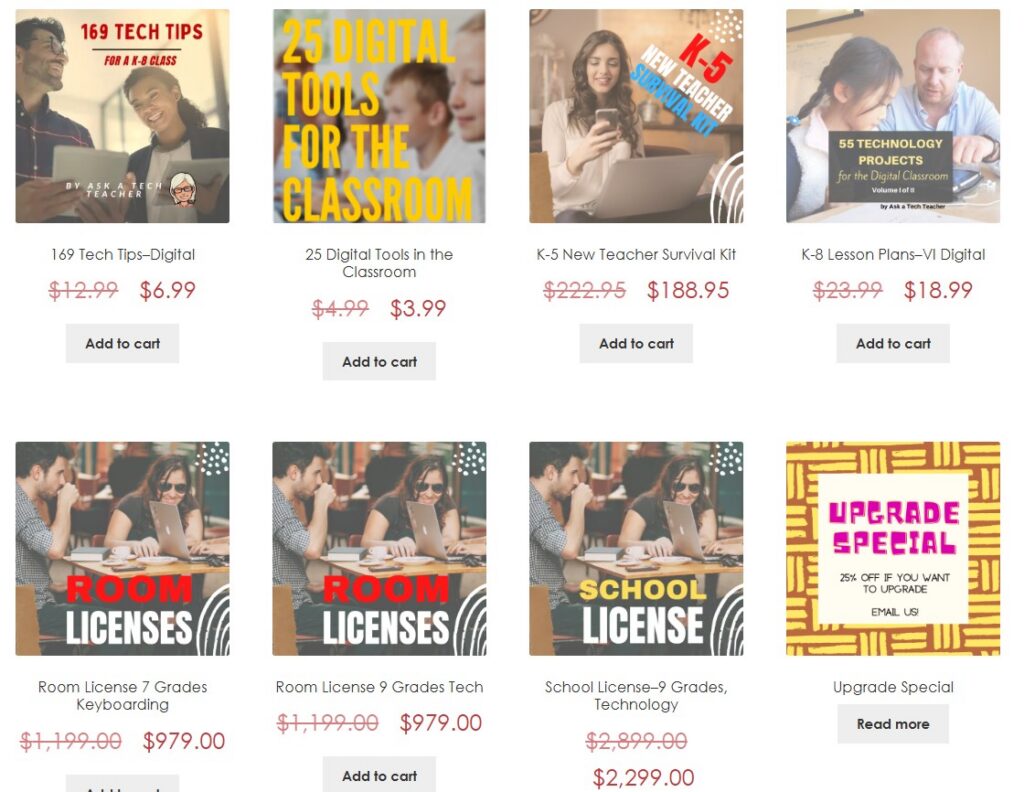
Check back often for new sales!

Happy Productive Labor Day

Labor Day, the first Monday in September, is an American holiday (though celebrated world-wide by different names) dedicated to the achievements of workers. Take today to think about it. Me, I’ll take it literally! I enjoy labor, the good feeling of finishing, meeting goals, working hard.
- “Labor Day differs in every essential way from the other holidays of the year… Labor Day is devoted to no man, living or dead, to no sect, race, or nation.” — Samuel Gompers
- “A truly American sentiment recognizes the dignity of labor and the fact that honor lies in honest toil.” — Grover Cleveland
-
“No work is insignificant. All labor that uplifts humanity has dignity and importance and should be undertaken with painstaking excellence.” — Martin Luther King Jr.
-
“Far and away the best prize that life has to offer is the chance to work hard at work worth doing.” — Theodore Roosevelt

If you’re devoting Labor Day to writing (rather than teacher prep) but need a kick start, here are suggestions for favorite labor-saving tools for writers:

A few Labor Day websites to enjoy for teaching (click here for updates): (more…)

World Letter Writing Day

Letter writing Lesson Plan
Kindergarten and 1st graders (and 2nd graders) can write increasingly complex letters like these with guidance and preparation:
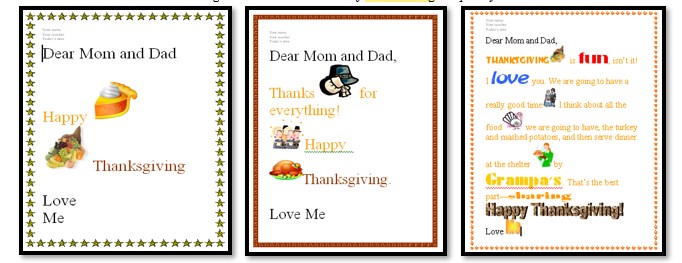
How? Follow these steps:
- Discuss letter writing skills such as:
- open with a greeting
- describe actions, thoughts, and feelings where required
- use temporal words to signal event order where required
- end with a closing
- In a word processing program like KidPix or a drawing program, for grade 2, type heading (name, teacher, date) and align it to the left.
- Have students type a letter to parents about why they are thankful (or another topic). Show 2nd graders how to select a font size 14-16 and adjust font look. Remind them that text wraps to next line—no need to push enter.
- As they type, reinforce age appropriate keyboarding skills such as elbows at your sides, hands on homerow, legs in front of your body.
- 2nd grade: Show them how to check grammar/spelling by clearing red/green squiggles.
- When done, work with neighbor to insure:
-
- sentence fluency
- good grammar and spelling
- proper letter writing style
Here’s a rubric appropriate for 2nd grade or higher: (more…)

Tech Ed Resources for your Class–Survival Kits
I get a lot of questions from readers about what tech ed resources I use in my classroom so I’m going to take time this summer to review them with you. Some are edited and/or written by members of the Ask a Tech Teacher crew. Others, by tech teachers who work with the same publisher I do. All of them, I’ve found, are well-suited to the task of scaling and differentiating tech skills for age groups, scaffolding learning year-to-year, offering inclusive solutions to the issue of tech tools–taking into account the perspectives of stakeholders, with appropriate metrics to ensure learning is organic and granular.
Today: K-12 Survival Kits
Overview
Collections of resources for specific teacher needs to address technology. Options include:
- K-5 All-in-one Tech Integration Kit
- K-5 New Teacher Survival Kit
- MS All-in-one Tech Integration Kit
- MS New Teacher Survival Kit
- Homeschool Tech Survival Kit