Here’s the sign-up link if the image above doesn’t work:


When testing moved online, it became painfully apparent to teachers how little students knew about using digital devices other than the internet, some apps, and iPads. The focus on online learning, thanks to COVID, has made that even more critical. IT Pro has an interesting article discussing the importance of digital literacy:

Digital literacy is becoming as important as reading and writing for young people’s future life prospects, a new report from Vodafone has found.
Limited access to an internet-connected device, or a lack of skills to use one, is preventing those entering the job market from attending online lessons or exams, applying for jobs, and gaining the necessary digital skills for many of today’s roles.
Ask a Tech Teacher has several articles on this topic that you’ll find interesting:
If you need guidance understanding how to make your students good digital citizens, check out my upcoming online class, Building Digital Citizens. It’s for college credit and starts next Monday!
@ITPro #digcit

 It used to surprise me that it became the school’s job to teach empathy. Shouldn’t parents do that? The truth is it doesn’t always happen in homes. Since children spend much of their daylight hours in school, it is a logical place to reinforce empathy as a life skill.
Edsurge has an interesting article, How to build empathy among students, that shares one teacher’s experiences:
Lessons in empathy often are taught with a focus on the individual, rather than the collective community, writes Ka’ua Adams, a ninth-grade English teacher at Kealakehe High School in Kona, Hawaii. In this commentary, Adams suggests strengthening these lessons by shifting individual activities to collective ones and focusing on care instead of skills.
Read on… (may require a free membership)
Ask a Tech Teacher has covered this topic often in the past. Here are some articles you might like:

Most teachers I know have used Twitter in their classes either to communicate with parents, share homework with students, for group study, to research on a topic, crowd source ideas with colleagues, or a myriad of other purposes (click here for more ideas). Ask a Tech Teacher contributor Christian Miraglia, Educational Consultant for T4Edtech, reminds us that how we used it at first is probably not how we use it now:

You may remember the JG Wentworth commercial in which frantic customers shout out, “ I need my money, and I need it now!”. I sometimes lacked a plan as a teacher due to an overloaded schedule or mental exhaustion. “I need a lesson idea, and I need it now!” Where did I turn? Twitter. The social media platform became a resource when I was running on empty. Twitter as a classroom resource, you ask? Over the past two decades, Twitter has been a mainstay in my instruction.
I began using Twitter in my classroom soon after its introduction in 2006. I found creative uses for it in my history teaching, even at that time. One group of students created a conversation between Andrew Jackson and the various Native American groups forcibly relocated to the Indian Territory. The discussion was based on the research of primary and secondary documents and was quite creative. Nowadays, there are so many social media platforms that it can be overwhelming to keep track of for teachers. When my students would ask me how many followers I had on my Facebook account and Twitter, I stated I did not know. “Two hundred, three hundred one thousand,” they probed. I would note I had no idea on my Facebook account, but maybe 500 on my Twitter account, and most of them are teachers.

Here are a few of the popular resources teachers are using to teach about animals (click headings for more resources):

Click here for updates to this list.

Are you struggling with all the tech required for remote and hybrid teaching? Education Week shares what tech-savvy educators are using to make this work:
 Education Week caught up with select teachers and instructional coaches who shared their thoughts on some essential practices to effectively implement technology into the practice of teaching. Some were discovered or honed during the pandemic. All offer lessons for job seekers wanting to present in-demand knowledge and skills, as well as districts and schools that are seeking truly tech-savvy teachers.
Ask a Tech Teacher has reviewed a list of easy-to-use, intuitive tech tools we think will make your teaching job easier. Check otu these articles:
How to Evaluate Programs You’ve Never Used in Less Than Seven Minutes


Every month, we’ll share themed posters that you can share on your website (with attribution), post on your walls, or simply be inspired.


–for the entire collection of 65 posters, click here
Jacqui Murray has been teaching K-18 technology for 30 years. She is the editor/author of over a hundred tech ed resources including a K-12 technology curriculum, K-8 keyboard curriculum, K-8 Digital Citizenship curriculum. She is an adjunct professor in tech ed, Master Teacher, webmaster for four blogs, an Amazon Vine Voice, CSTA presentation reviewer, freelance journalist on tech ed topics, contributor to NEA Today, and author of the tech thrillers, To Hunt a Sub and Twenty-four Days. You can find her resources at Structured Learning.

 In these 169 tech-centric situations, you get an overview of pedagogy—the tech topics most important to your teaching—as well as practical strategies to address most classroom tech situations, how to scaffold these to learning, and where they provide the subtext to daily tech-infused education.
Today’s tip: Alt+??? Brings up which Command?
Category: MS Office, Keyboarding
Q: I always forget the Alt keys for MS Word menu commands. Do you have a list?
A: I’ll do one better. In MS Office, push the Alt key and it tells you what number or letter is associated with which menu command.
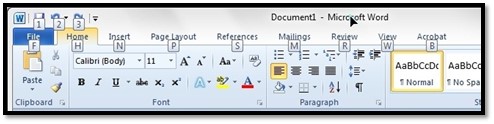
To activate the shortcut, push Alt+ exposed letter or number. For example, for Redo, push Alt+3. That’s it.
Sign up for a new tip each week or buy the entire 169 Real-world Ways to Put Tech into Your Classroom.
What’s your favorite tech tip in your classroom? Share it in the comments below.

 Every teacher knows the struggle of getting a class full of children to cooperate the first few weeks back after the long Christmas vacation break. If you’re looking to avoid going hoarse from shouting at distracted kids all day then you need an organized plan of action that will keep you and your pupils entertained whilst learning. This article is aimed at teaching children in the 4th and 5th grade so if that’s you, read on for our top lesson ideas to keep everyone happy, entertained, and ready to learn!
Before you pile straight back into hardcore learning (aka the boring bits!) give your kids a chance to settle in with a mindfulness session where they can write down their resolutions and wants for the year. You can have this session be as creative as you like. They could decorate their objectives, frame them or even add them to a jar. If you pick the latter, why not end the year by reading out everyone’s resolutions and seeing how far everyone has come?
Rather than having your kids write pages of English and history right off the back, ease them back in with educational worksheets. There are a ton of great teacher resource center websites where you can download sheets for virtually every subject on the planet. Why not pick a fun subject such as foreign languages that can relate to their Christmas break? You can pick three countries that some of your children may have visited over the holiday season and work on sheets based on the languages of each country.
Most children love blood and gore, so incorporate these themes into your history lessons. Focus on the Roman Empire, which was full of deathly battles they can learn about, or you can teach them about the early origins of the toilets. Romans are a great subject as they invented many things that we still use in the modern-day. You could even have the kids re-enact famous Roman gods and goddesses or have them paint their ultimate roman feast.
Let the children write and present what they did to celebrate Christmas to the rest of the class, or how others celebrate. If you can, set this task before the holidays begin as a homework task. You can ask them to pick one fact or tradition about Christmas and ask them to research it in depth. Bonus points to the child who explores a tradition and teaches the class some facts that even you don’t know!


Here are the most-read posts for the month of December
Here’s the sign-up link if the image above doesn’t work:
Jacqui Murray has been teaching K-18 technology for 30 years. She is the editor/author of over a hundred tech ed resources including a K-12 technology curriculum, K-8 keyboard curriculum, K-8 Digital Citizenship curriculum. She is an adjunct professor in tech ed, Master Teacher, webmaster for four blogs, an Amazon Vine Voice, CSTA presentation reviewer, freelance journalist on tech ed topics, and author of the tech thrillers, To Hunt a Sub and Twenty-four Days. You can find her resources at Structured Learning.


Here’s a preview of what’s coming up on Ask a Tech Teacher in January:
Public Domain Day
Subscriber Special and MLK Day
10 Hits and 10 Misses for 2021
10 Top Reviews for 2021
10 Top Tips in 2021
Tract–How to Change the Dynamics of Peer-to-peer Learning
Build Empathy Among Students
5 Must-have Apps for Curious Students
Free Posters
Practices of Tech-savvy Teachers
Tech Tips
Digital Literacy
Managing Difficult Parents
YouTube Features for Teachers
Google Earth Lesson Plans
Teaching Math
How Minecraft Teaches Reading, Writing, and Problem Solving
Here’s the sign-up link if the image above doesn’t work: