Category: Teacher resources

17 Ways to Add Tech to your Lessons Without Adding Time to Your Day
 Because I teach graduate classes for educators, I talk to lots of teachers all over the country. It’s become clear to me that for most of them, adding technology to their lessons means layering more work on top of their already overburdened lesson plans. Despite the claims of tech gurus that technology makes the job of teaching easier, few educators see it that way. Even the ones who love it put in lots of extra time to do one or more of the following:
- learn tech tools and then teach their students
- learn tech tools only to discover it’s not what they need
- learn a tech tool they love only to have it either disappear or switch to a fee-based program
- rework existing lesson plans in the school’s mandated digital program that too often, changes every year. This means they have to re-enter the lesson plan in a new format for a new LMS
- find a tool they love, but no one else in their teaching team agrees, understands it, or cares
- the tool won’t work on the Big Day of the lesson and nothing will bring it back to life
- the digital devices–computer or Chromebooks or iPads–won’t work on the Big Day
But the biggest reason is this: Students don’t know the technology, so their projects become rudimentary displays of their knowledge rather than anything resembling the higher order thinking we teachers aspire to. I’d put it at S- in the SAMR Model (if you don’t know what that is, click to get a brief primer).

3 Whiteboard Apps for Teachers and Students
Whiteboards have long been a de rigeur staple in classrooms, occupying pride-of-place at the front of the room. Despite the popularity of hi-tech Smartscreens, the simple whiteboard remains the favored method of sharing information during class time.
But one change has revolutionized their use: They can now be projected from your iPad. Before introducing three amazing must-have whiteboard apps, let me note that there are dozens of options, all with varied traits and prices. I selected these three because they are intuitive, multi-functional, and work as a classroom tool rather than just another new widget teachers must learn.
 AirSketch
Free to try
AirSketch is a basic, uncomplicated whiteboard that lets you do anything you’d normally do on a whiteboard. It’s similar to web-based options like AWW or Scriblink with two dramatic differences: It works through a iPad and can be mirrored to a computer (and from there, the class screen). This untethers teachers from their desk. All that’s needed is an iPad, AirSketch, a class computer, and a class screen.
Here’s how to do it:
- Open AirSketch on an iPad. In the lower right corner, it provides the page’s IP address.
- Type that IP address into the computer browser and the iPad screen appears.
- Project this to the class screen while using the iPad as a whiteboard
Pros
AirSketch is simple to set up and intuitive to use. It’s exactly like using the whiteboard–though instead of markers, you use a finger. Students no longer have to traipse up to the (intimidating) front of the room to answer questions. Instead, they borrow your iPad and draw their response.

How Teachers Learn About New Edtech Products (Round-up)
 How do teachers filter out all the social media noise to find the tech products that will transform their classrooms? I’d like to think we troll the online tech-in-ed ezines, review what the experts say and draw conclusions that fit our class environment. Truth is, most teachers I know don’t have time for that. They’re busy teaching, mentoring, chatting with parents, and grading papers.
The folks at SnapLearning! (read my review of their wonderful close reading product here) did a fascinating anecdotal survey on how teachers find their new tech toys. They got input from some of the top names in the tech-in-ed group, such as Vicki Davis, Dave Stuart, Kelley Tinkley–and me–I’m honored to be included. For me–I love hearing about new tech ed products, but I only dig into those that are scalable, rigorous, and transformative:
“I want tools that teach a concept better, differentiate for student learning more, or improve classroom grit. I’m so past the ‘fun’ of word clouds and talking avatars. Give me something purpose-built that transforms my classroom from work to wonder.”
Here’s a taste of what SnapLearning shared, and then click the link and go read the entire article. It’s quick. You can consume it with a cuppa.

Listen to Ask a Tech Teacher on EduTalk Radio
Many thanks to Larry Jacobs for inviting me to join him on EduTalk Radio, to talk about my recent Editor’s Choice Award from SmartBrief Education. We had a great time talking about technology in education, blending games like Minecraft into curriculum, and using technology to meet students where they want to learn.
Here’s the link:
http://www.blogtalkradio.com/edutalk/2015/12/22/the-power-of-minecraft-ed-tech-with-your-students
…and here’s a summary of some of the conversation:
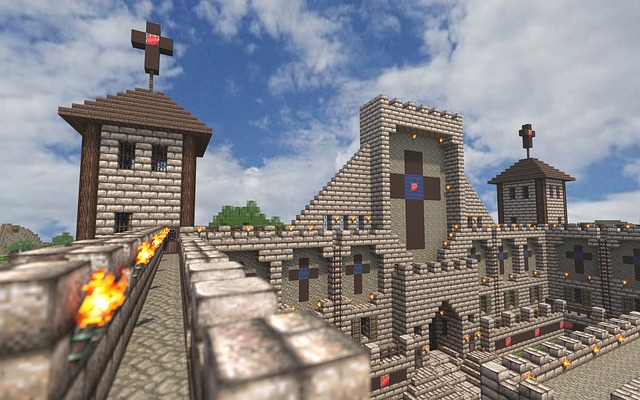 Minecraft
Kids are baptized in technology. To move education to the next level, we need to meet them where they’re ready to learn.
But, like any food that tastes good must be bad for you—same with MC. If kids love it, it must be a waste of time. But it isn’t.
- Minecraft can be used for any topic
- Kids inspire it. Teachers probably wouldn’t even be aware of Minecraft if not for student interest. That makes it authentic.
- Minecraft teaches critical thinking, problem solving , collaboration, many of the 8 Habits of Mind—authentically (persist, remain open to continuous learning), writing (pre-post game writing), history (build an ancient city and have kids explore)
Preparing students for end-of-year testing?

End of Year Tips: Update Your Online Presence
 This week, I’m providing tips for end-of-year technology maintenance. These are activities that could (or should) be done once a month if you’re active on your computer, but AT LEAST do them yearly.
Like today.
For most teachers I know, life zooms by, filled with lesson planning, meetings, classes, collaborations with their grade-level team, parent meetings, and thinking. There are few breaks to update/fix/maintain the tech tools that allow us to pursue our trade.
But, that must happen or they deteriorate and no longer accomplish what we need them to do. Cussing them out does no good. Buying new systems takes a long time and doesn’t fix the problem that the old one wasn’t kept up. If they aren’t taken care of, we are left wondering why our teacher blog or website isn’t accomplishing what it does for everyone else, why our social media Tweeple don’t generate activity, and why our TPT materials languish. There’s a short list of upkeep items that won’t take long to accomplish. The end of the calendar year is a good time to do these:

Everything Schools Should Know About Windows 10 Education Edition
 For the first time ever, Windows is upgrading the existing Windows platform for free. If you use a current version of Windows, you’ll notice a little icon in the lower right tooltray that encourages you to upgrade. There’s a time limit to how long you can wait and still get it for free, but it’s long enough for you to research the upgrades and decide if they work for you.
I’m still on the fence. So often early adopters are the guinea pigs for problems that are later fixed. Matthew Young, a tech writer and gadget enthusiast, has put together a nice summary of what’s included in Windows 10 Education Edition as well as some of the known known issues. Read through his review and then add your experiences under comments.
Windows 10 Education Edition is here to make both teaching and learning a walk in a virtual park. This powerful edition for schools has a variety of new tools and features that make learning more student focused, researching more user convenient, classrooms more globalized and teaching a lot more fun.
Microsoft wants to share the incredible teaching experience of Windows 10 Education Edition with as many people as possible so is offering free upgrades to Windows 10 for education customers using Win 7 or 8.1. In this article, I’ll count down the amazing features on the new Windows 10 Education Edition to show you just how much it will impact the noble profession of teaching, making learning both fun and eye-opening.

5 After School Tech Club Activities
With the growing interest in coding comes a call for after school tech camps that supersize student enthusiasm for learning technology. If you’ve been tasked (or volunteered) to run this activity, here are five activities that will tech-infuse participants:
 Write an Ebook
It’s been said that inside 70% of us is a book crying to get out. Kids are no different. Many dream of becoming an author, a journalist, or another profession that focuses on writing.
In this class, take students through the six steps required to move from dream to publication:
- brainstorm
- plan required research
- write the book
- review with a critique group
- edit
- publish
The goal during the after school tech club is that each student will publish their first ebook–or at least give it a good start.
Basics

3 Lesson Plans to Teach Architecture in First Grade
 Here’s a great lesson plan with three activities well-suited to the discussion of architecture and design in 1st grade:
Review
Students complete three projects in two weeks to aid understanding of architecture, design, and three-dimensional thinking. They’ll experiment with spatially laying out a three-dimensional structure on a two-dimensional paper. When completed, they’ll discuss with neighbors while practicing good listening skills learned in class.
Start with a discussion of design. This includes size, shape, texture, proportion, scale, mass and color. We will apply these to rooms, buildings, and neighborhoods. Encourage students to think and analyze critically as they engage in learning.
In figures below, ask students which are two- or three-dimensions? How do they know?
[gallery ids="50170,50171,50172,50173,50164"]Design the Classroom
Visit Classroom Architect and demo how to design the classroom with drag-and-drop pieces (see figures below). Take suggestions from class on layout. Students must think about where tables and storage are relative to other items. This is an active learning lesson that encourages visual thinking. Develop a sample based on class input and show how to make corrections if necessary.

Embed a File from Google Drive
As a working technology teacher, I get hundreds of questions from parents about their home computers, how to do stuff, how to solve problems. Each week, I’ll share one of those with you. They’re always brief and always focused. Enjoy!
Q: So many colleagues are embedding documents to their blogs and websites, but I don’t know how to do that. Can you help?
A: I love this part of Google Apps. When your Google document is complete–that includes Docs, Spreadsheets, Slides, and Drawings:
- Go to ‘Share’ in the upper right corner; select the option you prefer–allowing viewers to just view or edit
- Click File>Publish to the Web (on the menu bar)
- Select the link and copy-paste to your website (I’ve done this below) OR select Embed
- Copy the HTML code that starts with ‘<iframe…’
- Paste into blog, wiki, website like I did below:
Let’s try this out. Here’s a collaborative spreadsheet to share Exit Ticket ideas. Your name is optional. Strongly consider adding the linkback so we can add each other to our PLN–a great way to share ideas and knowledge. Access the spreadsheet and tell us your favorite warm-up activities and exit tickets:
Here’s the embedded document:

Subscriber Special: September
 This special on site licenses has been extended a month. When September ends, prices increase for the first time since we’ve offered multi-user licenses.
Let me step back. What are site licenses?
- They are for multiple users rather than just the teacher–students, other teachers, even parents
- They offer grade-level student workbooks (in PDF format) for the SL tech curriculum and keyboarding curriculum
- They include the grade-level teacher manual for free
- Also free: weekly videos showing how to teach the lesson
- New this year: Office Hours. This is a weekly Google Hangouts anyone using the curriculum can attend and talk real time with a teacher using the curriculum
Why are prices going up? During the beta phase, we priced site licenses low while we worked out bugs. The price increase applies to licenses for:
If you’re planning to purchase one, save 25% (off the future increased price) by purchasing yours now:
If you already purchased a teacher manual and want to trade it for the site license, just provide a receipt showing you purchased in the last six months.
Questions? Email askatechteacher@gmail.com or zeke.rowe@structuredlearning.net. The slideshow below includes samples of site license products:
[gallery type="slideshow" ids="48958,49942,49944,49945,49943,48957,48956,36551,48953,48952,41489,38283,38078,38077,38076,38075,29939,28765,49935,49932,49933,49934,49936,49937,49938,49939,49940,49941,49946,49947,49948,49949,49950,49951,49952,49953,49954,49955,49956,49957,49958,49959,49960,49961,49962,49963,49964,49965,49966,49967,49968,49969,49970,49971,49972,49973,49974,49975,49976,49977,49978,49979,49980"]