
Author: Jacqui

What You Might Have Missed in February

Here are the most-read posts for the month of February
- 100th Day of School — Make it about Learning
- #WorldReadAloudDay February 5
- 5 (free) Tech Problem Solving Posters
- Why Kindergartners Must Learn Technology
- Math Word Problems
- Random Acts of Kindness Day. How Will You Celebrate?
- Inspire Kids to Pursue an IT Degree
- How Fast Should Kids Type
- Tech Tip #31: 10 Best Keyboarding Hints
Jacqui Murray has been teaching K-18 technology for 30 years. She is the editor/author of over a hundred tech ed resources including a K-12 technology curriculum, K-8 keyboard curriculum, K-8 Digital Citizenship curriculum. She is an adjunct professor in tech ed, Master Teacher, webmaster for four blogs, an Amazon Vine Voice, CSTA presentation reviewer, freelance journalist on tech ed topics, contributor to NEA Today, and author of the tech thrillers, To Hunt a Sub and Twenty-four Days. You can find her resources at Structured Learning.

Here’s a Preview of March

Here’s a preview of what’s coming up on Ask a Tech Teacher in March:
- More free posters
- Creating shortkeys and favorites
- 5 Ways Ed Tech can enhance Social Studies
- Pi Day
- Remote learning classes
- March Subscriber Special
- Great Discounts to celebrate the (re)launch of our Structured Learning website

Online College Credit Classes Forming

Through the Midwest Teachers Institute, I offer four college-credit classes that teach how to blend technology with traditional lesson plans. They include all the ebooks, videos, and other resources required so you don’t spend any more than what is required to register for the class. Once you’re signed up, you prepare weekly material, chat with classmates, respond to class Discussion Boards and quizzes, and participate in a weekly video meeting. Everything is online.
Questions? Email me at askatechteacher@gmail.com
Here are the the ones I’m currently offering:
 The Tech-infused Teacher: The 21st Century Digitally-infused Teacher
MTI 562
March 1, 2021, June 28, 2021
The 21st Century lesson blends technology with teaching to build a collaborative, differentiated, and shared learning environment. In this course, teachers will use a suite of digital tools to make that possible while addressing overarching concepts like digital citizenship, internet search and research, authentic assessment, critical thinking, and immersive keyboarding. Teachers will actively collaborate, share knowledge, provide constructive feedback to classmates, and publish digitally. Classmates will become the core of the teacher’s ongoing Personal Learning Network. Assessment is project-based so participants should be prepared to be fully-involved and eager risk-takers.
At the completion of this course, the learner will be able to:
- Integrate and adapt blogs, wikis, Twitter, and Google Hangouts to collaborate and share. INTASC 2, 3, 5, 6, 8, 10
- Research ways to safely and effectively search and research on the internet, including how to be a good digital citizen. INTASC 1
- Appraise technology to support teaching and achieve Common Core Standards. INTASC 1, 7
- Integrate keyboarding skills into classroom activities and prepare for yearly assessments. INTASC 8
- Assess student technology use organically. INTASC 1, 8
- Develop digital portfolios to store, share, and curate classwork and justify their inclusion. INTASC 8, 9
- Develop and employ a Personal Learning Network. INTASC 2, 5, 10
- Solve common tech problems that arise in the classroom. INTASC 4
Assessment is based on involvement, interaction with classmates, and completion of projects, so be prepared to be fully-involved and an eager risk-taker. Price includes course registration, college credit, and all necessary materials. To enroll, click the link, search for MTI 562, and sign up. Classes start in May!
[gallery type="slideshow" ids="59050,59048,59045,59046,59049"]
 Differentiation: How Technology Makes Differentiation Fast and Easy
MTI 563
March 29, 2021, July 5, 2021
Differentiation in the classroom means meeting students where they are most capable of learning. It is not an extra layer of work, rather a habit of mind for both teacher and student. Learn granular approaches to infusing differentiation into all of your lesson plans, whether Common Core or other standards, with this hands-on, interactive class. Ideas include visual, audio, podcasts, movies, mindmaps, infographics, graphic organizers, charts and tables, screenshots, screencasts, images, games and simulations, webtools, and hybrid assessments.
At the completion of this course, the learner will be able to:
- Analyze and critique the technology used to differentiate for student learning styles. INTASC 1
- Explain how differentiating content and presentation engages a greater proportion of learners. INTASC 3
- Construct and implement measures that ensure the outcome of student learning demonstrates understanding. INTASC 1, 6
- Devise a variety of assignments to address all learners’ needs. INTASC 6
- Create an inclusive learning environment in the classroom. INTASC 3
- Integrate and adapt blogs, wikis, Twitter, and Google Hangouts to collaborate and share. INTASC 2, 3, 5, 6, 8, 10
Assessment is based on involvement, interaction with classmates, and completion of projects, so be prepared to be fully-involved and an eager risk-taker. Price includes course registration, college credit, and all necessary materials.
[gallery type="slideshow" ids="59051,59054,59052,59055,59057"]
 Building Digital Citizens
MTI 557
Starts June 14, 2021
If students use the internet, they must be familiar with the rights and responsibilities required to be good digital citizens. In this class, you’ll learn what topics to introduce, how to unpack them, and how to make them authentic to student lives.
Topics include:
- copyrights, fair use, public domain
- cyberbullying
- digital commerce
- digital communications
- digital footprint, digital privacy
- digital rights and responsibilities
- digital search/research
- image—how to use them legally
- internet safety
- netiquette
- passwords
- plagiarism
- social media
At the completion of this course, you will be able to:
- Know how to blend digital citizenship into lesson plans that require the Internet
- Be comfortable in your knowledge of all facets of digital citizenship
- Become an advocate of safe, legal, and responsible use of online resources
- Exhibit a positive attitude toward technology that supports learning
- Exhibit leadership in teaching and living as a digital citizen
Assessment is based on involvement, interaction with classmates, and completion of projects so be prepared to be fully-involved and an eager risk-taker. Price includes course registration, college credit, and all necessary materials. To enroll, click the link above, search for MTI 557 and sign up.

Tech Tip #31: 10 Best Keyboarding Hints
 In these 169 tech-centric situations, you get an overview of pedagogy—the tech topics most important to your teaching—as well as practical strategies to address most classroom tech situations, how to scaffold these to learning, and where they provide the subtext to daily tech-infused education.
Today’s tip: 10 Best Keyboarding Hints
Category: Keyboarding
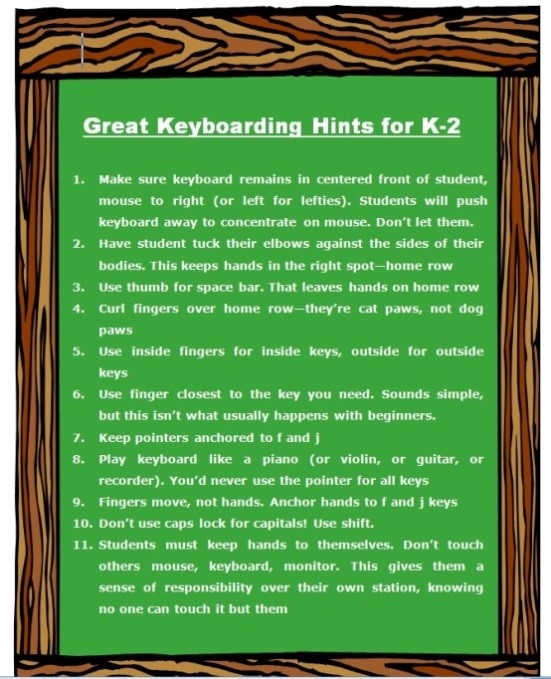
This poster has ten keyboarding hints that cover the most common mistakes students make that prevent them from excelling at keyboarding:
- Tuck your elbows against the sides of your body. This keeps your hands in the right spot—home row—at the right angle (parallel to the rows).
- Use your right thumb for the space bar. That leaves your hands ready, on home row.
- Curl fingers over home row—they’re cat paws, not dog paws.
- Use inside fingers for inside keys, outside fingers for outside keys. This is a great rule of thumb until students start touch typing.
- Use the finger closest to the key you need. Sounds simple, but this isn’t what usually happens with beginners.
- Keep your pointers anchored to f and j. Notice the tactile bump on those keys so you don’t have to look at the keyboard to find homerow.
- Play your keyboard like you do a piano (or violin, or guitar, or recorder). You’d never use your pointer for all keys. Don’t do it on a keyboard either.
- Fingers move, not your hands. Hands stay anchored to the f and j keys
- Add a barrier between the sides of the keyboards. I fashioned one from cover stock. That’ll remind students to stay on the correct side of the keyboard
- Don’t use caps lock for capitals! Use shift.
There’s an eleventh in the poster. Can you tell which one that is?
Buy the entire 169 Real-world Ways to Put Tech into Your Classroom.

How Fast Should Kids Type
 I get this question a lot from readers and purchasers of my technology curriculum: How fast should kids type? What about Kindergartners? When are their brains mature enough to understand speed and accuracy?
When I reviewed the literature on this subject, it is all over the place. Some say third grade, some leave it until sixth. I say–decide based on your own set of students. Me, I’ve come to conclusions that fit my particular K-8 students. Their demographics include:
- private school
- parents support emphasis on keyboarding
- most have computers at home; actually, most have their own computer at home
- students are willing to practice keyboarding in class and submit homework that is oriented to keyboarding
Based on this set of students, here’s what I require:
Kindergarten (more…)

Inspire Kids to Pursue an IT Degree
This is such an important topic! Often kids–and parents–see tech as complicated, daunting, all-math-and-science. Kids think they’re not ‘smart’ enough and maybe, parents think that too! Here are great suggestions for encouraging young participation in a field that is probably the top choice for jobs:
4 Ways to Inspire Kids to Pursue a Degree In Information Technology
 In this tech-centric day and age, the demand for science, technology, math, and engineering skills has spiked significantly, and it only seems to increase. This is evident in how an increasing number of schools offer information technology degrees. There isn’t a single day that we don’t interact with technology. However, while the vast majority of people understand how to use technology, far too few want to understand how technology works.
It’s intimidating to delve into the finer details on the functionality of tech. Most people know how to use a social media platform, but show no interest in understanding the coding behind it. How then, can we spark such an interest in our children?
Start With Toys
Playtime eventually evolves into work time, and toys have a powerful influence on a child’s interests, thinking, behavior, and creative expression. Educational toy manufacturers such as Sphero, Kiwi Co., and Sparkfun create toys that help children learn about coding, circuitry, engineering, and many other STEM fields.
Celebrate With Tech
Introduce your child into the culture of science by holding their next birthday at a science center or a discovery museum. Sure, many schools organize field trips to these places, but if you want your child to gain a genuine interest in these things, you need to try to introduce it on a more personal level. It’s much easier to pique a child’s interest when an element of fun is introduced.

Opportunities prisoners have to study
Education is a passion, both teaching and learning. For those of us who consider ourselves lifelong learners, we understand how learning can make everything feel right even when it’s wrong. What I didn’t think about until Ask a Tech Teacher contributor, Claire Ward, submitted this article was how true this is even for those in prison. She’s written a thoughtful article about the availability of education, books, and learning even for those without access to where you and I typically fulfill our need for knowledge:
What opportunities do prisoners have to study?
 The main asset that all prisoners have is time, and while there are only a limited number of options for how they can spend it, studying is one of them.
So what opportunities do inmates have when it comes to training and education, and how does this vary depending on their circumstances and the facility where they are incarcerated?
Historical complexities
While the rehabilitative purpose of being jailed is a comparatively modern idea, prisoners were offered basic forms of education from the 19th century onwards, with campaigners arguing that expanding the horizons of inmates through education was the best way to allow them to successfully re-enter society after release.
It was not until the mid-20th century that college-equivalent courses were provided, and this blossomed in the US until a change in legislation in the 1990s meant that the funding for such schemes was significantly reduced.
Efforts to reinstate Pell Grants for prisoners and allow them to study in a more structured way began in 2015, and it currently seems likely that programs will be reintroduced nationally, thanks to the bipartisan support this initiative has received.

5 (free) Tech Problem Solving Posters

Every month, we’ll share five themed posters that you can share on your website (with attribution), post on your walls, or simply be inspired.
This month: Problem-solving
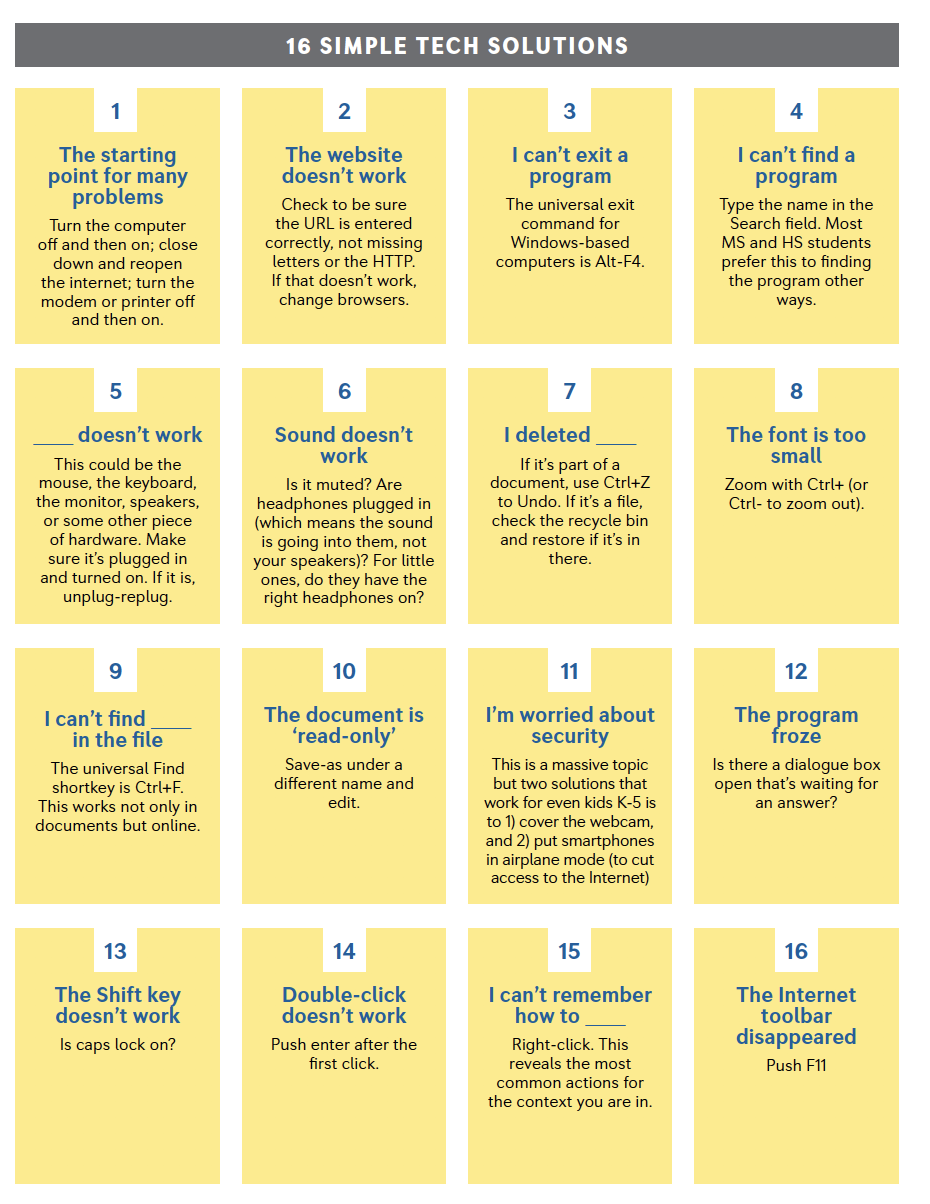
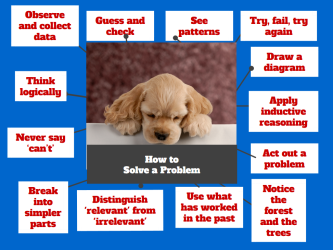

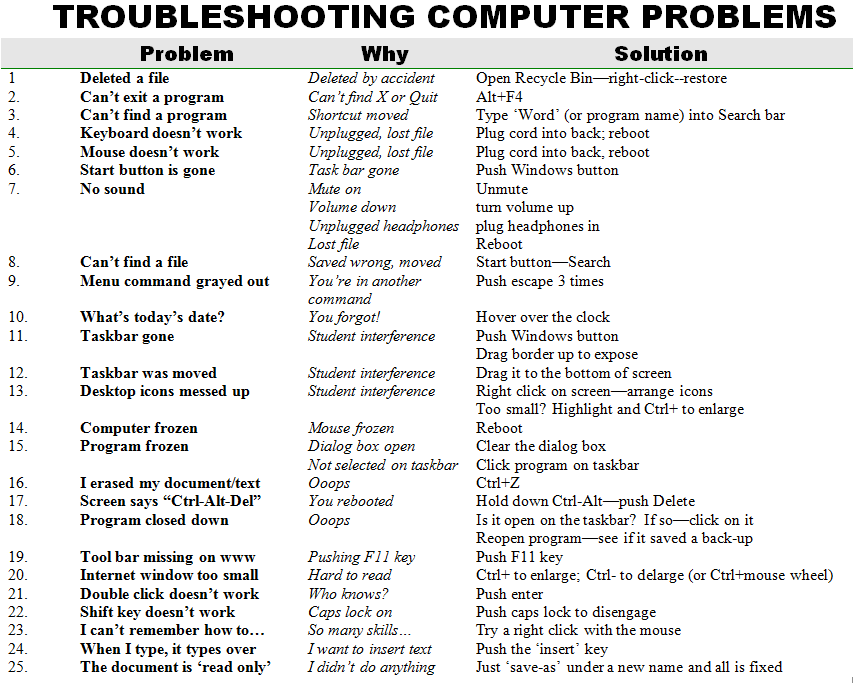
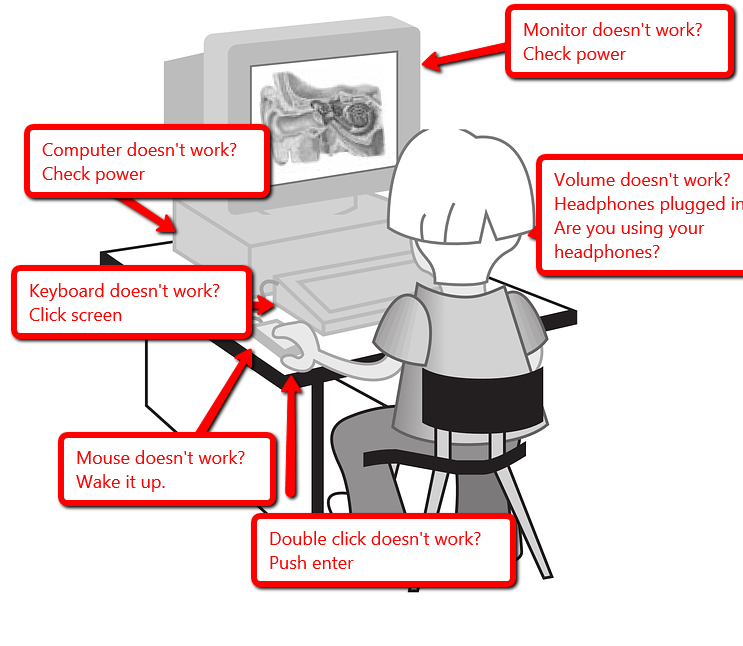
–for the entire collection of 65 posters, click here. If this link doesn’t work (we’re redoing the website), visit Ask a Tech Teacher’s Free Posters page or search ‘Posters’ on StructuredLearning.net.
Jacqui Murray has been teaching K-18 technology for 30 years. She is the editor/author of over a hundred tech ed resources including a K-12 technology curriculum, K-8 keyboard curriculum, K-8 Digital Citizenship curriculum. She is an adjunct professor in tech ed, Master Teacher, webmaster for four blogs, an Amazon Vine Voice, CSTA presentation reviewer, freelance journalist on tech ed topics, contributor to NEA Today, and author of the tech thrillers, To Hunt a Sub and Twenty-four Days. You can find her resources at Structured Learning.

Subscriber Special: More MLK

Every month, subscribers to our newsletter get a free/discounted resource to help their tech teaching.
Free Martin Luther King Day Lesson Plans

- brief summary of the project
- Essential Question
- Big Idea
- Common Core and ISTE alignment
- materials required
- teacher prep required
- step-by-step instructions
- extensions to dig deeper into the subject
- assessment strategies
- sample grading rubric
- sample project
- resources
Here’s a Preview of February
 Here’s a preview of what’s coming up on Ask a Tech Teacher in February:
- Subscriber Special
- 100th Day of School Activities
- World Read Aloud Day
- Free Posters
- Why Kindergartners Must Learn Tech
- Math Word Problems
- Shortkeys
- Great Websites for Remote Teaching
- Websites to Enhance Social Studies
- How Fast Schould Kids Type
- Keyboarding Hints
- College Credit Classes for Your PD





