
Category: Classroom management

Using an Internet Start Page
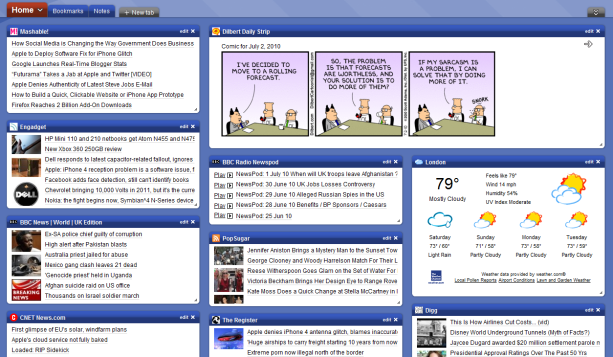
This is a great idea for kids. Use one of these free start pages to put everything important there for your child that’s internet-based. Mine includes oft-used websites, blog sites, a To Do list, search tools, email, a calendar of events, pictures of interest, rss feeds of interest, weather, news, a graffiti wall and more. Yours will be different, more geared toward summer activities. Ask your child what s/he’d like there. Maybe sponge activities (internet sites that take just a few minutes to soak up empty time).
I used protopage.com (Protopage is your own personal page, which you can access from any computer or mobile phone), but you can use netvibes. Start pages are an outreach of the ever-more-popular social networking. Most search engines offer them also. They all have a huge library of custom fields to individualize any home page. And, they’re all simple. Don’t be intimidated.
When you get yours set up, on the To Do list, put what the child should do to start each computer time. This gives them a sense of independence, adultness, as they get started while you’re wrapping something else up.

Tech Tip #16: Email That Document
As a working technology teacher, I get hundreds of questions from parents about their home computers, how to do stuff, how to solve problems. Each Tuesday, I’ll share one of those with you. They’re always brief and always focused. Enjoy!

#103: Know Your Computer Hardware
Learning computers must start with understanding the hardware. I show bits of the following three pages starting in kindergarten, extending through 5th grade. By sixth grade, they are good problem solvers because they understand the basics. (more…)

Thirty-two More Ways to Use Spare Classroom Time
I keep a list of themed websites that are easy-in easy-out for students. They must be activities that can be accomplished enjoyably in less than ten minutes. In the parlance, these are called “sponges”.
You may have read my post with nineteen sites my students love visiting during sponge time (let me know if you liked them, have some to add, I’m always interested in learning from you). Here are thirty-two more. Hope you like them! (more…)
Nineteen Ways to Use Spare Classroom Time
I keep a list of themed websites that are easy-in easy-out for students. They must be activities that can be accomplished enjoyably in less than ten minutes. In the parlance, these are called “sponges”.
What exactly are sponge activities? The term, originally coined by Madeline Hunter, refers to an activity designed to produce learning during the time taken up by “administrivia.” They stem from Hunter’s teaching philosophy that there should be no wasted moments in her classroom.
Here’s my list, by topic: (more…)

Website #14: The Internet Start Page
Drop by every Friday to discover what wonderful website my classes and parents loved this week. I think you’ll find they’ll be a favorite of yours as they are of mine.

Which Social Media Should Be Allowed in Schools?
Social networks dominated by Facebook now account for 22.7 percent of the hours spent in front of a computer, a leap of 43 percent over last year’s figures.
 According to the Neilson Co. report, the shift to social networks for communication caused a precipitous drop in email and instant messaging. Time spent emailing was down 28 percent and instant messaging dropped 15 percent.
If you don’t know what all the social networking stuff is, check out these two YouTube videos. They explain social networking in Plain English.
The question for schools is, how much of this should be let into the education environment. It’s way beyond the internet now. We’re talking about:
- YouTube
- internet access to email
These are all banned at my school. Yet, these are the sites that have kids excited about learning–excited about technology. So what are we doing? We’re cutting off the most effective avenue for keeping students interested in school because we’re afraid of them. (more…)
Help Kids Use the Internet Safely with a Start Page
Internet start pages are a great idea for kids. They put everything in one spot that they need to safely surf the net. You can put their favorite websites, as well as photostreams, games, more. (more…)





