

How can Teachers Increase Social Learning While Teaching Online?
It’s becoming more common to take online classes or blend traditional with online learning. Ila Mishra, a specialist in both LMS and virtual classrooms, has this informative explanation of how teachers can increase their social learning while teaching online classes:
Social Learning is defined as learning through observing behavior, attitudes, and outcomes of those behaviors. These help individuals to create a frame of reference of behaviors within themselves and prompt them to act. The main point of this theory is that social learning attributes human behavior to be an outcome of cognitive, behavioral and environmental influences (Bandura, 1977).
These cognitive, behavioral and environmental influences are:
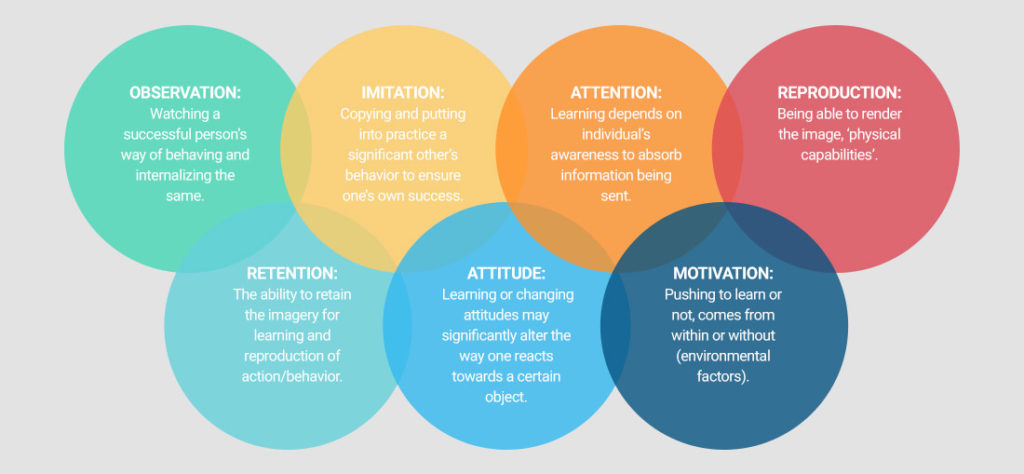
Traditional classrooms were a conduit for social learning where students could sit together and collaborate on projects, group assignments, or make use of peer-to-peer learning opportunities. However, in the current educational environments where technology is used to enhance learning outcomes, educators have consciously allowed for and are making use of technology to facilitate learning online.

What You Might Have Missed in May

Here are the most-read posts for the month of May:
- How to Wrap up Tech for the School Year
- Touch-Typing: Rote vs Integrated Learning or Rote and Integrated Learning?
- Kiddom’s Content Library Makes Differentiation Faster Than Ever
- Positive focus; Positive behaviors
- EdTech Magazine’s 50 Must-read K-12 IT Blogs
- 10 Ways to Wrap Up the School Year
- 5 Best Websites for IELTS Exam Prep
- Study.com Makes the College Dream a Reality for Lots of Students

Seven Fun Math Activities for the Summer Break
Summer can be a challenging time not just for parents but kids. They are accustomed to cerebral challenges that keep them motivated and summer arrives with its sports, naps, and vacations. If your kids miss the thrill of problem-solving or if you worry about them sliding backward without the mental exercise that is integral to school, ORIGO has come up with seven fun math activities that use a blend of popular math apps and everyday activities (like cooking) to fill the summer break with the excitement of math:
***
Seven Fun Math Activities for the Summer Break
The long weeks of summer break are wonderful for family time and vacations, but not so wonderful at keeping students on a positive learning curve. The Summer Slide is a very real issue, especially in mathematics instruction where students lose about one month of learning during the break and in some cases, 2.6 months of learning.

World Environment Day: Living Responsibly with Nature

World Environment Day is June 5th. Catherine Ross, Ask a Tech Teacher contributor, has some great suggestions on how to celebrate that with children and students in a way that shows them how to be responsible stewards for the only planet we have. I think you’ll enjoy her article:
***
We live in a millennium where technology has disrupted many of the traditional systems and ways. Cultural mores have morphed because of technology, leaving a discontinuity between the old and the new. Instead of snuggling into their grandmother’s lap and listening to dragon stories, do not be surprised to see kids persuade their grandmothers to play dragon games. Interestingly, grandmothers have coped and how; many senior women love gaming!
Wealth has been generated because of technology, but this has also increased the gap between the rich and the poor. Changes caused by technology have been beneficial, but there are side effects like loneliness and lack of social skills which individuals and society as a whole find hard to cope with.

Subscriber Special: June

June 5th-10th:
BOGO
Buy one grade level school license; get the second free
Purchase a School License for one grade and get the second grade level for free on either of the following:
This is perfect for private schools, independent schools, charter schools, public schools–any school with classroom computer pods, 1:1 programs, Google Classroom, and more.
Benefits of a School License
- provide access to full text PDF from every digital device in your school, 24 hours a day. This maximizes productivity and student independence.
- provide PDF access that isn’t limited by the availability of the Internet or Wifi
- free desk copy and digital file for teacher use (for domestic customers only; MS keyboarding curriculum only available in digital)
Benefits of School License for Students
- provide easy access to monthly lessons, how-tos, rubrics, project samples, practice quizzes, grade-level expectations, homework, images, and checklists
- provide quick links to websites required in lessons
- provide full color instructions that can be zoomed in on for greater detail
- allow a convenient place to take lesson notes (using a PDF annotator)
- encourage students to be independent in their learning, work at their own pace rather than a one-size-fits-all class pace
- enable a quick way to spiral up to the next grade level for quick learners or back to earlier resources for student needing to scaffold their learning
- provide access to 10 companion videos (Ultimate Guide to Keyboarding curriculum license only) to take students through each month of their keyboarding journey. They’re approximately one hour, viewed at student’s pace
- prepare students for the rigor of end-of-year summative testing
Additionally, with each School License, you get:
- print copy of each ebook selected (international and digital-only books not included)
- free access to additional grade-level resources and videos (K-5 tech curriculum). This is guidance on using the technology curricula in your classroom.
How do you buy this?
- Check the links above and decide what curricula and grade level you’d like.
- Click here for a School License.
- Scroll down and select the curricula and the package.
- Pay via PayPal or contact us to purchase via PO.
- In the comments, tell us which grade-level you’d like as your free gift.

How to Wrap up Tech for the School Year
 Wrapping up your school technology at the end of the school year is as complicated as setting it up in September. There are endless backups, shares, cleanings, changed settings, and vacation messages that — if not done right — can mean big problems when you return from summer vacation. If you have a school device, a lot of the shutdown steps will be done by the IT folks as they back up, clean, reformat, and maybe re-image your device. If you have a personal device, assigned by the school but yours to take home, the steps will be more numerous but really, not more complicated.
Here’s a list. Skip those that don’t apply to you and complete those that do. I won’t take time in this article for a how-to on each activity so if you don’t know how to complete one, check with your IT folks or Google it:
5 Ways to Become a Better Writer Using Android Apps and Tools
Jennifer Lockman, a journalism major at UCLA, contacted me about her thoughts on how technology has changed the way she and other professionals write. It’s been a while since I was in college so I am excited to share her ideas with you:
***
Technology has definitely changed the art of writing and the means we can use to get our points across. Not so long ago everything involved handwriting (and then typing) a draft, spending hours on revision and proofreading, and eventually submitting a finished text to an editor’s red pen. Thus, doing this kind of work well still takes skills, talent, and perseverance. Luckily for us due to the evolution of technology, everyone with an Android device or access to the internet can get the help needed to write and polish a paper. Whether you’re writing a college paper or the next Great American Novel, there are multiple apps available to help you with the entire process.

Touch-Typing: Rote vs Integrated Learning or Rote and Integrated Learning?
Here’s a fascinating article by Ask a Tech Teacher contributor, James Lovelock, discussing the balance between rote drills and integrated learning in teaching keyboarding:
***
 As a pre-service teacher, I have always found the arguments around different forms of teaching and learning to be highly frustrating. Authoritative and Egalitarian models of teaching are considered superior to Authoritarian even though we know that in some cases the Authoritarian approach may be the best due to factors such as cultural expectations or simply the context of a classroom. Likewise, when it comes to learning, while Integrated Learning is certainly the preference there are times when Rote Learning is appropriate to implement.
It is at this point most educators look at me like I have just said the moon is made of cheese. Rote Learning has become a bit of a dirty phrase in some circles, right up there with corporal punishment as a throwback to an older era of unenlightened education. Rote Learning lacks authentic application and therefore lacks engagement and fails to root student learning in real life applications.
By itself, I’d wholeheartedly agree that Rote Learning in isolation is a weak form of instruction. Having said that, Integrated Learning by itself has its own pitfalls. Take a class of thirty students, tell them they are going to learn how to type only by using it in searches on google and creating reports in Microsoft Office. Students who have already learned how to touch-type at home (like I did in the early 90s) possess significant advantages over students who did not learn to touch-type outside of class and particularly over students who have limited access to computers outside of school.

Memorial Day
I’m taking the day to honor our all soldiers on America’s Memorial Day. Without their sacrifice, where would we be? I tried to keep the videos to three and failed miserably. Once I got started watching, I got lost.
[youtube https://www.youtube.com/watch?v=Omd9_FJnerY] [youtube https://www.youtube.com/watch?v=MoNj8qsptjA] [youtube https://www.youtube.com/watch?v=07-RnI8W4xY] [youtube https://www.youtube.com/watch?v=TT5u2xVEO5M]
14 Memorial Day Websites for Students
 Memorial Day (May 28, 2018) is the time we remember all of those soldiers who gave their lives in the defense of American freedom. In war and peace, they made the ultimate sacrifice and because of them we are privileged to live the American Dream.
Once a year, we honor them, their sacrifice, and those they left behind. Here are some activities to help students understand the import of this day:
- Folding the American flag
- In Flanders Field--poem
- Memorial Day Messages, Speeches, Oaths, Poems, Anthems, and images
- Memorial Day Poems
- Memorial Day Poetry–poems
- Memorial Day Prayer
- Memorial Day puzzle I
- Memorial Day Puzzle II
- Memorial Day DigitPuzzle
- Memorial Day Quiz
- Memorial Day Word Search
- Primary source recollections of War
- Quotes about Memorial Day/Wars
- Who you are remembering–Americans killed in action





