

Here’s a Preview of October
 Here’s a preview of what’s coming up on Ask a Tech Teacher in October:
- National Bullying Prevention Month resources
- NaNoWriMo and Young Writers
- Election resources
- Dyslexia Awareness Month resources
- Digital Citizenship Week resources
- Long List of Shortkeys
- Shortkey Posters
- Great Websites for Special Needs
- Apps that Inspire Students
- Tech Tips
- A Geek is asked, “Who are you?”
- Halloween Projects, Websites, Apps, Books, and a Costume

Tech Ed Resources for your Class–Digital Citizenship
I get a lot of questions from readers about what tech ed resources I use in my classroom so I’m going to take a few days this summer to review them with you. Some are edited and/or written by members of the Ask a Tech Teacher crew. Others, by tech teachers who work with the same publisher I do. All of them, I’ve found well-suited to the task of scaling and differentiating tech skills for age groups, scaffolding learning year-to-year, taking into account the perspectives and norms of all stakeholders, with appropriate metrics to know learning is organic and granular.

Today: K-8 Digital Citizenship Curriculum
Overview
K-8 Digital Citizenship Curriculum—9 grade levels. 17 topics. 46 lessons. 46 projects. A year-long digital citizenship curriculum that covers everything you need to discuss on internet safety and efficiency, delivered in the time you have in the classroom.
Digital Citizenship–probably one of the most important topics students will learn between kindergarten and 8th and too often, teachers are thrown into it without a roadmap. This book is your guide to what children must know at what age to thrive in the community called the internet. It blends all pieces into a cohesive, effective student-directed cyber-learning experience that accomplishes ISTE’s general goals to:
- Advocate and practice safe, legal, and responsible use of information and technology
- Exhibit a positive attitude toward using technology that supports collaboration, learning, and productivity
- Demonstrate personal responsibility for lifelong learning
- Exhibit leadership for digital citizenship

20 Great Websites to Inspire 2nd Graders
 Here’s a great list of age-appropriate, safe websites that will inspire 2nd graders whether they’re in your classroom or at home (check here for updated links):
- Edutainment with BBC
- Games that make you think
- Puzzle of student pic–create
- Plant games
- Plant life cycle
- Computer basics
- Computer puzzle
- Parts of the computer
- Videos on Computer Basics K-6
- Google World of Wonders
- Mt. Everest
- Flash cards and more
- Grammar—Adjectives
- Grammar games
- High-frequency words—hangman
- Vocabulary Fun
- Vocabulary-Spelling City
- Word and logic problems
- Word Study Games—Merriam Webster
- Virtual tour of America—via Biplane
More websites for 2nd graders
33 Resources for Read Across America Day
How to Teach Digital Citizenship in 2nd Grade
16 Word Study Websites for 2nd Grade
Jacqui Murray has been teaching K-18 technology for 30 years. She is the editor/author of over a hundred tech ed resources including a K-12 technology curriculum, K-8 keyboard curriculum, K-8 Digital Citizenship curriculum. She is an adjunct professor in tech ed, Master Teacher, webmaster for four blogs, an Amazon Vine Voice, CSTA presentation reviewer, freelance journalist on tech ed topics, contributor to NEA Today, and author of the tech thrillers, To Hunt a Sub and Twenty-four Days. You can find her resources at Structured Learning.

Tech Tip #2–The PrintScreen Key
 In these 169 tech-centric situations, you get an overview of pedagogy—the tech topics most important to your teaching—as well as practical strategies to address most classroom tech situations, how to scaffold these to learning, and where they provide the subtext to daily tech-infused education.
Today’s tip:
Category: Keyboarding
Q: When I push ‘PrintScreen’ to take a screenshot, nothing happens. Why?
A: I have to teach this as a full lesson in class because it is so counter-intuitive; even adults don’t get it.
- When you push PrintScreen, it saves a copy of your screen to the clipboard. Then, you must tell the computer where to put it.
- For example, after pushing PrintScreen (and putting a screenshot onto your clipboard), open a new MS Word document. Paste (Ctrl+V or right click>paste or use the icon on the toolbar or Edit-paste) and a copy of your screen will appear as a picture.
It can be pasted into docs, emails, cards–wherever you’d like. Just don’t forget to paste!
Buy the entire 169 Real-world Ways to Put Tech into Your Classroom.

5 (free) Shortkey Posters to Mainstream Tech Ed

Every month, we’ll share five themed posters that you can share on your website (with attribution), post on your walls, or simply be inspired.
This month: Shortkeys
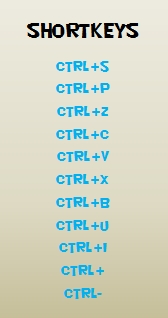
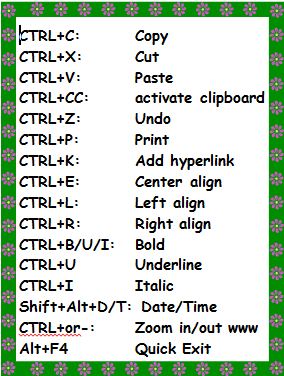
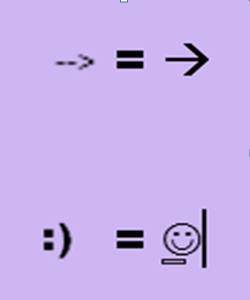
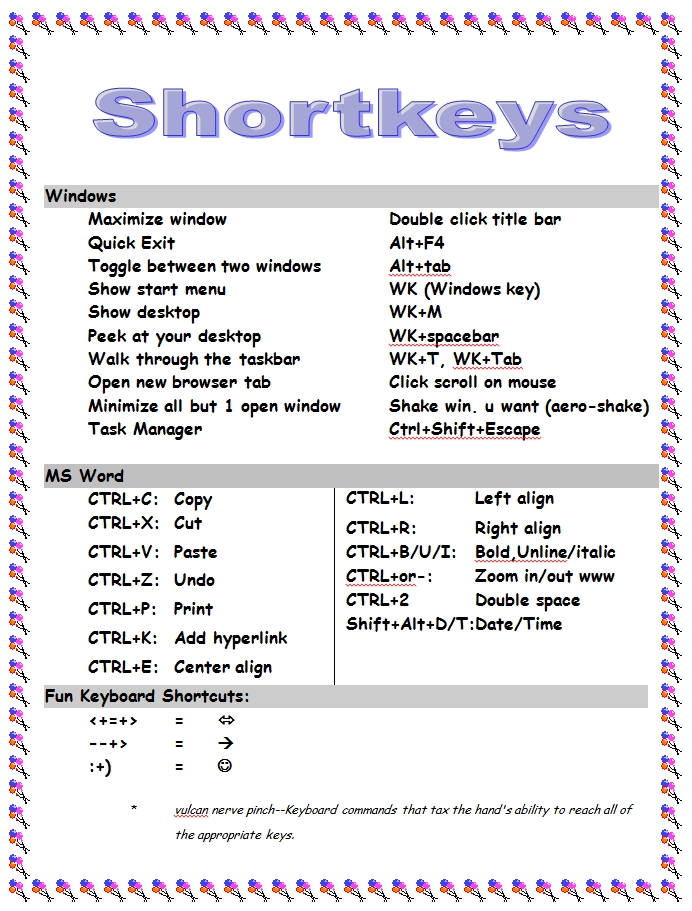
–for the entire collection of 65 posters, click here
Jacqui Murray has been teaching K-18 technology for 30 years. She is the editor/author of over a hundred tech ed resources including a K-12 technology curriculum, K-8 keyboard curriculum, K-8 Digital Citizenship curriculum. She is an adjunct professor in tech ed, Master Teacher, webmaster for four blogs, an Amazon Vine Voice, CSTA presentation reviewer, freelance journalist on tech ed topics, contributor to NEA Today, and author of the tech thrillers, To Hunt a Sub and Twenty-four Days. You can find her resources at Structured Learning.

19 Great Websites to Inspire 5th Graders
 Here’s a great list of age-appropriate, safe websites that will inspire 5th graders whether they’re in your classroom or at home (check here for updated links):
- Animals
- Wolfquest—simulation–DL
- Civics games
- FBI Games
- Looking Glass—animated story
- Snap!—runs in your browser
- Tynker
- Wolfram Alpha widgets
- Dig hole through the earth with Google Earth
- Whyville–Social Media Sim
- Spent
- Earth science animations
- Geography for Kids
- Geography Games
- Geography Games II
- Geography—geonet game
- Geography quiz—Seterra
- Maps—Make them
- States games

Favorite Shortkeys for Special Needs
 I forget where I got this list but it’s well-suited to special needs students. Share these with those students but push them out to all students. You never know who’ll benefit:
STICKY KEYS
Sticky Keys allows keyboard shortcuts to be executed one key at a time. When a modifier key is pressed, Sticky Keys can enable it to make a sound to alert users of the fact. If the user presses two modifiers simultaneously, Sticky Keys is disabled. To enable it, Shift has to be pressed five times.
TOGGLE KEYS
Like Sticky Keys, Toggle Keys alerts users when a command key (e.g. CapsLock) is pressed by making a sound. However, the alert sounds can be sporadic in Windows 7 and 8. Some solutions may be the sound driver should be updated or a corrupted file should be fixed.
FILTER KEYS
Filter Keys is an accessibility feature to make keyboard usage easier. It regulates keystroke rates. For example, if the user presses too hard on keys, Filter Keys can prevent repetitive keystrokes by adjusting the number of seconds a key is pressed. It also can prevent users from inadvertently pressing unwanted keys if the user’s hand trembles or slides across the keyboard. Filter Keys can be enabled by pressing the right Shift for five seconds.
Tech Tip #1–The Insert Key
In these 169 tech-centric situations, you get an overview of pedagogy—the tech topics most important to your teaching—as well as practical strategies to address most classroom tech situations, how to scaffold these to learning, and where they provide the subtext to daily tech-infused education.
Today’s tip: The Insert Key
Category: Keyboarding
Q: When I type, the new words cover up everything that comes after. I’m losing all my work as I edit. How do I fix that?
A: Push the insert key. It toggles between ‘insert’ and ‘typeover’. You are probably in ‘typeover’.
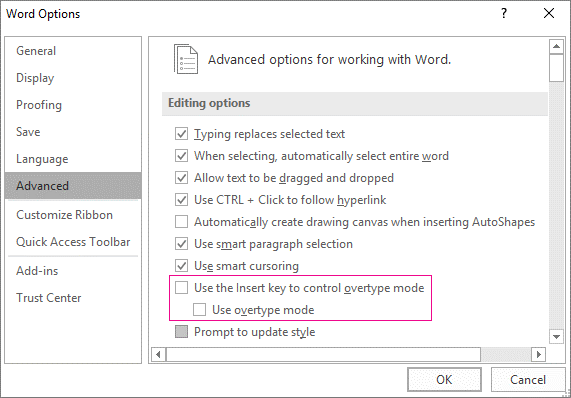
This is an option in MS Office and most programs deselect it as the default. If yours is active and you want to change that, go to
File>Options>Advanced
…and check the boxes shown in the inset.
Sign up for a new tip each week or buy the entire 169 Real-world Ways to Put Tech into Your Classroom.

5 reasons why outdoor learning is vital for young children
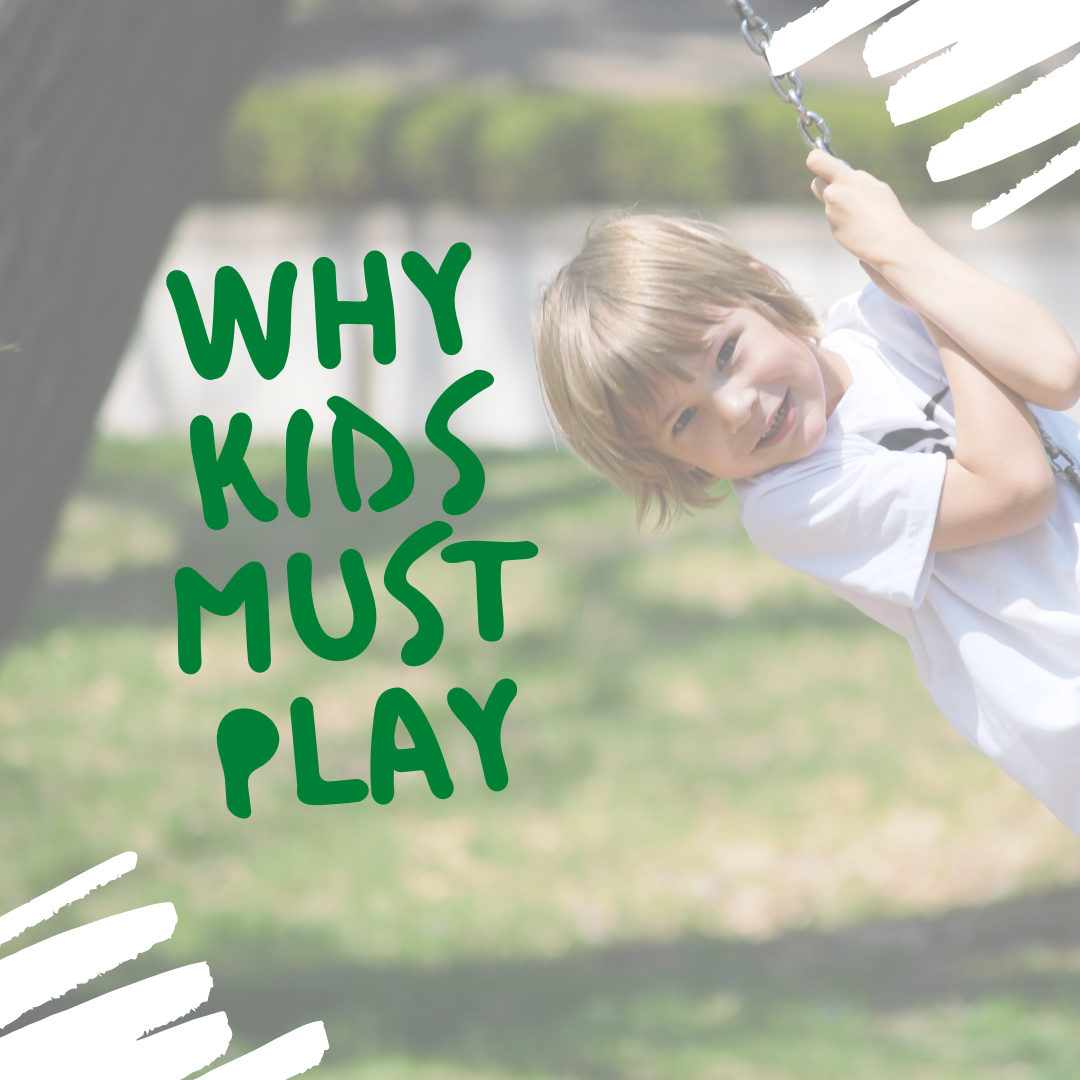 Great reminder about the importance of play from one of our Ask a Tech Teacher contributors
Outdoor education might sound like a modern fad to many. However, there are so many advantages to this that it is critical for young children. Continue reading to find out why.
- Dispel the myth that learning only occurs in school
Many people, not just children, believe that learning only happens within the school building. It is something formal, something strict, and something planned. This couldn’t be further from the truth. Plus, teachers aren’t the only educators in a child’s life; parents, siblings, grandparents, club leaders and so on all play a part.
- Apply learning in different contexts
If children only learn about the value of money within a classroom, they may not be able to apply that skill to their own lives. For example, a child who has the opportunity to go to the shop and spend a dollar will understand the concept of exchanging money for an item far better than someone who only completes a worksheet based on it. The same goes for skills like measuring. Why should children only be made to measure the length of things within a classroom? In the great outdoors, people building enclosures for their animals, a new fence for their garden or setting up a campsite will all need to use the skill of measuring. Furthermore, understanding the use of technology within life outside of school is vital too. Many teachers encourage the use of an electronic device to help measure or a website to support learning.
- Promotes active lifestyle
“Stop running!” School buildings are a place where you must not run or jog, unless of course, you are a teacher in a rush. Rules can be broken then. When classrooms are done badly, they create passive individuals. Learners who follow the rules, but who are not fully engaged in what they are doing. Take the pupils outdoor,s and what do they do first? They run around! There are fewer limitations imposed on them and it allows them to not only be active in terms of their engagement, but also their physical selves. Who says that a child can’t successfully learn their times tables while taking part in games outdoors?
- Learn through play
Learning through play is the most common method of education for young children. Play comes naturally in the great outdoors as there are fewer limitations and more opportunities. This preschool Utah outdoor space just shows what is possible. Although a classroom setup may have a role play area, for example, it also has more formal areas in which children know they will have to sit and learn. Spending time outdoors and allowing the children to create their own opportunities for learning is essential. Anna Ephgrave’s Planning in the Moment approach is perfect for this.
- Physical and sensory approach works for younger children
Many children rely on a physical and sensory approach to learning when they are young. The outdoors is the obvious choice for many to have this opportunity. It seems much more acceptable to encourage water and messy play outside.
Although we feel strongly that children should be actively encouraged to spend time outdoors during their early years of education, the advantages can certainly continue into later life too. It is also vital to ensure the environment itself is fit for purpose, providing prompts and apparatus to support their learning.
More on play and learning
How to Blend Learning with Play for a Kid-friendly Summer
Learning and Playing and Why Both Matter for Teachers
Jacqui Murray has been teaching K-18 technology for 30 years. She is the editor/author of over a hundred tech ed resources including a K-12 technology curriculum, K-8 keyboard curriculum, K-8 Digital Citizenship curriculum. She is an adjunct professor in tech ed, Master Teacher, webmaster for four blogs, an Amazon Vine Voice, CSTA presentation reviewer, freelance journalist on tech ed topics, contributor to NEA Today, and author of the tech thrillers, To Hunt a Sub and Twenty-four Days. You can find her resources at Structured Learning.

What You Might Have Missed in August

Here are the most-read posts for the month of August:





