
Author: Jacqui

How Blogs Make Kids Better Writers
If kids are inspired to write, they get better at writing. The trick is to make writing fun.
Blogs do that. The students get to interact with their favorite toy–a computer–and go online for legitimate purposes. They get to see their thoughts in print. What could be more appealing. Blogs and online forums are a teachers dream.
The problem is how teachers use these tools. Like every good skill, blogging and online writing requires a bit of explanation. Start with these simple rules:
- Be concise in a blog. Readers don’t go to blogs to read a novel. They want something that will help them in, say, a minute (that seems to be the average time people spend on a post)
- Be pithy. Readers don’t want to waste even that sixty seconds. They may get tricked the first time by a snazzy title, but not again. So, students must put their thoughts together in a cogent and concise arrangement.
- Be knowledgeable. There are so many bloggers out there, students must come across as intelligent on their topic and smart enough to discuss it in that one minute the reader gives them. How do they do that?
- Watch grammar and spelling.
- Pick a topic they know about. If it’s an opinion, pick something they have ideas about.
- Don’t tear down the other guy’s opinion as a way to promote their own. This sort of mean-spiritedness turns people off.
For more great reasons why blogs are good for kids, visit Educational Blogging Wiki–including helping them find their voice and empower their maturing identities.

Tech Tip #20: How to Add A Link to Word
As a working technology teacher, I get hundreds of questions from parents about their home computers, how to do stuff, how to solve problems. Each week, I’ll share one (or more) of those with you. They’re always brief and always focused. Enjoy! (more…)
Tech Tip #19: How to Activate a Link in Word
As a working technology teacher, I get hundreds of questions from parents about their home computers, how to do stuff, how to solve problems. Each Tuesday, I’ll share one of those with you. They’re always brief and always focused. Enjoy! (more…)

Just Another Day In Computer Lab
Today, my guest blogger is Kristi Richard of South Bend, IN (Go Notre Dame!) She’s a web designer, owns her own freelance business called Studio 545, and
[caption id="attachment_4333" align="alignright" width="338"] Where’s the blue one go?[/caption]
volunteers one day a week to teach computer basics to grades six , seven and eight at Our Lady of Hungary Catholic School. In her words, “Our Lady of Hungary … received a nice donation of computers and internet service to get a computer lab up and running. I was asked to teach basic computer skills to the kids, and have enjoyed working with them for about four months now. I only work one day at week with the kids, but I have developed quite an appreciation for what teachers go through nine months out of the year!”
Kristi and I met online chatting about tech teacher experiences and she had me in stitches telling me about her escapades. I asked her to write a post so I can share it with you. Enjoy!
Sometimes the kids in my 6th – 8th Grade computer lab look at me as a computer genius, but I am thinking to myself “Whew, glad that worked, now remember what you did, Kristi”!
My second week of teaching this lab, my priority was trying to remember all the kid’s names. But shortly after the kids came in to the lab, all of a sudden four computers including mine went down. We are on a network, so I am thinking, “Now what do I do??” I kept myself under control and did what the tech guys always ask you to do. 1) are the cables plugged into the back of the computers (check!), 2) are the computers turned on (check!) . . . 3) are they plugged in correctly? So there I was, Mrs. Richard, on my hands and knees, ass in the air as I was looking under the lab desks to check the monstrous mess of cords, plugs and cables that hook up twenty computers along this section! I could hear the kids giggling at me while I continued to struggle in tight quarters trying to figure out which cord/cable/plug hooked to the computers that went out. Then came the hot flash . . . jeeze, not now!
After about seven minutes of searching, I saw it . . . the extension cord to a power strip was wrapped around a girls ankle and had come unplugged. She didn’t have a clue! She must have sat down and wrapped her ankle around the cord and just yanked the cord out of the power strip. NO CLUE as she sat there working away on her computer with this cord wrapped around her ankle! I unwrapped the cord, and debated for a second if this was the right cord, or if I would set off a huge power surge and kill a row of computers if i plugged it into the empty outlet. What did I have to lose? I was just a volunteer and I was dying under here! They applauded when I plugged in the cord and the computers went back on – it worked! “Mrs. Richard, you rock!!” (I thought to myself as i backed out from under the desks, face sweaty and red).
At 52, I am getting a bit old to be crawling around under desks. But somehow . . . I love it!
If you have a funny story you’d like to share with readers, email me at askatechteacher@gmail.com or leave a comment here. Chances are, lots of other tech teachers and parents will relate to your experience.
Jacqui Murray has been teaching K-18 technology for 30 years. She is the editor/author of over a hundred tech ed resources including a K-12 technology curriculum, K-8 keyboard curriculum, K-8 Digital Citizenship curriculum. She is an adjunct professor in tech ed, Master Teacher, webmaster for four blogs, an Amazon Vine Voice, CSTA presentation reviewer, freelance journalist on tech ed topics, contributor to NEA Today, and author of the tech thrillers, To Hunt a Sub and Twenty-four Days. You can find her resources at Structured Learning.

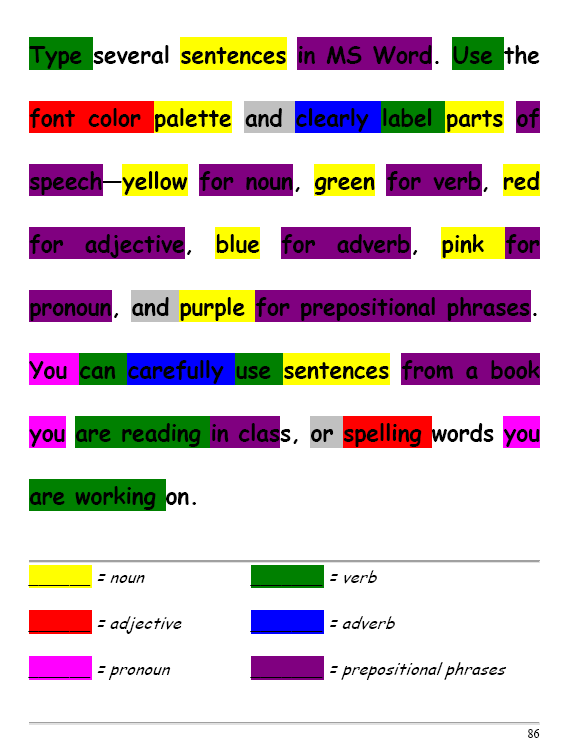
#32: How to Use Art to Teach Grammar
Here’s a great lesson that uses every child’s innate love of color to learn grammar. All you need is MS Word, a quick introduction to the toolbars and tools, and about 25 minutes to complete. If you’re the tech lab teacher, this gives you a chance to reinforce the grammar lesson the classroom is teaching:
[caption id="attachment_1026" align="aligncenter" width="450"] From Structured Learning’s Tech Lab Toolkit Volume I[/caption]
Jacqui Murray has been teaching K-18 technology for 30 years. She is the editor/author of over a hundred tech ed resources including a K-12 technology curriculum, K-8 keyboard curriculum, K-8 Digital Citizenship curriculum. She is an adjunct professor in tech ed, Master Teacher, webmaster for four blogs, an Amazon Vine Voice, CSTA presentation reviewer, freelance journalist on tech ed topics, contributor to NEA Today, and author of the tech thrillers, To Hunt a Sub and Twenty-four Days. You can find her resources at Structured Learning.

Tech Tip #16: Email That Document
As a working technology teacher, I get hundreds of questions from parents about their home computers, how to do stuff, how to solve problems. Each Tuesday, I’ll share one of those with you. They’re always brief and always focused. Enjoy!

10 Top Click-throughs from Ask a Tech Teacher
I include lots of links for my readers to places that will help them integrate technology into their education. They cover websites on lesson plans,
[caption id="attachment_4210" align="alignright" width="160"] Top Ten Click-throughs[/caption]
math, keyboarding, classroom management, cloud computer, digital books, teacher resources, free tech resources, and more. On any given day, I generate on average 157 of these click throughs. Which links my readers select tells me a lot about the type of information they’re looking for from me.
Here’s a list of the top sites my readers selected to visit from my blog:
- Keyboard Climber–actually, the top four were keyboarding websites, so I’ll lump them all into the #1 slot. They included:
- Bees and Honey Keyboard Practice
- Spider Typing
- Big Brown Bear Typing–one of my students’ favorites
- Mousing around--a fun mouse-skills program that’s perfect for kindergarten and first grade (more…)
Tech Tip #19: How to Activate a Link in Word
As a working technology teacher, I get hundreds of questions from parents about their home computers, how to do stuff, how to solve problems. Each Tuesday, I’ll share one of those with you. They’re always brief and always focused. Enjoy! (more…)

Ask a Tech Teacher Receives an Award
 Did you notice the new seal in the left sidebar? Ask a Tech Teacher–Homeschool Edition–received a seal of approval from the proclaimed EdAnywhere, voted #1 by Homeschool.com We are proud to be part of the resources they make available to all homeschoolers to integrate technology into the homeschool curriculum.
We are proud to be included in this community. I encourage everyone to click on the seal and visit this wonderful site for homeschooling ideas.

Tech Tip #18: No Excuse for Spelling Errors
As a working technology teacher, I get hundreds of questions from parents about their home computers, how to do stuff, how to solve problems. Each week, I’ll share one with you. They’re always brief and always focused. Enjoy! (more…)





