
Author: Jacqui

*8: Fifth Grade Cloning in Photoshop
 Adobe Photoshop is kind of like KidPix for grown-ups, as well as the default photo-editing program for anyone serious about graphics. This series of projects (available in the first volume of the book, 55 Technology Projects for the Digital Classroom) introduces students to a traditionally-challenging program in an easy to understand way, each project scaffolding to the next, thus avoiding the frustration and confusion inherent in most Photoshop training.
We’ve already completed Word image editing basics here and Photoshop autofixes here. This one on cloning is going to be a favorite of your children.
The clone tool duplicates a hard to crop-and-copy image (like the flowers below) or deletes part of a background—a sign or a post in a nature scene—you don’t want there. You can clone within a picture (as with the flowers), (more…)
#46: How to Use Technology to Teach Landforms
Every elementary school student learns about landforms–deserts, mountains, oceans–what they are, how they’re different. Here’s a great table to put some of those details onto one page for your students. The best part is they explore Google Images, finding some of the most amazing pictures of landforms you’ve ever seen.
#16: A Holiday Memory in Word or KidPix
Use this not only to create a gift for parents, but to practice writing skills, grammar, MS Word’s spell check. I have student compose the memory one week and we format it the next. For beginning writers, use KidPix and its text tools. (more…)

#15: A Holiday Letter for Grades 2-6

This holiday letter can be as simple (for 2nd graders) or sophisticated (middle school) as your students can handle. There are a gamut of skills–
- text
- borders
- pictures (from the internet, from clip art, from a separate file folder on your school server)
- different fonts, font colors, font sizes
I’ve included a grading rubric to guide students in accomplishing as much as they can. Start with the basics (text, a border, some pictures) and add more skills as students get used to the early ones: (more…)

Weekend Website #12: Wacky Faces
Drop by every Friday to discover what wonderful website my classes and parents loved this week. I think you’ll find they’ll be a favorite of yours as they are of mine. (more…)
#87: Use MS Word’s Diagrams to Teach Animal Characteristics
Use MS Word to organize an animal group (reptiles, mammals, amphibians, etc.) and their traits. This project is a favorite with my students, mostly because of the stunning animal picture they get to embed into the background. (more…)

ASCII Art–Computer Art for Everyone
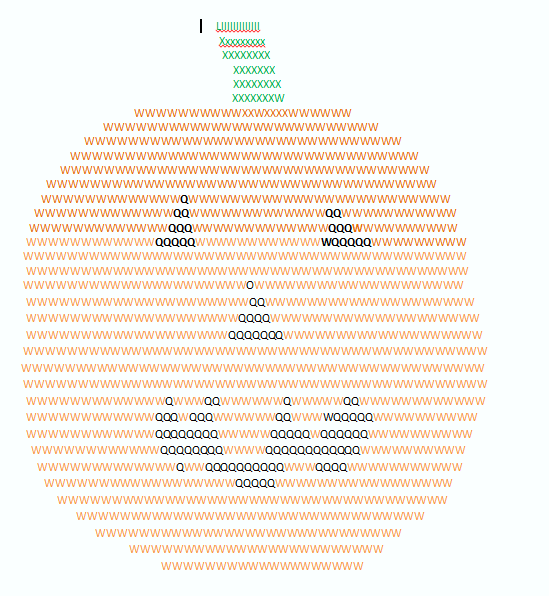
ASCII art is that amazing computer drawing where keyboard letters become a picture. Done well, it never fails to impress friends with your geekiness.
I was inspired by my friend, Zakgirl, to try it. I’m inherently lazy so wanted an ‘easy way’ to accomplish this tedious art. I went on a hunt for that method–and found it! Here’s a pumpkin I did for Halloween in about fifteen minutes:

#21: A Holiday Card in Publisher
Publisher cards are easy enough for second graders–even early readers. Pick a template, add a picture to personalize, add their name–and they’re done. It takes about 15 minutes. Kids always feel great about creating these greeting cards: (more…)

Weekend Website #10: Google Mars
Drop by every weekend to discover what wonderful website my classes and parents loved this week. I think you’ll find they’ll be a favorite of yours as they are of mine. (more…)
How to Use MS Word to Teach Geography
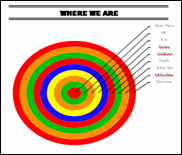 Sample diagram[/caption]
Grade Level: 3-5
Background: Using MS Word.
Vocabulary: diagram, graphic organizer, solar system
Time: About 30 minutes
Steps:
- Open MS Word. Add a heading to the top.
- Add a title–Where We Are–centered, bold and font 14. Use this to point out the tool bar with the four alignment tools, bold, fonts and font size (more…)





