

As a working technology teacher, I get hundreds of questions from parents about their home computers, how to do stuff, how to solve problems. Each Tuesday, I’ll share one of those with you. They’re always brief and always focused. Enjoy!
This week’s tip: I’m supposed to find a tool on the toolbar, but there are so many and I have no idea what they are for? It’s just as bunch of pictures to me. Is there an easy way to figure this out?
A: To figure out what a tool does on the toolbar, hover your mouse over the tool (place the mouse above it without clicking). A tool tip will appear with a clue as to what it’s for.
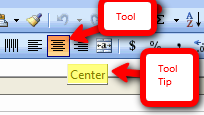
This works in any program with a toolbar or ribbon–MS Office, the internet, Photoshop, and more.
If you’d like to add screentips (tips that appear when you hover over a word in a document), check out this video:

To get the complete list of 169 Tech Tips, click here.
To ask a question, add a comment.

Here’s the sign-up link if the image above doesn’t work:
https://forms.aweber.com/form/07/1910174607.htm
Copyright ©2026 worddreams.wordpress.com – All rights reserved.
“The content presented in this blog is the result of my creative imagination and not intended for use, reproduction, or incorporation into any artificial intelligence training or machine learning systems without prior written consent from the author.”
Jacqui Murray has been teaching K-18 technology for 30 years. She is the editor/author of over a hundred tech ed resources including a K-12 technology curriculum, K-8 keyboard curriculum, K-8 Digital Citizenship curriculum. She is an adjunct professor in tech ed, Master Teacher, freelance journalist on tech ed topics, and author of the tech thrillers, To Hunt a Sub and Twenty-four Days. You can find her resources at Structured Learning.





