As a tech educator, it’s difficult to find a substitute teacher. Even if the sub is knowledgeable in the subject matter, s/he doesn’t have intimate knowledge of what this particular student group knows about software, websites, or problem solving which can be scaffolded for the current lesson. Nor does she know the level of independence and self-direction to expect during class. When I started teaching tech, my generic sub lesson plan looked like this:
- practice keyboarding for fifteen minutes
- visit inquiry-themed websites
That was fine–don’t get me wrong; it promotes student learning while avoiding a meltdown by the teacher–but I now have better options that keep momentum going while I am away for PD or recovering from an unexpected illness. These stand-alone lesson plans are designed to complete important techie learning tasks, assess existing knowledge, or integrate technology rigor into class inquiry. They require little domain-specific knowledge, asking primarily that the sub supervise activities and encourage critical thinking, problem solving, and transfer of knowledge on the part of students:

Key Placement
Working in teams of two, students fill out a blank template of key placement. Here’s how this goes:
- Divide class into pairs.
- Give groups five minutes to memorize key placement, then ask them to turn over all the classroom keyboards.
- Give groups 15-20 minutes to complete the sheet.
- Those who identify a pre-determined percentage of keys correctly can have the next fifteen minutes to visit websites you’ve selected as supportive of class inquiry. All other students will retake the quiz.
Prep: copies of the blank keyboards to pass out to students, such as the one below
Knowledge: no tech knowledge
 Play simulations

Students play an online simulation on a topic that ties into class inquiry. Here’s how:
- Point students either to a themed simulations from this list.
- Let students work in pairs as they select the website and get started.
Remind students that these games require them to be risk-takers to take responsibility for their own learning. They shouldn’t expect the sub to answer how-to questions.
Prep: provide a list of appropriate websites.
Knowledge: no tech knowledge
Khan Academy
Students continue Khan Academy lessons already begun as part of a class-wide or school-wide program.
Prep: Have student accounts set-up and introductory lessons completed.
Knowledge: nominal tech knowledge; nominal math knowledge. Here’s a downloadable free lesson plan on using Khan Academy in your classroom.

The Digital Citizen
Draw a student on the class screen and have students add all the digital devices they use on a daily basis. Here’s how to play:
- Discuss the meaning of ‘digital’, ‘technology’, and similar concepts. Have students name digital devices they see in the classroom–iPads, phones, printer, computers, and more.
- Break class into groups. Ask them to take ten-fifteen minutes (or longer if you have time) to develop a list of digital devices they use on a daily basis.
- While students are discussing, draw a student on the class screen with lots of space around him/her for adding words and pictures.
- As a class, discuss the devices student groups came up with and add them to your class screen student.
See the poster below for ideas.  Prep: access to class screen
Knowledge: no tech knowledge
Gameshow Competition
Students engage in a gameshow-style competition to assess student knowledge on a specific or general topic. Here’s how:
- Prepare the gameshow assessment prior to the sub’s arrival by filling the template with appropriate questions and answers. You can use a variety of formats.
- You might create several so the sub can select the one s/he is most comfortable using.
- Break class into teams.
Prep: complete game show template with appropriate questions and answers
Knowledge: no tech knowledge


ASCII Art
Students create a drawing using ASCII art that supports class inquiry. Here’s how:
- Working independently, search Google Images (or the appropriate image website used in your school) for a picture that ties in with the selected class inquiry. Single images work best.
- Open a word processing program and add the selected picture as a watermark.
- Type over it with appropriate letters. Color some or leave them black against white.
- Delete the watermark.


This is an authentic method of practicing keyboarding without drills and games.
Prep: none
Knowledge: nominal tech knowledge; no required materials. Click here for more detail.
Problem Solving Challenge
Students challenge their knowledge of common computer and technology problems they encounter daily. These may come from your classroom observations, student suggestions of what causes difficulties when they use technology, and core classroom teacher observations. You can also include shortkeys you want students to know. Here’s how:
- Divide class into teams. Pass out copies of common problems your student group faces. Give ten minutes to study list. Collect papers before beginning.
- Have students elect a group member who will answer for the group. While the group can confer on a problem’s solution, only this one person can provide the answer.
- Give Team One one problem from the list. They get five seconds to solve it. If they can’t, move onto the next team. Repeat until a solution is revealed or all teams have had a chance.
- Go to Team Two for the next question and repeat process.
- Each right answer gets one point.
- Continue until you run out of time.
- Team with the most points will get a school-appropriate prize.
Prep: provide a list of problems that students can be expected to know how to solve. See below for examples that can be included
Knowledge: no tech knowledge
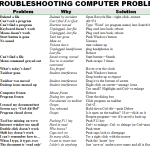

All of these lesson plans are easily accomplished by a qualified substitute teacher and will provide both formative and summative assessment metrics for your class. For more ideas, here’s a thorough list of substitute lesson plans from ELA Common Core Lesson Plans.
More free lesson plans:
Common Core Writing–Digital Quick Writes
Common Core Reading–What if Students Don’t Like Reading

Here’s the sign-up link if the image above doesn’t work:
https://forms.aweber.com/form/07/1910174607.htm
“The content presented in this blog are the result of creative imagination and not intended for use, reproduction, or incorporation into any artificial intelligence training or machine learning systems without prior written consent from the author.”
Jacqui Murray has been teaching K-18 technology for 30 years. She is the editor/author of over a hundred tech ed resources including a K-12 technology curriculum, K-8 keyboard curriculum, K-8 Digital Citizenship curriculum. She is an adjunct professor in tech ed, Master Teacher, freelance journalist on tech ed topics, and author of the tech thrillers, To Hunt a Sub and Twenty-four Days. You can find her resources at Structured Learning.