

Tech Tip #102: Doc Saved Over? No Problem
As a working technology teacher, I get hundreds of questions from parents about their home computers, how to do stuff, how to solve problems. Each Tuesday, I’ll share one of those with you. They’re always brief and always focused. Enjoy!
Q: My youngers constantly save a blank document over their MS Word file. How? Instead of ‘file>open’, they use the menu command ‘file>save-as’ and then they lose all their work. Is there any way to retrieve the file?
A: Absolutely. I just found out about this recently. Bring the student’s file folder in Windows Explorer (I’m using Win 7). Right click on the file name for the lost Word file and select ‘Restore previous version’. Select the latest version that’s not today.
Every time I do this, I’m a hero for ten minutes.

Dear Otto: My computers are old. What do I do?
 Dear Otto is an occasional column where I answer questions I get from readers about teaching tech. If you have a question, please complete the form below and I’ll answer it here. For your privacy, I use only first names.
Here’s a great question I got from Laurie:
There are a lot of teachers trying to keep up with tech ed changes despite older labs and computer set-ups. Some are lucky with 1:1 set-ups and classroom iPads, but lots of teachers make do with what they have.
Like you, I don’t have a smartscreen. Our IT guys attached my computer to a screen (probably like your Epson) so I can display samples and rubrics, and I have Splashtop on my iPad so I can get back to my screen from anywhere in the classroom (albeit, it’s a bit clunky) so that-all helps. I have students come up to the screen and point or share–a way to involve them more in the lessons. At times, I let them use my computer–when I flip the class and have them teaching a skill. This is quite popular.

Tech Tip #28: 5 Ways to Fix a No-Sound Problem–For Free
 for K-8[/caption]
As a working technology teacher, I get hundreds of questions from parents about their home computers, how to do stuff, how to solve problems. Each Tuesday, I’ll share one of those with you. They’re always brief and always focused. Enjoy!
Q: I can’t get any sound out of my computer. Do I need a new sound card?
A: Before you invest that kind of money, try these easy fixes:
- Are headphones plugged in?
- Is the volume turned up?
- Are speakers plugged in? This is my personal favorite. About once a year, this happens to me. The solution is exacerbated because I can’t reach the back of my CPU (the tower) to check the plugs. Can’t being a relative word, because I do finally do so and my problem is fixed!
- Is the sound muted? Check the icon on the systray, or the collection of icons in the lower right corner of your monitor.
- Are the speakers broken? Plug in a set of speakers that you know work. Does that fix it?

Weekend Website #104: Animoto
Every Friday, I share a website (or app) that I’ve heard about, checked into, gotten excited to use. I hope you enjoy it as much as I do.
[caption id="attachment_8326" align="aligncenter" width="614"]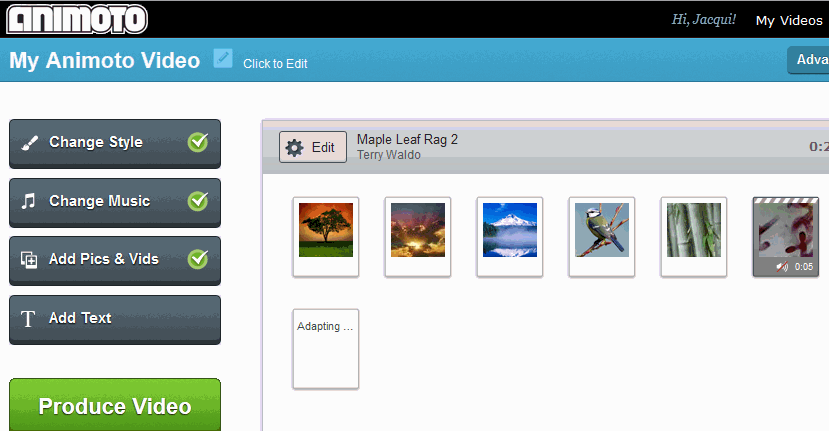 Animoto–create a video in a minute (if you’re in a hurry) or take your time to make it perfect. Either way, it’s easy.[/caption]

Subscribe to my Blog–Get Special Gifts Every Month
 Free or discounted–both are great[/caption]
If you subscribe to my blog, you are eligible for specials on tech ed books and ebooks every month. Here are some of the specials subscribers have received:
- 5 for $25 on tech themed bundles
- Discount of 98 Tech Tips
- Free 19 Posters
Click for this month’s special.
Jacqui Murray has been teaching K-18 technology for 30 years. She is the editor/author of over a hundred tech ed resources including a K-12 technology curriculum, K-8 keyboard curriculum, K-8 Digital Citizenship curriculum. She is an adjunct professor in tech ed, Master Teacher, webmaster for four blogs, an Amazon Vine Voice, CSTA presentation reviewer, freelance journalist on tech ed topics, contributor to NEA Today, and author of the tech thrillers, To Hunt a Sub and Twenty-four Days. You can find her resources at Structured Learning.

Book Review: 19 Posters to Decorate Your Technology Lab
19 posters to Decorate Your Technology Lab is for new and experienced tech teachers to remind students of the basics of computer use. It includes keyboard tips, website usage, mouse control, how to solve common problems, parts of the computer, email netiquette, how to search, volunteer guidelines and more. As a Bonus: There’s a sample structure for a 45-minute tech class.
This is a must-have for new teachers, a time-saver for everyone.


Tech Tip #27: My Taskbar Disappeared
As a working technology teacher, I get hundreds of questions from parents about their home computers, how to do stuff, how to solve problems. Each Tuesday, I’ll share one of those with you. They’re always brief and always focused. Enjoy!
Q: My taskbar disappeared. What do I do?
A: Push the flying windows key (it’s located between Ctrl and Alt on the bottom left of your keyboard). That brings up the start button
It might have disappeared because its properties got reset to Autohide. Here’s what you do to fix that:
- Hover over the area where the toolbar normally lives.
- If it appears, right click on it and select Properties
- Go to the tab that says Taskbar
- Make sure the box that says Autohide toolbar isn’t checked.
What if the toolbar doesn’t appear when you hover over it? That means it got minimized to the bottom edge of your screen. Here’s what you do:
Dear Otto: What About Carmen San Diego?
Dear Otto is an occasional column where I answer questions I get from readers about teaching tech. If you have a question, please complete the form below and I’ll answer it here. For your privacy, I use only first names.
Here’s a great question I got from Dawn:
We have upgraded our Computer Lab computers to Windows 7, some programs are now obsolete since they were DOS and will not run with 7. Carmen San Diego is one we used for Geography. Some teachers are sad we can’t use that anymore – the students did enjoy it. Do you know of anything our that can take its place? Thanks for your time!
I know what you mean. We tried to run it at my school–spent too much time tweaking everything–and never succeeded. I’ve had to toss it.
There are a few geography games you can look into:
- Geography games–National Geographic
- Geography—geonet game (from Houghton Mifflin)
- Geography Games II
They’re OK, but not as good as CSD. I’ll post your comment–see if anyone has any other ideas.

10 Passwords Everyone Uses (And You Shouldn’t)
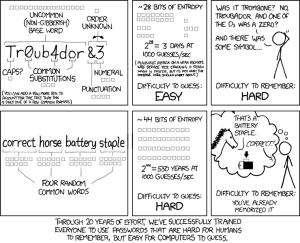 There’s one good outcome from the Yahoo breach (a hacker defeated Yahoo’s firewalls, stole 450,000 accounts, and proceeded to post the user names and passwords onlines). You know all that dire advice about using numbers and letters and symbols in passwords? Turns out the Yahoo users didn’t. A peek at their twenty favorite passwords makes it clear once more that the biggest impediment to computer security remains human users:
- 123456′ used by 1666 (0.38%)
- ‘password’ used by 780 (0.18%)
- welcome’ used by 436 (0.1%)
- ‘ninja’ used by 333 (0.08%)
- ‘abc123’ used by 250 (0.06%)
- ‘123456789’ used by 222 (0.05%)
- ‘12345678’ used by 208 (0.05%)
- ‘sunshine’ used by 205 (0.05%)
- ‘princess’ used by 202 (0.05%)
- ‘qwerty’ used by 172 (0.04%)
If you’re thinking this looks familiar, you’re right. Here are the top 25 from 2011:

Book Review: 55 Tech Projects for the Digital Classroom
With the school year almost back, I want to share some of the tech books I use in my classroom. I think you’ll enjoy them also. This one is a two-volume all-in-one for grades K-8. It includes a mixture of lessons that cover different skills, different subjects. Hope you like it!
Volume I is 219 pages and Volume II 235 pages, making this series an all-in-one K-8 toolkit for the lab specialist, classroom teacher and homeschooler, with a years-worth of simple-to-follow projects for K-8. Integrate technology into language arts, geography, history, problem solving, research skills, and science lesson plans and units of inquiry using teacher resources that meet NETS-S national guidelines and many state standards. The fifty-five projects are categorized by subject, program (software), and skill (grade) level.  Each project includes standards met in three areas (higher-order thinking, technology-specific, and NETS-S), software required, time involved, suggested experience level, subject area supported, tech jargon, step-by-step lessons, extensions for deeper exploration, troubleshooting tips and project examples including reproducibles. Tech programs used are KidPix, all MS productivity software, Google Earth, typing software and online sites, email, Web 2.0 tools (blogs, wikis, internet start pages, social bookmarking and photo storage), Photoshop and Celestia. Also included is an Appendix of over 200 age-appropriate child-friendly websites. Skills taught include collaboration, communication, critical thinking, problem solving, decision making, creativity, digital citizenship, information fluency, presentation, and technology concepts. In short, it’s everything you’d need to successfully integrate technology into the twenty-first century classroom. (more…)





