
Category: 4th Grade

Tech Tip #18: No Excuse for Spelling Errors
As a working technology teacher, I get hundreds of questions from parents about their home computers, how to do stuff, how to solve problems. Each week, I’ll share one with you. They’re always brief and always focused. Enjoy! (more…)

Tech Tip #17: Don’t Know the Date? No Problem
As a working technology teacher, I get hundreds of questions from parents about their home computers, how to do stuff, how to solve problems. Each Tuesday, I’ll share one of those with you. They’re always brief and always focused. Enjoy! (more…)

#72: How to Check Your Math in Excel
This is one of the most popular lessons I teach to Excel beginners. It is relevant, instantly usable and makes sense from the beginning. Before you start this one, be sure to complete Project 70 and 71.
[gallery columns="2" ids="45219,45218"]–from 55 Technology Projects for the Digital Classroom
–5 lesson plans for spreadsheets
Jacqui Murray has been teaching K-8 technology for 15 years. She is the editor/author of over a hundred tech ed resources including a K-8 technology curriculum, K-8 keyboard curriculum, K-8 Digital Citizenship curriculum. She is an adjunct professor in tech ed, CSG Master Teacher, webmaster for four blogs, anAmazon Vine Voice book reviewer, Editorial Review Board member for Journal for Computing Teachers, CAEP reviewer, CSTA presentation reviewer, freelance journalist on tech ed topics, and a weekly contributor to TeachHUB. You can find her resources at Structured Learning.
updated 5-18-16

Tech Tip #15: Save Early Save Often
As a working technology teacher, I get hundreds of questions from parents about their home computers, how to do stuff, how to solve problems. Each Tuesday, I’ll share one of those with you. They’re always brief and always focused. Enjoy! (more…)

18 Online Keyboard Sites for Kids
You want to practice 10-15 minutes two to three times a week. Even for kindergartners. Choose a fun software program–whichever will keep their attention when they’re young. I use Type to Learn Jr. in my school until half-way through first grade, but there are other good ones. For the older children, I use Type to Learn. I have great results with it. Students are challenged, intrigued, motivated by the prizes and the levels.
Another option is online typing sites. Typingweb is good. It’s a graduated program that keeps track of your progress. If you’re picking an online program as an alternative to software, it’s important to log in so the software remembers what your child has accomplished. If you’re going to use online sites as part of an overall typing practice curriculum, here are some other good sites to try:
- Keyboard challenge—adapted to grade level http://www.abcya.com/keyboard.htm
- Keyboard practice—quick start http://www.keybr.com/
- Keyboarding Fingerjig—6 minute test of ability http://www.jonmiles.co.uk/fingerjig.php
- Keyboarding for Kids http://webinstituteforteachers.org/~gammakeys/Lesson/Lesson1.htm
- Keyboarding practice http://www.usspeller.com/keytutor.html
- Keyboarding—alphabet rain game http://www.powertyping.com/rain.shtml (more…)

#46: How to Use Technology to Teach Landforms
Every elementary school student learns about landforms–deserts, mountains, oceans–what they are, how they’re different. Here’s a great table to put some of those details onto one page for your students. The best part is they explore Google Images, finding some of the most amazing pictures of landforms you’ve ever seen.
#16: A Holiday Memory in Word or KidPix
Use this not only to create a gift for parents, but to practice writing skills, grammar, MS Word’s spell check. I have student compose the memory one week and we format it the next. For beginning writers, use KidPix and its text tools. (more…)

#15: A Holiday Letter for Grades 2-6

This holiday letter can be as simple (for 2nd graders) or sophisticated (middle school) as your students can handle. There are a gamut of skills–
- text
- borders
- pictures (from the internet, from clip art, from a separate file folder on your school server)
- different fonts, font colors, font sizes
I’ve included a grading rubric to guide students in accomplishing as much as they can. Start with the basics (text, a border, some pictures) and add more skills as students get used to the early ones: (more…)
How to Use MS Word to Teach Geography
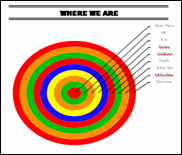 Sample diagram[/caption]
Grade Level: 3-5
Background: Using MS Word.
Vocabulary: diagram, graphic organizer, solar system
Time: About 30 minutes
Steps:
- Open MS Word. Add a heading to the top.
- Add a title–Where We Are–centered, bold and font 14. Use this to point out the tool bar with the four alignment tools, bold, fonts and font size (more…)
#17: A Holiday Story in MS Word for Grades 2-7
Reinforce fiction writing–characters, plot, setting, climax–with a short story in MS Word. Then use color, borders, pictures to enhance the words. (more…)





