Author: Jacqui

IB Extended Essay Tips
Many students dread IB essays. But with the right approach, you can make the procedure exciting. Read how to draft an IB extended essay below

Writing Strategies for an Extended Essay in the International Baccalaureate Program
IB is a rigorous two-year project for personal and academic development. In the end, you receive a globally recognized IB diploma. But like all educational qualifications, it involves various intricate processes. One of them is the extended essay. It is mandatory for all students and is an independent piece of research that culminates into a 4,000-word paper. The paper provides an opportunity to investigate a topic of interest. However, more importantly, it contributes to the overall diploma grade. Let us show you some tips to help you draft a well-written piece.
Understanding the Requirements as a Key to Success in IB Extended Essay Writing
One of the mistakes university students make is ignoring the extended essay brief or paying little attention to the requirement. It is worse for distance learning since no one is around to offer guidance. But even the pros and cons of remote learning are intertwined. So, right off the bat, avoid this pitfall. The IB sets criteria and guidelines for the write-up. The requirements guide discussions to ensure the article meets the standards for successful research. Some of them include citation guidelines, research question formulation, word count, etc.

Research Tips for Paper Writing
This post will introduce you to some quick tips for writing a research paper along with the importance of samples.
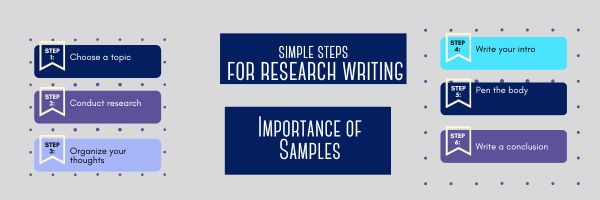
Simple Steps for Research Paper Writing and the Importance of Samples
Research papers are academic writings that offer rigorous analysis, evaluation, assessment, and interpretation of a specific topic. They are similar to essays but usually more detailed and longer. The primary purpose of encouraging students to jot down a research paper is to assess their writing and research skills.
Regardless of the course (science, history, or literature), every student has to prepare a research document at some point or the other. Looking for tips to prepare outstanding work? This post will take you through the writing process of a research paper and the importance of samples. Let’s dive into the details.
Main Tips for Research Paper Writing

The Role of Artificial Intelligence in Education
From the Ask a Tech Teacher crew, here’s a topical article on how to use AI in your education journey:

The Role of Artificial Intelligence in Education
Technological innovation is now casting its shadows over the education sector as well, making learning experiences better than ever before. Better engagement, reduced pressure on students, and easy accessibility to learning are some of the many benefits that the education sector is receiving through technology.
In the last decade, technology and software delivery has improved tremendously due to the support from third-party solution providers like GitLab, Cloudbees, and Jfrog. Artificial intelligence is just one of the major technologies that is changing how we perceive learning and education.
AI in education is expected to grow 41% by 2025. With this rise, we are preparing for a global adoption of artificial intelligence in education. Moreover, artificial intelligence will allow education providers to offer a more customized experience to different learning groups. Let’s discuss how artificial intelligence is changing the education sector:

Tech Tips #170: Cover your webcam!
 This is part of the 169 tech tips for your class-but this is a bonus, not included in the ebook, just for readers of Ask a Tech Teacher. If you follow this blog, you’ve seen it before, but it’s worth repeating. Feel free to grab the image and use it in your classroom:
Tech Tip #170: Cover your webcam when you aren’t using it!

I used to do this and forgot about it. My mentor came for a visit and slapped a post-it note over my webcam.
And she’s right! Webcams and mics are too easy to hack, been done often. Why risk it? When I want to use the webcam (which isn’t that often), I take the post-it off.
I’m not the only one. In questions during a conference at the Center for Strategic and International Studies, former FBI Director Comey revealed that cam-covering is commonplace at the FBI and other government offices:
“If you go into any government office, we all have our little camera things that sit on top of the screen, they all have a little lid that closes down on them. You do that so people who do not have authority don’t look at you. I think that’s a good thing.”
One more person who’s security conscious is that poster-boy for social media: Mark Zuckerberg. Do you see what the geek experts noticed about this photo (one is that Mark covers his webcam as a matter of policy):

How to Create a Paperless Classroom

Every Earth Day (April 22, 2023 this year–see our previous article on Earth Day Class Activities) someone in your school, maybe the parent group, raises the question of WHY NOT a paperless classroom? Everyone nods their heads, agrees this is a revolutionary idea, and moves on as Earth Day passes.
Really, though: Why not? There are benefits to adopting alternatives to paper:

18 Things Teachers Do Before 8am

This is inspired by Jennifer Cohen over at Forbes who wrote a wonderful article on “5 Things Super Successful People Do Before 8am” (few of which I do, though I can claim #5). She includes chores like exercise, eat a healthy breakfast, map out the day–all great ideas, but not pithy enough for the average teacher I know.
Here’s my list of what the average teacher accomplishes before her first class of children crosses the threshold of her domain. These are gathered from chatting with friends and efriends on how they start their days:
- Research the answers to sixteen ‘why’ questions students asked during yesterday’s classes.
- Figure out how to run that dang iPad app students want to use.
- Wash Superman (or woman) cape.
- Close eyes for three seconds to invoke the memory of Emma [replace ‘Emma’ with the name of the Poster Child for why you’re a teacher].

- Accomplish the equivalent of stuffing twenty people in a phone booth–which means find son/daughter’s lost iPad which must be brought to school every day, get kids off to school with packed lunches and completed homework, arrange household repairs, sort dog and husband/wife, talk significant other down from an emotional cliff, and figure out how to make coffee by pouring hot water through yesterday’s grounds (oops–forgot to buy coffee).
- Eat breakfast–real food, not leftovers or peanut butter from sandwiches.
- Move what wasn’t accomplished yesterday to today’s To Do list, which is most everything.
- Promise that today, unlike yesterday and the day before, and the day before that, you won’t say D*** five times before the first class arrives. Set a goal of only four times.
- Do emergency morning yard duty instead of the project set up you’d planned to do this morning—and the reason you came in early.
- While doing emergency morning yard duty, imitate someone being patient rather than someone chewing on their last nerve.
- Keep an open mind to all nature of miracles, no matter the shape or size.
- Answer parent email and voicemail from the prior day because you promised the Principal you would–again.
- Paste on your Reasonable face when a parent drops in for an impromptu conference, shoehorned in after s/he dropped off her/his child and before the 8am start-of-day. Stow the one that says, ‘Leave me alone’.
- Take a nap, especially if you’ve been up most of the night grading papers or preparing lesson plans.
- Smile at the parent who always talks with that irritating tone reserved for women they consider delicate.
- Solve the education problems of the world.
- As Paul Harvey said in Broadcast, “In times like these, it is good to remember that there have always been times like these”.
- Remember that–as Edwin Louis Cole once said, you don’t drown by falling in the water; you drown by staying there.


Use the SAMR Model to Energize Class Tech
 This is a question I get often from teachers: Technology is always an extra layer of work in my classroom. How can I blend it into what I already do without taking time I don’t have? When I first addressed this issue fifteen years ago, it was all about replacing traditional classroom tools with one on a computer. For example, book reports were typed on the computer instead of handwritten, or math facts were practiced with a math game instead of flash cards. But that quickly became cumbersome. Teachers didn’t know how to use the digital tools and there was never enough training to untip that balance. At the end of the day, paper-and-pencil was easier, faster, and perfectly understood. Soon, even the most stalwart tech-infused teachers discovered it was just as effective to use traditional tools and pull out the tech stuff for special occasions.
What happened? How did such a good idea go so wrong? The problem was four-fold:
- students didn’t have the technology foundation to smoothly incorporate digital tools into projects. Too often, the effort to provide evidence of learning suffered as students (and teachers) became mired in efforts to get the technology to work. Where is the tool? How do you do **? Why is the program not working?
- teachers didn’t have training in the tools. Even schools that made herculean efforts to train teachers in technology found themselves flailing. Even teachers who understood the tool would struggle with the inadequate infrastructure, the undependability of the technology itself, and the non-intuitive nature of so many of the programs they wanted to use. As a result, they used tools they understood rather than those best-suited for the project and learning.
- projects always–really, always–took longer using technology than the traditional low-tech approach.
- school infrastructure often struggled to support the exciting plans that tech-savvy teachers wanted to try. Computers froze or the network became over-burdened or the internet went down just as students required them the most. The money required to fix these problems was measured in the thousands of dollars–tens of thousands. Too many schools just didn’t have that budget.

6 Ways to Make Classroom Typing Fun
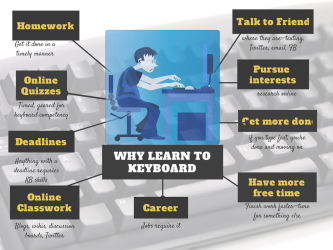
When you teach typing, the goal isn’t speed and accuracy. The goal is that students type well enough that it doesn’t disrupt their thinking.
Let me say that again:
The goal of keyboarding is students type well enough that it doesn’t disrupt their thinking.
Much like breathing takes no thought and playing a piano is automatic (for some), students must be able to think while they type, fingers automatically moving to the keys that record their thoughts. Searching for key placement shouldn’t interfere with how they develop a sentence. Sure, it does when students are just starting, but by third grade students should be comfortable enough with key placement to be working on speed.
To type as fast as the speed of thought isn’t as difficult as it sounds. For students in school, ‘speed of thought’ refers to how fast they develop ideas that will be recorded. 20 wpm means they know most key placements by touch. 30 wpm is the low end of not interfering with thinking. 45 wpm is good.

How to Compare and Contrast Authentically

To students, knowing how to ‘compare and contrast’ sounds academic, not real world, but we teachers know most of life is choosing between options. The better adults are at this, the more they thrive.
Common Core Standards recognize the importance of this skill by addressing it in over 29 Standards, at every grade level from Kindergarten through Twelfth Grade. Here’s a partial list:
Analyze how two or more texts address similar themes or topics in order to build knowledge or to compare the approaches the authors take. (K-5 and 6-12 Reading Anchor Standards)

25 Sites to Add Rigor and Authenticity to Word Study

Memorizing word lists and testing on them doesn’t really work very well. Here are lots of websites that will make student academic and domain-specific word study more relevant and sticky. I’ve collected them into various categories–pick what works for you: