
Tag: 169 tech tips

Tech Tip #49: The Fifteen Second Slideshow
As a working technology teacher, I get hundreds of questions from parents about their home computers, how to do stuff, how to solve problems. Each Tuesday, I’ll share one of those with you. They’re always brief and always focused. Enjoy!
Q: My kindergarten and first grade students are too young to create their own slideshows for Open House (or any parent day) and I’m just too busy. What’s an easy way to display their work digitally for parents that also involves the students in the preparation?
A: I had this problem last year. I simply ran out of time trying to prepare so I offloaded the work onto the students. I was worried it would be too much, but it turned into a wonderful experience for students and parents alike. Here’s all you do:
Tech Tip #48: Quickly Switch Between Windows
As a working technology teacher, I get hundreds of questions from parents about their home computers, how to do stuff, how to solve problems. Each Tuesday, I’ll share one of those with you. They’re always brief and always focused. Enjoy!
Q: I’m copy-pasting between a Word doc and an Excel doc on my computer. I know how to do that, but here’s the problem: I have three Word docs open. I don’t want to close the other two because I’ll need them soon. It takes a lot of time to click down to the taskbar, bring up the Word group and find the correct Word doc. Is there an easier way?
A: Oh yes, Much easier. Use Alt+tab. That takes you to the last window you visited. If you’re toggling between two windows, this is the perfect solution. I use it a lot for grading and report cards.

Tech Tip #47: Tool Tips
As a working technology teacher, I get hundreds of questions from parents about their home computers, how to do stuff, how to solve problems. Each Tuesday, I’ll share one of those with you. They’re always brief and always focused. Enjoy!
This week’s tip: I’m supposed to find a tool on the toolbar, but there are so many and I have no idea what they are for? It’s just as bunch of pictures to me. Is there an easy way to figure this out?
A: To figure out what a tool does on the toolbar or 2007/10”s ribbon, hover your mouse over the tool (place the mouse above it without clicking). A tool tip will appear with a clue as to what it’s for.
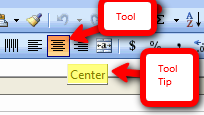
This works in any program with a toolbar or ribbon–MS Office, the internet, Photoshop, and more.

Tech Tip #111: Quick Internet Fix

As a working technology teacher, I get hundreds of questions from parents about their home computers, how to do stuff, how to solve problems. Each Tuesday, I’ll share one of those with you. They’re always brief and always focused. Enjoy!
Q: The internet website is quirky. Stuff I know should work doesn’t. Is there any quick way to fix that without having to reboot?
A: Refresh the webpage with the ‘reload current page’ tool. About half the time, that works.

Tech Tip #110: Sound Doesn’t Work?
As a working technology teacher, I get hundreds of questions from parents about their home computers, how to do stuff, how to solve problems. Each Tuesday, I’ll share one of those with you. They’re always brief and always focused. Enjoy!
Q: Headphones are so difficult. There’s always someone who can’t get theirs to work. I’ve tried the usual solutions, and still, we have problems. I know the sound works. What else can I do?
A: Another solution to the no-sound problem is to switch where headphones are plugged in. Sometimes, the front port on a CPU degrades and doesn’t work well anymore. Pick your reason–little kids jiggling jacks, overuse, leprechauns. The reason doesn’t matter. What matters is students can’t hear what’s going on.
Switch headphones to a different jack. In my case, since I always use the front jack so students can independently plug them in, I switch to the rear jack. Problem’s over. (more…)
Tech Tip #37: My MS Word Toolbar Disappeared
As a working technology teacher, I get hundreds of questions from parents about their home computers, how to do stuff, how to solve problems. Each Tuesday, I’ll share one of those with you. They’re always brief and always focused. Enjoy!
Q: My tools for formatting disappeared from the top of my MS Word (2003). Where’d they go and what do I do?
A: They do disappear at times, for no good reason. Here’s the simple fix:
- Right-click in the toolbar area at the top.
- Select Format or Standard.
- Make sure they’re checked. That’s where 99% of your tools live.
- This is true in all MS Office software
(more…)
Tech Tip #105: Create Shortkeys for any Windows Tool
As a working technology teacher, I get hundreds of questions from parents about their home computers, how to do stuff, how to solve problems. Each Tuesday, I’ll share one of those with you. They’re always brief and always focused. Enjoy!
Q: I love the Windows snipping tool, but it takes too long to get to. Is there a shortkey for it?
A: Oddly, there isn’t, which is why I’ve never used it. I want a screen capture that’s instantaneous. Jing is even too slow for me (though I tolerate it because of all its very cool annotations.
Then I discovered how to create a shortkey for it:
- Go to Start–accessories
- Right click on ‘snipping tool’
- Select ‘properties’
- Click in ‘shortcut’ (I never knew that field was there. Maybe they added it with Win 7)
- Push the key combination you want to use to invoke the snipping tool. In my case, I used Ctrl+Alt+S
- Save
Now all I have to do is remember the shortkey!
BTW, this works for any tool.
Tech Tip #104: Need a File on Your iPad? Here’s an Easy Way
As a working technology teacher, I get hundreds of questions from parents about their home computers, how to do stuff, how to solve problems. Each Tuesday, I’ll share one of those with you. They’re always brief and always focused. Enjoy!
Q: I have a video on my classroom computer I want to use on my iPad. How do I do that?
A: There are ways to do that–email it to your iPad, open through DropBox–but those have issues:
- emailing requires extra steps and time you may not have
- many email accounts limit you to <10MB. What if a video file is larger?
- DropBox has limited space
- like email, you must put materials in DropBox to access them from there (In know–Duh, but that requires planning. What if your inquiry-driven class popped onto this topic on the fly?)
If you’re like me, anything to make your worker faster, easier, less steps is a good thing.

Tech Tip #30: Menu Command is Greyed Out
As a working technology teacher, I get hundreds of questions from parents about their home computers, how to do stuff, how to solve problems. Each Tuesday, I’ll share one of those with you. They’re always brief and always focused. Enjoy!
Q: I pushed the menu command I wanted to use (in MS Office 2003). I got the drop-down list, but the command I needed was greyed out. When I pushed it, nothing happened. What do I do?
A: Rest assured, your software program isn’t broken or corrupted. Here’s the solution: Push escape four times. That’ll get you out of whatever you’re in that is preventing you from moving on.
This trick always works. Can’t say that about much else in my techie life.
Questions you want answered? Leave a comment here and I’ll answer it within the next thirty days.
Tech Tip #19: How to Activate an MS Word Link
As a working technology teacher, I get hundreds of questions from parents about their home computers, how to do stuff, how to solve problems. Each Tuesday, I’ll share one of those with you. They’re always brief and always focused. Enjoy!
Q:I see a blue phrase on my page. It’s underlined. I’m told that’s a link to a website. How do I make it work?
A: Activating a link in MS Word or most of the MS Office products is simple.
- hover over the word or phrase
- Push Ctrl+click to activate





