

Here’s a Preview of May
 Here’s a preview of what’s coming up on Ask a Tech Teacher in May:
- Cinco de Mayo Websites
- Teacher Appreciation Week
- World Password Day
- I’m traveling–see you in June!

Digital Citizenship Projects
 Education has changed. No longer is it contained within four classroom walls or the physical site of a school building. Students aren’t confined by the eight hours between school bells or the struggling budget of an underfunded program. Now, education can be found anywhere — teaming up with students in Kenya, Skyping with an author in Sweden, or chatting with an astrophysicist on the International Space Station. Students can use Google Earth to take a virtual tour of a zoo or a blog to collaborate on class research. Learning has no temporal or geographic borders and is available wherever students and teachers find an Internet connection. This vast landscape of resources is offered digitally, freely (often), and equitably (hopefully), but to take that cerebral trek through the online world, children must know how to do it safely, securely, and responsibly. This used to mean limiting access to the Internet, blocking websites, and layering rules upon rules hoping (vainly) to discourage students from using an infinite and fascinating resource. It didn’t work. Best practices now suggest that instead of cocooning students, we teach them to be good digital citizens, confident and competent. Here are eleven projects to teach kids authentically, blended with your regular lessons, the often complicated topic of becoming good digital citizens, knowledgeable about their responsibilities in an Internet world. (more…)

169 Tech Tip #49 The 15-second Slideshow
 In these 169 tech-centric situations, you get an overview of practical strategies to address most classroom tech situations, how to scaffold these to learning, and where they provide the subtext to daily tech-infused education.
Today’s tip: #49–The 15-second Slideshow
Category: Images
Sub-category: PCs, Macs, Chromebooks, iPads
Q: What’s an easy way Kindergartners and first graders can share a slideshow of their work?
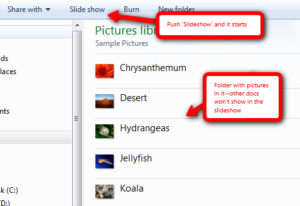
A: If you have PCs:
- Go to the Start button; select Computer in the right column.
- Select the folder with the pictures you want displayed as a slideshow.
- Select Slideshow from the toolbar; push play at the bottom.
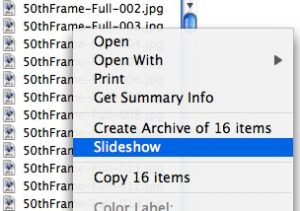
Here’s how you do it in Macs:
For Chromebooks:
- select Files
- select the folder that includes student images
- select the image
- click Openat the bottom of the screen
- hover over the bottom right toolbar and select the video icon for slideshow

How AI is Changing Writing: Check out Robot Don
 Ask a Tech Teacher contributor, Lisa Griffin, has an interesting AI-inspired tool to share with readers. It brings the best of today’s AI functions to classroom writing programs. See what you think:
***
We live in a digital era where the kids are in contact in all sorts of technological solutions that help them learn, connect, and have fun. Furthermore, recent tech advancements are facilitating the inclusion of kids with different sorts of disabilities, allowing them to attend regular classes without any trouble.
Nowadays, Artificial Intelligence is becoming more and more accepted in classrooms all over the world. The benefits of technology usage in schools are vast, including everything from grading tests to analyzing weak spots in courses, providing improvement suggestions. The use of AI in writing and education is also displayed through overwhelming employment of various forms of writing checkers powered by AI. One of these writing assistants is Robot Don, an AI-driven software which we are going to discuss in this article.
What does Robot Don bring to the table?
Writing essays on any given topic includes more than just performing deep research and understanding the issue at hand. It’s about practicing the ability to articulate your knowledge in a manner that is easy to understand and follow. In order to accomplish these goals, proper writing skills are a necessity. This includes impeccable spelling, punctuation, wording, and an extensive vocabulary. According to research, most common undergraduate writing errors include faulty sentence structure, misplaced words, poor punctuation, and pretty slim vocabulary.

What to do when you lose a digital document
 With classwork and homework now heavily digital, the days of “the dog ate my homework” are gone. It’s simple to track, isn’t it? It’s right on the student’s LMS account or in their digital portfolio, somewhere in the cloud.
Maybe. But the latest excuses are even more frightening — “Someone stole it from my digital file” or “The cloud ate it”. Every adult I know (myself included) has lost a critical, time-sucking digital file. It was saved wrong or got corrupted or simply vanished. The reason doesn’t matter. All that matters is that a week’s worth of work is now forever-gone.
Saving work correctly on a digital device isn’t as easy as it sounds. There’s a learning curve to knowing where to save, how to do that correctly, and then ultimately how to retrieve it. It can be especially complicated for students who use a different digital device at home than the one they use at school. Sure, it’s pretty easy if saved to a school-centric cloud account (like Google or One Drive) but that’s not always the case. If students use an online webtool, their work could be saved in that webtool’s server or as a link rather than a file.
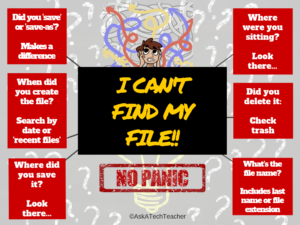
Most kids learn how to properly save/retrieve digital files by suffering a painful experience. Before that happens, teach them this first place to look when save fails and they must search for it:
- Go to the digital device’s general Search field. This will find the file if it’s on that digital device or any drive connected to it.
- Search for the exact name or whatever part of the name is known. If you’ve taught students to always include their last name in a filename, they will now thank you!
- If they don’t know the file name but do know the file extension (maybe it was created in Google Docs or Excel), search for that using the general search term: *.[extension]. In this case, * is a general search term and replaces the file name. If they don’t even have that much information, look down this page under “When did you create the file?” for help.
I start students saving their own files and understanding what that means as soon as they create work on a digital device they want to be able to find at a later date. I start very (very) simply and scaffold year to year. When they can’t find a project, here are six questions they can ask themselves:
A note before starting: Don’t answer these for students. Let them experience the thrill of critically thinking through how to solve this problem successfully.
Where did you save it?
Most programs have a default location where files are saved. This may be preset by the school (or parents) or it may be the system default. Where is that? If the student doesn’t know, this is a good time to have them ask that question.

Dear Otto: Help With Classroom Management Problems
 Dear Otto is an occasional column where I answer questions I get from readers about teaching tech. If you have a question, please contact me at askatechteacher at gmail dot com and I’ll answer it here.
BTW–lots of people ask why the name ‘Otto’. It’s a palindrome so beloved by geeks and nerds and techie-sort of folk.
I got this question from a colleague::
I teach computer literacy. K-4 teachers line their students up and they arrive all at one time, so with this age it would be easier to give instruction before everyone is seated. However, it is still difficult because I don’t really have enough open floor space to seat them away from their computer.
169 Tech Tip #12 Wrap Text Around a Picture
In these 169 tech-centric situations, you get an overview of pedagogy—the tech topics most important to your teaching—as well as practical strategies to address most classroom tech situations, how to scaffold these to learning, and where they provide the subtext to daily tech-infused education.
Today’s tip: #12–Wrap Text around a Picture
Category: Images
Sub-category: MS Office, Google Apps
Q: I want my text to wrap around the picture I inserted, but it goes under/above it. There’s a big white space I can’t type in. What do I do?
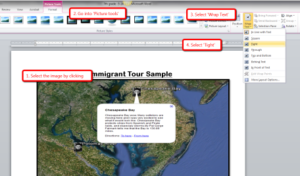
A: I get this from students a lot. Here’s what you do in MS Word:
- select the image
- select the ‘Pictures’ tab at the top of the screen
- select ‘wrap text’ from the ribbon
- select ‘tight’ from drop down menu
Text now flows around the picture
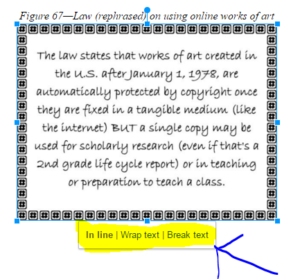
In Google Apps, click the image and select ‘wrap text’ from the three options:
Sign up for a new tip each week or buy the entire 169 Real-world Ways to Put Tech into Your Classroom.

Have Google Takeout at Your End-of-Year Party
 One of the most difficult chores teachers perform at the end of the school year is not final grades, saying goodbye to students, or wondering how to fill their summer free time. It’s preserving the digital files that made up their school year. Be it to close out one school year in preparation for the next, transfer student files to the next class, or the need to safely and effectively transfer teacher files to a new job, handling digital files for use later is stressful. In fact, teachers self-report that this task is one of the most stressful of their end-of-year chores.
There are a lot of products to address this nerve-wracking activity. That’s not the purpose of this article. Here, I’ll concentrate on schools that use Google products. That includes Google Classroom as an LMS, Google cloud as a digital portfolio, Gmail as an email program, YouTube to deliver videos, and other apps (like Google Sites and Blogger) included in the Google ecosystem. If this applies to you, you’re in luck. Google’s free product, Google Takeout, is one of the simplest available. It requires no installation, no new hardware, and is already part of the Google you already use. Google Takeout automates the download of your Google data across all Google services, making it ready to be uploaded to new accounts or preserved as a back-up. This includes but is not limited to:
- Gmail
- Google Apps (but not all of them)
- Google+
- Google Calendar
- Google Contacts
- Google Drive files
- Google Keep
- Google Voice
- YouTube
How does it work
Whether you use Google at your school or as an individual, you’ll be pleased to learn that the Takeout process is intuitive. Here’s what you do:

12 Tech Tasks To End the School Year
 Wrapping up your school technology for the summer is as complicated as setting it up in September. There are endless backups, shares, cleanings, changed settings, and vacation messages that — if not done right — can mean big problems when you return from summer vacation. If you have a school device, a lot of the shutdown steps will be done by the IT folks as they backup, clean, reformat, and maybe re-image your device. If you have a personal device assigned by the school but yours to take home, the steps may be more numerous but really, not more complicated.
Here’s a list. Skip those that don’t apply to you and complete the rest. I won’t take time in this article (I’m at about 1000 words right now) for a how-to on each activity so if you don’t know how to complete one, check with your IT folks or Google it:
Make sure your firewall and antivirus programs are working.
Many computers come with a built-in one to keep viruses and malware out that slow your computer. Sometimes, they seem to turn off by themselves (I have no idea why). Check to be sure yours is active. If you have a Chromebook or an iPad, don’t even worry about this.
Clean out your documents.
Sort through the documents you collected this year and get rid of those you don’t need anymore. It’s intimidating, like a file cabinet that hasn’t been opened in months –- or years — and is covered with spider webs. If you don’t do this regularly, the computer must finger through these unused files every time you search. If you hate throwing anything away, create an ‘Old’ folder, toss them all in it, and save that to a flash drive or in the cloud.

Kindergartners need Technology too!
 Hi all! I’m off to visit good efriend Norah Colvin over at ReadiLearn to discuss how important technology is even for kindergartners. If you’ve ever wondered about that, come check out my short article on this subject. And leave comments so we can chat!
Before getting into the article, I want to thank Norah Colvin for inviting me as a guest on her wonderful newly-redesigned education blog, ReadiLearn where Norah covers great topics for the first three years of education., I’ve been a long-time subscriber, always coming away a little smarter on teaching our youngest learners.
A topic dear to me–and one I get lots of questions about–is teaching Kindergartners to Tech.
When I started teaching technology almost twenty years ago, I taught K-8, three classes in each grade every week. I was buried under lesson plans, grades, and parent meetings. I remember suggesting to my principal that he ease my schedule by eliminating tech for kindergartners. They wouldn’t miss anything if I started them in first or second grade.
And back then, that was true. Even a decade ago, technology was an extra class in student schedules where now, it is a life skill. Today, my teacher colleagues tell me kids arrive at school already comfortable in the use of iPads and smartphones, doing movements like swipe, squeeze, and flick better than most adults. Many teachers, even administrators, use that as the reason why technology training isn’t needed for them, arguing, “They’re digital natives.”





