
Category: Tech tips

Tech Tip #19: How to Activate a Link in Word
As a working technology teacher, I get hundreds of questions from parents about their home computers, how to do stuff, how to solve problems. Each Tuesday, I’ll share one of those with you. They’re always brief and always focused. Enjoy! (more…)

Tech Tip #18: No Excuse for Spelling Errors
As a working technology teacher, I get hundreds of questions from parents about their home computers, how to do stuff, how to solve problems. Each week, I’ll share one with you. They’re always brief and always focused. Enjoy! (more…)

Tech Tip #17: Don’t Know the Date? No Problem
As a working technology teacher, I get hundreds of questions from parents about their home computers, how to do stuff, how to solve problems. Each Tuesday, I’ll share one of those with you. They’re always brief and always focused. Enjoy! (more…)
Tech Tip #15: Save Early Save Often
As a working technology teacher, I get hundreds of questions from parents about their home computers, how to do stuff, how to solve problems. Each Tuesday, I’ll share one of those with you. They’re always brief and always focused. Enjoy! (more…)
Tech Tip #14: Desktop Icons Disappear?
As a working technology teacher, I get hundreds of questions from parents about their home computers, how to do stuff, how to solve problems. Each Tuesday, I’ll share one of those with you. They’re always brief and always focused. Enjoy! (more…)
Tech Tip #13: The Powerful Right Mouse Button
As a working technology teacher, I get hundreds of questions from parents about their home computers, how to do stuff, how to solve problems. Each Tuesday, I’ll share one of those with you. They’re always brief and always focused. Enjoy! (more…)

Twenty-one Techie Problems Every Student Can Fix
The Number One reason–according to students–why their computer doesn’t work is… It’s broken. Can I move to a different computer??? They never look inward first. I often wonder what happens at home. As a tech teacher, I know that half the problems that stop students short in their tech lessons are the same few. Once they’ve learned the following twenty-one trouble shooting solutions, they’ll be able to solve more than half of their ongoing problems.
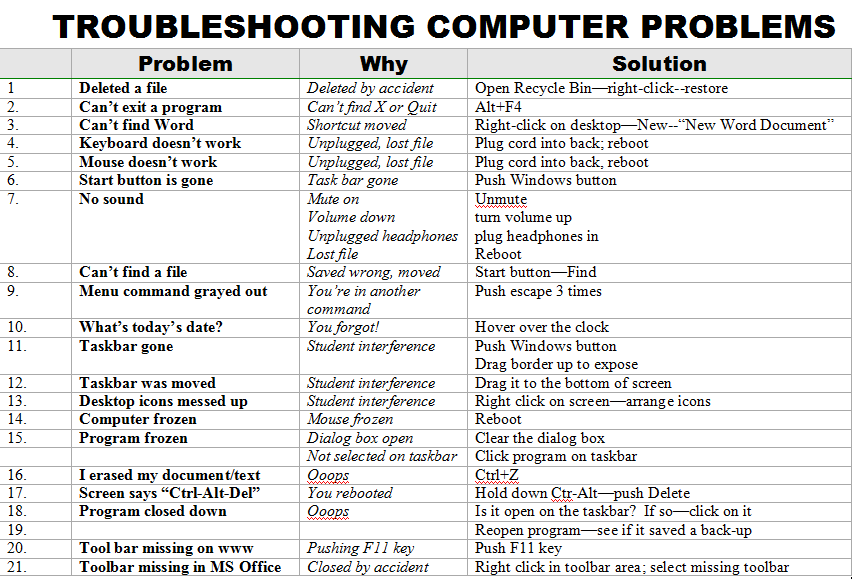
When they can’t double click that tiny little icon to open the program (because their fine motor skills aren’t up to it), teach them the ‘enter’ solution. When somehow (who knows how) the task bar disappears, show them how to bring it up with the ‘flying windows’ key. When their monitor doesn’t work, go through all possible solutions together (monitor power on, computer power on, plugged into duplex, etc.)
Once they know the solution, I play Socrates and make them come up with it when faced with the problem. I reinforce the solutions by having them teach each other when called for. By the end of the year, they’ve got all twenty-one, and we can move on to more complicated issues.
Jacqui Murray has been teaching K-18 technology for 30 years. She is the editor/author of over a hundred tech ed resources including a K-12 technology curriculum, K-8 keyboard curriculum, K-8 Digital Citizenship curriculum. She is an adjunct professor in tech ed, Master Teacher, webmaster for four blogs, an Amazon Vine Voice, CSTA presentation reviewer, freelance journalist on tech ed topics, contributor to NEA Today, and author of the tech thrillers, To Hunt a Sub and Twenty-four Days. You can find her resources at Structured Learning.
Tech Tip #12: Wrap Text Around a Picture
As a working technology teacher, I get hundreds of questions from parents about their home computers, how to do stuff, how to solve problems. Each Tuesday, I’ll share one of those with you. They’re always brief and always focused. Enjoy! (more…)
Tech Tip #11: How to Show the Entire Drop Down Menu
As a working technology teacher, I get hundreds of questions from parents about their home computers, how to do stuff, how to solve problems. Each Tuesday, I’ll share one of those with you. They’re always brief and always focused. Enjoy! (more…)

#103: Know Your Computer Hardware
Learning computers must start with understanding the hardware. I show bits of the following three pages starting in kindergarten, extending through 5th grade. By sixth grade, they are good problem solvers because they understand the basics. (more…)





