Category: Teacher resources

15 Ways to Get Your Geek On
Celebrate your geekiness. Flaunt it for students and colleagues. Play Minecraft. That’s you–you are sharp, quick-thinking. You can’t help but smile when you see an iPad and the first thing you do when you awake is turn on the computer.
It’s OK. Here at Ask a Tech Teacher, we understand. The readers understand. You’re at home. To honor you, I’ve created this poster. It gives fifteen more ways to get your fully geek on as you go through your day:
- Be smart. Yeah, it feels good
- That’s my inner Geek speaking
- Think. Exercise your brain.
- Waves. Sigh.
- Repeat after me: People are my friends. Like Siri.
- Move away from the keyboard–Not.
- Some people watch TV. I play with a Rubik’s Cube
- Be patient. I’m buffering.
- There must be a shortkey for that
- Life needs an Undo key
- Leave me alone for 2 minutes and I’ll go to sleep
- Yes, I can fix your computer
- Like a computer, I do what you tell me to
- My RAM is full. Come back later.
- Slow down. My processor isn’t that fast
Want that as a poster? Here you are:

Dear Otto: What’s a good program to create an online ezine?
 Dear Otto is an occasional column where I answer questions I get from readers about teaching tech. If you have a question, please complete the form below and I’ll answer it here. For your privacy, I use only first names.
Here’s a great question I got from Ganasini:
I want to create a literary e-zine for my small, rural elementary school. What is the best program or venue–blog, wiki, or something else? I am looking more for a way to display work. In the past, I’ve done hard copy photocopied “newspapers” for students to publish their stories, reports, art work, book and movie reviews etc. I would like to try to publish something similar on the computer. One idea is that each student contributor could have a bi-line with their photo and then links to their various entries, or else I could organize it with links to student fiction, for instance. I think it would only go out to our small school community. Thanks so much for your input and direction! It is much appreciated.
This is especially important because of the requirements for publishing in the CCSS K-5 education standards and ISTE technology standards. There are a lot of solutions, I think, that could work for you:
- Adobe Professional–collect pdfs into a bundle and publish online with a cover, table of contents, or whatever else you’d like to include. I did this one year for a 4th grade poetry book. Students designed the cover. I added a TofC with each student poem, and then each poem. It can be displayed as a book or a rotating selection or a variety of different ways. And, it didn’t take long to create
- Issuu–collect all student work into a traditional magazine. Just upload and Issuu does most of the heavy lifting.
- Glogster–create a poster which includes each student name and is linked to their work..
- Check this link at Cool Tools for School. Scroll down to ‘publish’ (it’s under ‘presentation tools’) and see nine more options like Youblisher and Scribd.

Book Review: Common Core SS K-5 Lesson Plans
THE KEY TO ALIGNING YOUR K-5 CLASS WITH COMMON CORE STATE STANDARDS:
30 Projects that integrate technology into core lesson plans
What is this book?
The Key to Aligning Your K-5 Class with Common Core State Standards is for classroom teachers, technology integration specialists and lab professionals, as a resource for aligning your technology program with the Common Core State Standards now implemented in forty-six states. You will find it a foundational tool for scaffolding technology into the areas of math, language, reading, writing, speaking and listening as is required in CCSS. Overall, they are authentic approaches to student-centered learning, asking the student to be a risk-taker in his/her educational goals and the teacher to act as guide. The essential questions are open-ended and conversations organic and inquiry-driven, ultimately asking students to take responsibility for the process of their own learning.

Subscribe to my Blog–Get Special Gifts Every Month
 Free or discounted–both are great[/caption]
If you subscribe to my blog, you are eligible for specials on tech ed books and ebooks every month. Here are some of the specials subscribers have received:
- 5 for $25 on tech themed bundles
- Discount of 98 Tech Tips
- Free 19 Posters
Click for this month’s special.
Jacqui Murray has been teaching K-18 technology for 30 years. She is the editor/author of over a hundred tech ed resources including a K-12 technology curriculum, K-8 keyboard curriculum, K-8 Digital Citizenship curriculum. She is an adjunct professor in tech ed, Master Teacher, webmaster for four blogs, an Amazon Vine Voice, CSTA presentation reviewer, freelance journalist on tech ed topics, contributor to NEA Today, and author of the tech thrillers, To Hunt a Sub and Twenty-four Days. You can find her resources at Structured Learning.

10 Passwords Everyone Uses (And You Shouldn’t)
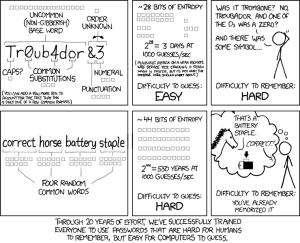 There’s one good outcome from the Yahoo breach (a hacker defeated Yahoo’s firewalls, stole 450,000 accounts, and proceeded to post the user names and passwords onlines). You know all that dire advice about using numbers and letters and symbols in passwords? Turns out the Yahoo users didn’t. A peek at their twenty favorite passwords makes it clear once more that the biggest impediment to computer security remains human users:
- 123456′ used by 1666 (0.38%)
- ‘password’ used by 780 (0.18%)
- welcome’ used by 436 (0.1%)
- ‘ninja’ used by 333 (0.08%)
- ‘abc123’ used by 250 (0.06%)
- ‘123456789’ used by 222 (0.05%)
- ‘12345678’ used by 208 (0.05%)
- ‘sunshine’ used by 205 (0.05%)
- ‘princess’ used by 202 (0.05%)
- ‘qwerty’ used by 172 (0.04%)
If you’re thinking this looks familiar, you’re right. Here are the top 25 from 2011:

5 Great Tech Ed Blogs You May Not Have Heard Of
 Here are five more of the blogs I read to get inspired, motivated, re-energized:
- Cybraryman–a massive resource of materials curated by a teacher. You don’t want to miss this one.
- Diary of a Public School Teacher–this blog will warm your heart. Lisa is upbeat, hard-working, and authentically integrates technology into her students’ days. I love reading her story.
- EdTechSandy–Sandy is one of those educators that seems to have her finger on the trends that drive technology in education. I often visit her blog to orient my thinking, see what I’ve missed at Geographically-Undesirable conferences and center my pedagogy. Here’s her bio:
I am a professional educator with 18 1/2 years of experience in education. My areas of interest include teaching with technology, educator professional development, online blended & distance learning, social media in education, and digital citizenship. I want to build bridges between thinkers in the cloud and teachers in the classroom.
Dear Otto: How Can I Highlight a Document
Do you have a tech question?[/caption]
Dear Otto is an occasional column where I answer questions I get from readers about teaching tech. If you have a question, please complete the form below and I’ll answer it here. For your privacy, I use only first names.
One of my readers was making a presentation and wanted to know how to highlight the screen for her audience and/or spotlight information. When she sent the question, I didn’t have a solution, but have since come across several I want to share with you.
I love this tool I discovered thanks to Rick over at What’s on my PC. This is a portable tool that presents on the Windows Desktop as a virtual pointer stick. It’s freeware, requires no log-in, and minimal installation.

Weekend Website #110: 89 Resources for Teachers
I know summer just started. You’re relaxing, reading the stack of books that collected on your nightstand, planting the flowers you were supposed to take care of in April, but, well, teaching came first.
Bookmark this page and when you’re ready to look at some teacherly resources, come back. I’ve collected 89 great resources to make your job easier–everything from grading rubrics, online quizzes, audio books, utilities, to puzzle creators and more.

9 Steps to Tech Savviness This Summer
Summer is for change. Out with routine, in with spontaneity. When you were in high school, that meant relaxing, seeing friends, going to parties. In college, it likely meant a summer job to make the money that paid for college. Now, as an adult, living your future, summer is a time to rejuvenate, to enrich, to build your core–those things that make you who you are.
As a technology teacher or IT coordinator or computer specialist (or all of the above), you need as much time as you can get and more than you have during the school year to stay afloat of what’s happening in the tech ed field. The list of changes is daunting–iPads, 1:1 initiatives, technology integration, podcasts, sharing and publishing student work, embeddable widgets, Common Core State Standards, digital citizenship, keyboarding. If you’re like me, you try to do what you can during the school year, but it’s summer, with its endless days and no schedule that gives you the freedom to let your brain lose.
Here’s my bucket list for this summer:
Dear Otto: Where Can I Find Kid-safe Images?
Dear Otto is an occasional column where I answer questions I get from readers about teaching tech. If you have a question, please complete the form below and I’ll answer it here. For your privacy, I use only first names.
Here’s a great question I got from a reader:
I am a computer lab teacher and teach grades 1-5. I can really use some advice from others. Do you have a good place for students to go and get images that are appropriate – I teach grades 1-5 and Google even with strict settings as well as MS Office clipart have some inappropriate images that come up from searches
I wrote a post about this almost a year ago. I appreciate that you’ve reminded me it’s time to revisit. This is harder than it should be. I use Google as a default because it is the safest of all the majors, not to say it’s 100% kid-safe. I spent quite a few hours one weekend checking out all of the kid-friendly child search engines (Sweet Search, KidSafe, QuinturaKids, Kigose, KidsExplore, Ask Kids, KidRex, and more), but none did a good job filtering images. Content–yes, but images dried up to worthless for the needs of visual children.
So I went back to Google and tried their Safe Search settings. Normal Google search is set to moderate. For school-age children, they can easily be set to Strict (check out this video on how to do it).