
Category: security

Tech Tip #123: Quick Search for Plagiarized Images
As a working technology teacher, I get hundreds of questions from parents about their home computers, how to do stuff, how to solve problems. Each Tuesday, I’ll share one of those with you. They’re always brief and always focused. Enjoy!
Q: I’m teaching a class on internet forensics–to drive home the point that the internet is a scary place for the uninformed. I know people who use facial recognition tools to search FB, Instagram and those sorts of picture curatators. Most of the programs I’ve found are expensive and complicated. Is there an easy one to share with my students:
There sure is–Google’s Image Search. Go to:
Upload an image you want to search for (or drag-drop it into the field), like this one:

Google will find all the places it appears:

Tech Tip #107: 6 Tips to Avoid Email Phishing
As a working technology teacher, I get hundreds of questions from parents about their home computers, how to do stuff, how to solve problems. Each week, I’ll share one of those with you. They’re always brief and always focused. Enjoy!
Q: I got an email that looks legitimate, but I’m not sure. How do I check?
A: You’re right to take a step back. ‘Phishing’ is an attempt to steal your personal information by posing as a trusted source (a friend, your bank–like that). Kaspersky reports that while spam is declining, accounting for only 66% of email last year, phishing attacks have tripled. Why? Because it works. People think it won’t happen to them, until it does. To clean up after a successful email box invasion can take months, cost thousands of dollars, and give you many sleepless nights.
As a educator, you’ll want to teach students how to protect themselves as soon as they start using open email networks. Here are six suggestions:

Dear Otto: How Can Students Keep Track of Passwords?
 Do you have a tech question?[/caption]
Dear Otto is an occasional column where I answer questions I get from readers about teaching tech. If you have a question, please complete the form below and I’ll answer it here. For your privacy, I use only first names.
Here’s a great question I got from Kaylene in Ohio:
How do you teach students to keep track of the many usernames and passwords they will need when using all of the great web 2.0 tools? I personally use an encrypted Excel file, but what do you suggest for students in K-8?
Hi Kaylene
Great question. Here’s what I do for K-5: I have a binder by each station in the computer lab with a template for recording UN and PW for all accounts. This isn’t private (anyone could look in the binders), but most accounts don’t require any degree of security. The process is to get students used to tracking log-ins, that they have a source to check when they need a log-in. I do ask that each UN and PW be different so they acclimate to that and figure out a logic to accomplishing that which works for them. For example, they might come up with a sentence where they use the first letter of each word as the PW with some combination of number/symbol appended to the front or back.

10 Passwords Everyone Uses (And You Shouldn’t)
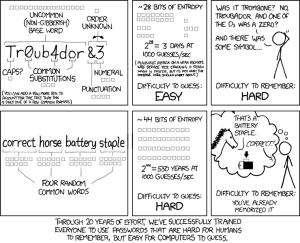 There’s one good outcome from the Yahoo breach (a hacker defeated Yahoo’s firewalls, stole 450,000 accounts, and proceeded to post the user names and passwords onlines). You know all that dire advice about using numbers and letters and symbols in passwords? Turns out the Yahoo users didn’t. A peek at their twenty favorite passwords makes it clear once more that the biggest impediment to computer security remains human users:
- 123456′ used by 1666 (0.38%)
- ‘password’ used by 780 (0.18%)
- welcome’ used by 436 (0.1%)
- ‘ninja’ used by 333 (0.08%)
- ‘abc123’ used by 250 (0.06%)
- ‘123456789’ used by 222 (0.05%)
- ‘12345678’ used by 208 (0.05%)
- ‘sunshine’ used by 205 (0.05%)
- ‘princess’ used by 202 (0.05%)
- ‘qwerty’ used by 172 (0.04%)
If you’re thinking this looks familiar, you’re right. Here are the top 25 from 2011:





