
Category: Freebies/Discounts

#52: Indigenous Cultures Magazine in Publisher
Create a magazine on any topic you’re covering in class using text, pictures, diagrams, charts. Add a cover and a table of contents.
Click on each page of lesson plan.

#51: History Trifold in Publisher–Grades 4-7
This lesson is a crowd pleaser. Students create a timeline showing what was happening around the world while they lived their lives. I’ve found this generates lots of discussion between students and their parents as they try to understand what the world events were.
Click on each page of lesson plan. (more…)

Martin Luther King Day Lesson Plans
 Martin Luther King Day is January 19th. I have two lesson plans, both aligned with Common Core, that I’m giving away to help you plan Martin Luther King Day.
4th grade
Students interpret the words of Dr Martin Luther King in their own words in a visual organizer. Great project that gets students thinking about the impact of words on history. Common Core aligned. 7-page booklet includes a sample, step-by-step projects, a rubric for assessment, and additional resources to enrich teaching.
5th grade
Students research events leading up to Dr. Martin Luther King’s impact on American history and share them with an Event Chain organized visually, including pictures and thought bubbles. Aligned with Common Core. 7-page booklet includes a sample, step-by-step projects, a rubric for assessment, and additional resources to enrich teaching.

A Holiday Flier in Publisher
This is the only project that’s easier than the holiday card in Publisher I shared on Monday. There’s no folding and the templates are bright, colorful and exciting for kids as young as second grade: (more…)

A Holiday Card in Publisher
Greeting cards are easy enough for second graders–even early readers. Using MS Publisher, pick a template, add a picture to personalize, add their name–and they’re done. It takes about 15 minutes. Kids always feel great about creating these greeting cards: (more…)

What’s Tomorrow’s Student Look Like
 Just as the teacher’s job has changed from ‘sage on the stage’ to ‘guide on the side’, so too has the student’s job. Take a peek into the near future at tomorrow’s student. Today, you’d call this child the ‘techie’ minority. Tomorrow, s/he’ll be the majority.
S/he is no longer a passive observer of his/her educational journey, expecting a teacher to impart knowledge that will shape his/her future. Tomorrow’s student takes charge of their learning, sifts through available options and selects what works for them, spirals up or down when required, asks for scaffolding when it’s lacking, accepts accountability for their progress as a stakeholder in the process, adapts to change as needed. They look for rigor in their learning environment and rise to the challenge when required.
These future students expect to collaborate, share, publish, contribute, and participate in a community of learners.
In some cases, the future has already arrived
What’s all that mean? Let’s add detail.

What’s the Classroom of the Future Look Like?
Education is changing. Teachers no longer primly lecture from the front of the class. Students don’t fervently copy the instructors words down, read text, and memorize material for a test.
And the classroom itself has changed.
If these reforms have your head spinning, hold on to your sensibilities because lots more are coming. You thought Smartscreens at the front of the class linked to a computer, students storing schoolwork in the cloud rather than a personal file folder, homework submitted electronically, parents signing up to volunteer on something called ‘Sign up Genius’ was cutting edge? By the time your new born baby enters kindergarten, here’s what they’ll find at their school house:

#49: California Missions Project–in Publisher
Millions of third graders study California missions. Here’s a great project that brings it to life with some writing, lots of pictures and a dash of creativity that will excite every student.

Freebies #19: My Bookcover in KidPix
This year more than any before, classroom budgets have been cut making it more difficult than ever to equip the education of our children with quality teaching materials. I understand that. I teach K-8. Because of that, I’ve decided to give the lesson plans my publisher sells in the Technology Toolkit (110 Lesson Plans that I use in my classroom to integrate technology into core units of inquiry while insuring a fun, age-appropriate, developmentally-appropriate experience for students) for FREE. To be sure you don’t miss any of these:
…and start each week off with a fully-adaptable K-8 lesson that includes step-by-step directions as well as relevant ISTE national standards, tie-ins, extensions, troubleshooting and more. Eventually, you’ll get the entire Technology Toolkit book.
I love giving my material away for free. Thankfully, I have a publisher who supports that. If everyone did, we would reach true equity in international education.
My Bookcover in KidPix
Draw a cover for a classroom project or unit of inquiry or use one of Kidpix’s templates. Have students nicely mix text and pictures for an attractive design. Introduce KidPix fonts, font sizes, font colors to grade 1
[caption id="attachment_5424" align="aligncenter" width="577"]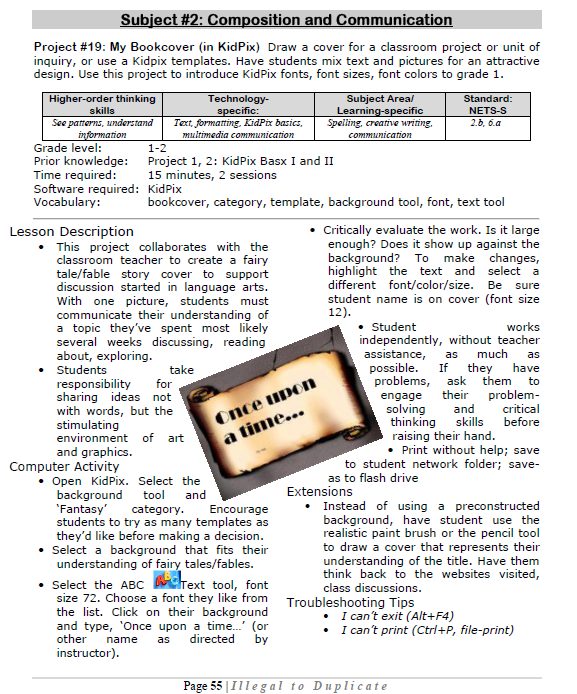 Make a cover page in KidPix[/caption]
–from 55 Technology Projects for the Digital Classroom
Jacqui Murray has been teaching K-18 technology for 30 years. She is the editor/author of over a hundred tech ed resources including a K-12 technology curriculum, K-8 keyboard curriculum, K-8 Digital Citizenship curriculum. She is an adjunct professor in tech ed, Master Teacher, webmaster for four blogs, an Amazon Vine Voice, CSTA presentation reviewer, freelance journalist on tech ed topics, contributor to NEA Today, and author of the tech thrillers, To Hunt a Sub and Twenty-four Days. You can find her resources at Structured Learning.

#50: American Revolution Magazine in Publisher
This project includes everything the student user will require throughout high school. It has so many skills, every student will find one that grabs their imagination.
Reminder: Make this the second magazine they attempt (unless they’re in middle school) so they’ve had some practice with the more basic skills. You might try the California Mission magazine one year and this the next. (more…)





