
Category: Art

#25: Intro to PowerPoint–with KidPix Pictures
Drawings are done in KidPix. Assign topics (me, my family, etc) for grades K-1 to reinforce the concept of following directions. With 2nd grade, use one picture for each of the parts of a story—characters, plot, setting, climax/resolution. Mix pictures and text. Younger students can show these to parents at Open House or a parent night using Windows slideshow function (something they can do without assistance after a bit of practice). Second graders can create a PowerPoint slideshow that will knock the socks off of their parents.
This is the first of about six projects in PowerPoint (see sidebar for more). Start with this one and build up to the last. (more…)

#43: How to Teach Geography with KidPix II
Click on image to enlarge if it’s blurry.
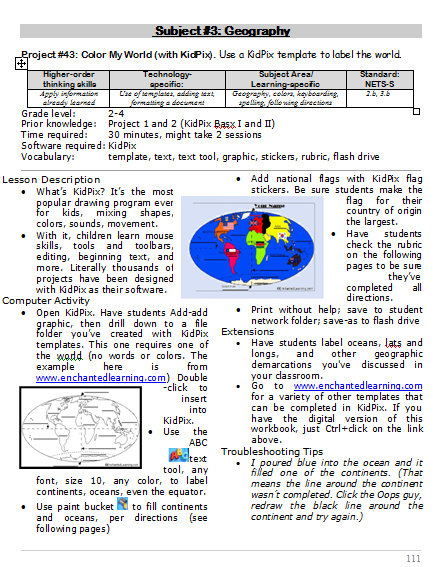

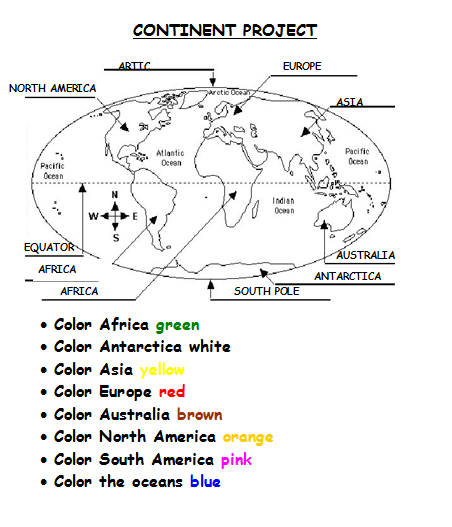

–from 55 Technology Projects for the Digital Classroom
Jacqui Murray has been teaching K-18 technology for 30 years. She is the editor/author of over a hundred tech ed resources including a K-12 technology curriculum, K-8 keyboard curriculum, K-8 Digital Citizenship curriculum. She is an adjunct professor in tech ed, Master Teacher, webmaster for four blogs, an Amazon Vine Voice, CSTA presentation reviewer, freelance journalist on tech ed topics, contributor to NEA Today, and author of the tech thrillers, To Hunt a Sub and Twenty-four Days. You can find her resources at Structured Learning.
#26: Create a Storybook in KidPix
Create the drawings in KidPix for grades kindergarten and first. By second grade, you can have students insert them into PowerPoint as a slideshow for Open House. (more…)

#13: Great Online Art Sites
With the start of a new school year, there’s no better time to explore every child’s favorite topic: art. What better way than visit a few great online art sites.
Here’s a collection of online resources for great worldwide museums. Take one lesson to introduce students to these six art sites (five to ten minutes on each) and then allow them to revisit when they have a few minutes at the end of a class projects, unit, before lunch, etc.

#1: How to KidPix I
According to the creator, “KidPix combines art tools, graphic capability with ease of use and powerful new teacher tools to inspire creativity and learning.” According to the world, it’s the most popular drawing program for kids. Ever.
In this lesson, students learn about tools, toolbars, drag-drop, multi-media, menus—all tech basics. Every kindergarten-second grader should start with this lesson, and then move on as they master the rudiments. Besides provide tech basics, this project appeals to a student’s creativity and desire for the personal. And, it’s quick and easy. (more…)
Free Lesson Plans That Mix Tech and Ed
 Over the years, I’ve developed a list of lesson plans that nicely integrate technology into core classroom subjects like, science, language arts, spelling, math,
  history and more. To share them, click here, on Free Lesson Plans.
When you get to the page, you’ll find 112 options. They all don’t have links. The ones with links I’ve posted. The others, I’m planning to. For the entire book of lessons without waiting, and arguably clearer than the reproduction in the blog allows, go to the Store and select either volume of 55 Technology Projects for the Digital Classroom.
As you start this school year, feel free to ask questions of Ask a Tech Teacher. They’re probably the same one many others are curious about.
#13: Art Online
Lots of kids think technology is technical, another word for complicated/difficult/math-like. Here are six websites students can visit that will change their minds:
Click on image to enlarge if it’s blurry.





