
Category: 7th grade

Book Review: K-8 Keyboard Curriculum
K-8 Keyboard Curriculum: The Essential Guide to Teaching Keyboarding in 45 Minutes a Week
You may think it impossible to find an effective keyboarding curriculum for the skimpy forty-five minutes a week you can devote to keyboarding. You teach what you can, but it always seems to be the same lessons—hands on home row, good posture, eyes on the copy. You wonder if it’s making a difference, or if it matters.
Yes, it does and there is a way. It requires a plan, faithfully executed, with your eye relentlessly on the goal, but if you commit, it works. In this book, The Essential Guide to Teaching Keyboarding in 45 Minutes a Week: a K-8 Curriculum, I’ll share a unique keyboarding curriculum for K-8 that I’ve seen work on thousands of students. The book includes:
- A summary of the literature
- Answers to the most-asked questions like ‘Can youngers learn to keyboard—and should they?’
- The importance of the teacher to early keyboarders
The K-8 curriculum includes a lot more variety than keyboard exercises on installed software. Here’s a rundown of the pieces used:

Book Review: K-8 Digital Citizenship Curriculum
Education has changed. No longer is it contained within four classroom walls or the physical site of a school building. Students aren’t confined by the eight hours between the school bell’s chimes or the struggling budget of an underfunded program.
Now, education can be found anywhere, by collaborating with students in Kenya or Skyping with an author in Sweden or chatting with an astrophysicist on the International Space Station. Students can use Google Earth to take a virtual tour of a zoo or a blog to collaborate on a class project. Learning has no temporal or geographic borders, available 24/7 from wherever students and teachers find an internet connection.
This vast landscape of resources is available digitally, freely, and equitably, but before children begin the cerebral trek through the online world, they must learn to do it safely, securely, and responsibly. This conversation used to focus on limiting access to the internet, blocking websites, and layering rules upon rules hoping (vainly) that students would be discouraged from using this infinite and fascinating resource.
It didn’t work.
Best practices now suggest that instead of protecting students, we teach them to be good digital citizens, confident and competent in the use of the internet.
This 70-page text (click for a peek inside) is your guide to what our children must know at what age to thrive in the community called the internet. It’s a roadmap for blending all the pieces into a cohesive, effective student-directed cyber-learning experience that accomplishes ISTE’s general goals to:
-
- Advocate and practice safe, legal, and responsible use of information and technology
-
- Exhibit a positive attitude toward using technology that supports collaboration, learning, and productivity
- Demonstrate personal responsibility for lifelong learning
- Exhibit leadership for digital citizenship

#10: Drawing in Photoshop
Photoshop reputation as a photo editor ignores its many other tools that enable you to draw like a pro with a wide variety of brushes, textures, and scintillating extras. This side of Photoshop is perfect for creative projects that tie in with many different classroom lesson plans.
[caption id="attachment_5413" align="aligncenter" width="576"]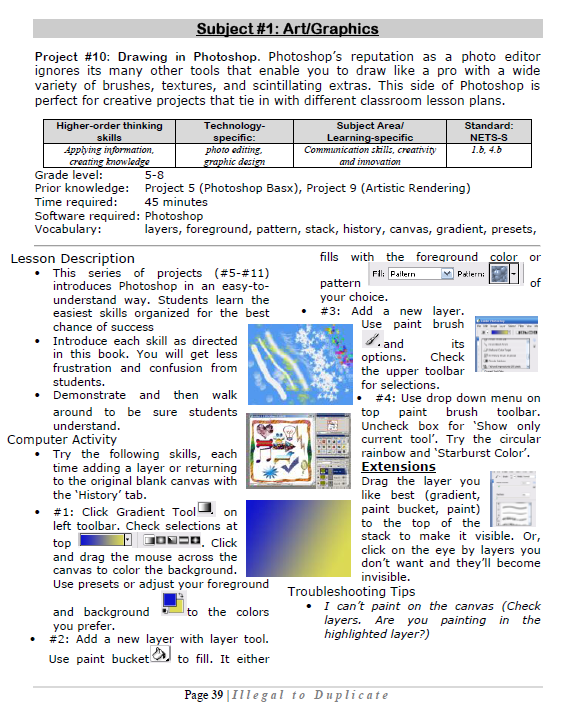 Photoshop basics[/caption]

#17: A Holiday Story in MS Word for Grades 2-7
Reinforce fiction writing–characters, plot, setting, climax–with a short story in MS Word. Then use color, borders, pictures to enhance the words. (more…)





