
Author: Jacqui

World Backup Day–Once a Year
 March 31st is called World Backup Day. At least once a year, backup your data files to an external drive (like a flash drive). This is one that isn’t connected to your local computer so can’t be compromised if you get a virus. It’s good to always backup data to cloud drives or a different drive on your computer but once a year, do the entire collection of data files to what is called an ‘air gap’ drive–one that is separated from any internet connection.
How to do this
There are various ways to back up your data. You can back up your data to an external device or you can back up your data to a cloud-based backup service, or back up your data to both an external device and a cloud backup service. You might even make more than one backup to external storage devices and keep the two copies in different places (providing protection and access to your data even if one of the backup devices is destroyed or inaccessible. Preserving your valuable documents and images for future access and use requires planning, as well as the use of automatic backup services.

Why Teach Poetry?

April is National Poetry Month. For thirty days, we celebrate the value and joy that poetry brings to our world. According to the Academy of American Poets, the goals are:
- Highlight the extraordinary legacy and ongoing achievement of American poets
- Introduce more Americans to the pleasures of reading poetry
- Bring poets and poetry to the public in immediate and innovative ways
- Make poetry a more important part of the school curriculum
- Increase the attention paid to poetry by national and local media
- Encourage increased publication, distribution, and sales of poetry books
- Increase public and private philanthropic support for poets and poetry
All across the nation, school, teachers, students, libraries, and families celebrate by reading, writing, and sharing poetry. Here are websites that do all that and more. Share them with students on a class page, Symbaloo, or another method you’ve chosen to share groups of websites with students.
When I was in high school, I was forced to learn poetry. I didn’t want to, saw no benefit to it, and unfortunately, the teacher didn’t change my mind. All that analyzing meaning and deconstructing stanzas went right over my head. Worse, selections such as Beowulf and anything by Elizabeth Barrett Browning seemed unrelated to my life and goals. Poems I loved like “The Charge of the Light Brigade”, “The Raven”, and “The Road Not Taken” were rare. It wasn’t until University, where I discovered that poetry speaks the language of dreams, that I fell in love with it.
Thankfully, today’s teachers communicate poetry’s essence much better than what I experienced.
What is poetry?
When many people think of poetry, they visualize flowing groupings of soulful words as pithy and dense as a fruitcake and for some, just as (un)appealing. I’ll get back to that in a minute, but first, here’s a definition (from Wikipedia):
an art form in which human language is used for its aesthetic qualities in addition to, or instead of, its notional and semantic content.
You are most likely to recognize a poem by its truncated lines that rarely end in a period (though this isn’t always true), the rhythm created when reading it, the liberal use of literary devices such as alliteration and similes, and its ability to tell an entire story in a very (very) few stanzas. A good poem not only communicates with words but with emotion, senses, and memories, it gives a reader permission to interpret the content in ways that speak to his/her dreams. It may ask a question or answer one but always, it encourages the reader to think.

15 St. Patrick’s Day Resources For Your Class
Getting ready for St. Patrick’s Day? Try these fun websites:
- Color the shamrock
- Color the Pot-o-gold
- Color the leprechaun
- Puzzle–St. Pat’s Puzzle
- Puzzle–St. Pat’s puzzle II
- Puzzle–St. Pat’s drag-and-drop puzzle
- Puzzle–St. Pat’s slide puzzle
- Puzzles and games
- St. Patrick’s Day history–video
- St. Pat’s Day songs–video
- Tic tac toe
- Webquest for St. Patrick’s Day I
- Webquest II
- Wordsearch

World Maths Day–March 14
 The first World Maths Day was held on March 14, 2007 (also Pi Day), and has ever since been held occasionally on the 1st Wednesday in March. March 2020 World Maths Day is one of the world’s largest global educational events aimed at lifting numeracy standards in a fun and meaningful way. Why not celebrate with your own fun maths teaching – take a look at our lovely supporting resources! Find out more at the World Maths Day Website
World Maths Day is a free, fun, online competition with up to 4 million students world-wide participating. The competition measures speed in arithmetic and numeracy skills on the Live Mathletics platform and runs for 48 hours and is open to all schools around the world. Students compete online with other students and top scores are displayed on a live ‘Hall of Fame’.
@worldedugames
More on math
Math Webtools to Support Any Curriculum

Subscriber Special: March

Every month, subscribers to our newsletter get a free/discounted resource to help their tech teaching.
March:
Join our technology-in-education newsletter for updates on edtech resources, classes, and webtools
get 10% off on any Structured Learning products

169 Tech Tip #36: The Internet Toolbar Disappeared
 In these 169 tech-centric situations, you get an overview of pedagogy—the tech topics most important to your teaching—as well as practical strategies to address most classroom tech situations, how to scaffold these to learning, and where they provide the subtext to daily tech-infused education.
Today’s tip: The Internet Toolbar Disappeared
Category: Internet
Sub-category: Problem-solving
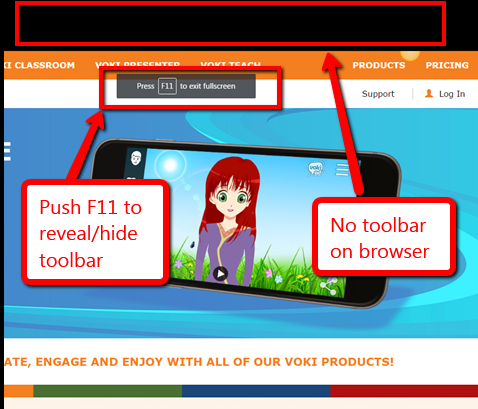
Q: My internet toolbar disappeared. All I see at the top of the internet screen is more of the page I’m on. I can’t find any of the tools. What do I do?
A: Push F11. You can hide or unhide the internet toolbar with F11. This is great if you’re working closely with the site and don’t want the distraction of toolbars.
Sign up for a new tip each week or buy the entire 169 Real-world Ways to Put Tech into Your Classroom.

Last Chance for this College-credit Class (MTI 557)

MTI 557: Building Digital Citizens
starts Monday, June 29, 2020
vv
xx
If students use the internet, they must be familiar with the rights and responsibilities required to be good digital citizens. In this class, you’ll learn what topics to introduce, how to unpack them, and how to make them authentic to student lives.
Topics include:
- copyrights, fair use, public domain
- cyberbullying
- digital commerce
- digital communications
- digital footprint, digital privacy
- digital rights and responsibilities
- digital search/research
- image—how to use them legally
- internet safety
- netiquette
- passwords
- plagiarism
- social media
At the completion of this course, you will be able to:
- Know how to blend digital citizenship into lesson plans that require the Internet
- Be comfortable in your knowledge of all facets of digital citizenship
- Become an advocate of safe, legal, and responsible use of online resources
- Exhibit a positive attitude toward technology that supports learning
- Exhibit leadership in teaching and living as a digital citizen
Assessment is based on involvement, interaction with classmates, and completion of projects so be prepared to be fully-involved and an eager risk-taker. Price includes course registration, college credit, and all necessary materials.
To enroll, click the link above, search for MTI 557 and sign up. Need help? Email askatechteacher@gmail.com for upcoming dates.

Great Virtual Reality Apps
 The potential impact of Virtual Reality (VR) in the classroom can’t be overstated. It has become the most exciting education device in a decade, enticing students to become engaged in pretty much any topic that includes a VR overlay. As a learning tool, it’s affordable, inclusive, and worth the moderate learning curve required to get it up and running.
Let me step back a moment and explain what VR is. HowStuffWorks defines it this way:
using computer technology to create a simulated, three-dimensional world that a user can manipulate and explore while feeling as if he were in that world.
Marxent explains it simply as:
the use of computer technology to create a simulated environment. Virtual Reality’s most immediately-recognizable component is the head-mounted display (HMD).
If you (desperately) want to unpack this revolutionary tool in your classroom, there are lots of online resources — some free, some with a fee — available to address a wide variety of education needs. Here are my favorites:
900 VR Expeditions
If you use the Expeditions app (see below), here’s a curated spreadsheet of 900 free expeditions available to you and your classes. It is crowd-sourced and sorted by tag, name, Panorama title, location, brief description, link, with a cell where teachers can note any additional required materials.
On a separate tab of the spreadsheet is a similar curated list of augmented reality expeditions, for those who have that technology available.
169 Tech Tip #70 Visit Foreign Language Google Search
In these 169 tech-centric situations, you get an overview of pedagogy—the tech topics most important to your teaching—as well as practical strategies to address most classroom tech situations, how to scaffold these to learning, and where they provide the subtext to daily tech-infused education.
Today’s tip: Visit Foreign Language Google Search
Category: Internet
Sub-category: Language, Search/Research
Q: English isn’t my first language. How do I access Google in other languages?
A: To visit the foreign language Google search engines, type:
Then add the country extension you would like to visit. For example:
…for Japan.
Sign up for a new tip each week or buy the entire 169 Real-world Ways to Put Tech into Your Classroom.

169 Tech Tip #79 My Internet Stopped Working
In these 169 tech-centric situations, you get an overview of pedagogy—the tech topics most important to your teaching—as well as practical strategies to address most classroom tech situations, how to scaffold these to learning, and where they provide the subtext to daily tech-infused education.
Today’s tip: My Internet Won’t Work
Category: Internet
Sub-category: Problem-solving
Q: My internet stopped for no reason. I’m in the middle of something important. I don’t want to reboot—it takes forever. What can I do?
A: Do what the pros do–unplug your internet connection, wait ten seconds, and plug it in again. Half the time, this is all it takes.
The same applies to a printer that stops for no known reason–turn it off, wait ten seconds and turn it back on. It’s something about tasks being shuffled out of the way and needing to re-establish their order. All I know is it works often enough, it’s my first line of defense to problem-solving this particular problem.
If that doesn’t work, try these:
- use a different browser
- reboot your computer
- check all the cables–is everything plugged in as it should be?
- see if your firewall is blocking it
- check recent system upgrades–did they affect the internet?
- ask a neighbor if theirs is working–maybe it’s out all over
Sign up for a new tip each week or buy the entire 169 Real-world Ways to Put Tech into Your Classroom.





