
Author: Jacqui

Teacher Appreciation Week Gifts for the Tech Teacher in Your Life
Teacher Appreciation Week: The First Full Week of May
 There’s always been something mystically cerebral about people in technical professions like engineering, science, and mathematics. They talk animatedly about plate tectonics, debate the structure of atoms, even smile at the mention of calculus. The teaching profession has our own version of these nerdy individuals, called technology teachers. In your district, you may refer to them as IT specialists, Coordinators for Instructional Technology, Technology Facilitators, Curriculum Specialists, or something else that infers big brains, quick minds, and the ability to talk to digital devices. School lore probably says they can drop a pin through a straw without touching the sides.
When I started teaching K-8 technology, people like me were stuffed in a corner of the building where all other teachers could avoid us unless they had a computer emergency, pretending that what we did was for “some other educator in an alternate dimension”. Simply talking to us often made a colleague feel like a rock, only dumber. When my fellow teachers did seek me out — always to ask for help and rarely to request training — they’d come to my room, laptop in hand, and follow the noise of my fingers flying across the keyboard. It always amazed them I could make eye contact and say “Hi!” without stopping or slowing my typing.
That reticence to ask for help or request training changed about a decade ago when technology swept across the academic landscape like a firestorm:

World Password Day — It’s Coming!
One of the most important yet underwhelming international events is coming up the first Thursday in May (in Canada, it’s March 15th). What is it? It’s World Password Day,
Yawn…
I know — words can’t express how tedious most people find passwords, how annoying they are to use, and how likely it is 99% of the world will not celebrate this event. Let me see if I can convince you otherwise. On January 1, 1983, when the Internet was invented, mankind agreed to a binary choice: Invent passwords or forever regret their absence. Without them, there would be no protection for your privacy, your online information, or even your personal identity. Passwords are now required to access websites, banking, email, social media, favorite shopping sites, chat venues like iMessenger, and even certain documents. These annoying, forgettable, intrusive entities are the first line of defense against hackers and for many, their entire defense. Because so many treat passwords casually, despite all they know about their importance, password theft is one of the fastest growing and most effective crimes.
While every expert recommends changing your password two-three times a year, no one does that. Do you? I don’t. I’m challenged to remember my password much less remember to change it regularly. As a result, World Password Day came into being:
Annually, on World Password Day, change all of your passwords

169 Tech Tip #164 Parts of a Website
 In these 169 tech-centric situations, you get an overview of pedagogy—the tech topics most important to your teaching—as well as practical strategies to address most classroom tech situations, how to scaffold these to learning, and where they provide the subtext to daily tech-infused education.
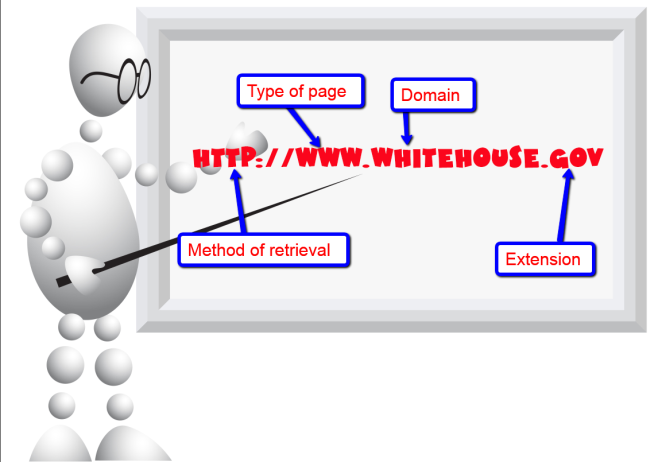
Today’s tip: Parts of a Website
Category: Internet
Share with students the four most important parts of a website (see inset):
Sign up for a new tip each week or buy the entire 169 Real-world Ways to Put Tech into Your Classroom.

End of Year Activities

From our files, here are great articles about activities popular at the end of the school year:
5 Favorite Activities to End the School Year
The end of the school year is a time when both students and teachers alike are distracted by thoughts of vacation, sleeping in, and no deadlines. For many, this means, during the last few weeks of school, learning limps to a grinding halt but increasingly, teachers use this time productively to introduce curricular- and standards-aligned activities that “color outside the lines” — step away from the textbook to blend learning with dynamic activities that remind students why they want to be life-long learners. Many of these, educators would love to teach but “just don’t have time for“, even though they align well with broad goals of preparing students for college and career.
If you’re looking for meaningful lessons to wrap up your school year, here are my top picks:
-
-
- Digital Passport
- Cool book reports
- Practice keyboarding
- Dig into cyberbullying
- Applied Digital Skills
-
10 Ways to Wrap Up the School Year
It’s the end of school. Everyone’s tired, including you. What you want for these last few weeks are activities that keep the learning going but in a different way. You want to shake things up so students are excited and motivated and feel interested again.
Change your approach. Provide some games, simulations, student presentations–whatever you don’t normally do in your classroom. If you’re doing PowerPoints, use the last few weeks for presentations. Make them special–invite teachers. Invite parents. If you never serve food in your lab, do it for these presentations.
Here are my favorite year-end Change-up activities:
-
-
- 6 Webtools in 6 weeks
- Class Debate
- Digital Citizenship review
- Games and Simulations
- Genius Hour
- Group Discussion
- Khan Academy
- Presentation Boards
- Service Learning
- Write an Ebook
-
169 Tech Tip #73 7 tips for Netiquette
In these 169 tech-centric situations, you get an overview of pedagogy—the tech topics most important to your teaching—as well as practical strategies to address most classroom tech situations, how to scaffold these to learning, and where they provide the subtext to daily tech-infused education.
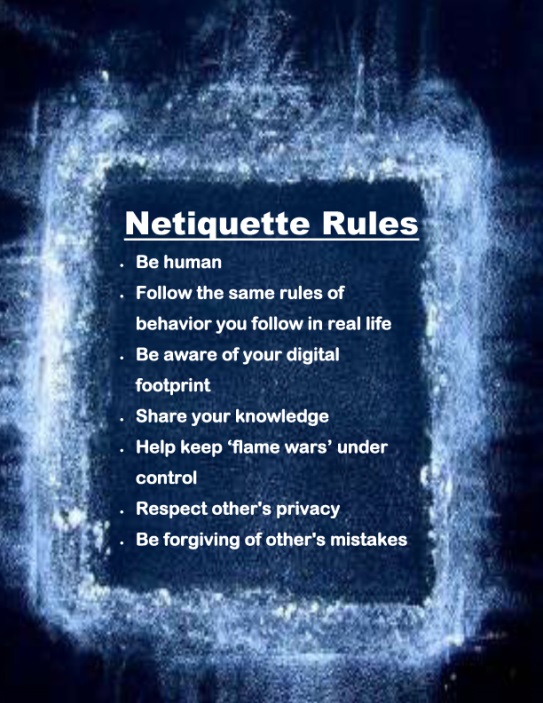
Today’s tip: 7 Netiquette Tips
Category: Internet
Sub-category: MS Office, Keyboarding
Q: What are the most important netiquette tips for students when using the Internet?
A: Here’s a poster:
Sign up for a new tip each week or buy the entire 169 Real-world Ways to Put Tech into Your Classroom.
#digcit

Why Earth Day May be the Most Important Event at School
 Every year, the world celebrates Earth Day on April 22nd, a day the United Nations recognizes as International Mother Earth Day. It is a day to remind ourselves of the importance of clean air, fresh water, and unlittered land. It’s when we can all participate in making that happen rather than accepting the trash-filled oceans, the smoggy skies, and the debris-laden land that is becoming the norm in our lives.
Despite the questionable health of our world, we have made progress. Back in 1970, when Earth Day was first celebrated, trucks spewed black smoke as they drove down the highways, toxic waste was dumped into oceans with no repercussions, and the general opinion was that the Earth took care of itself. That changed when U.S. Senator Gaylord Nelson, Earth Day’s founder, witnessed the ravages of the 1969 massive oil spill in Santa Barbara California and decided it was time for someone to do something. When he looked around for that “someone”, it turned out to be himself. He started with a “national teach-in on the environment” with a simple goal: Encourage people to recognize the importance of protecting the Earth:
“It was on that day [Earth Day] that Americans made it clear they understood and were deeply concerned over the deterioration of our environment and the mindless dissipation of our resources.”
How effective is Earth Day
In the 49 years since the inception of Earth Day, there have been more than 48 major environmental “wins”. Here are some of those:
- The U.S. Clean Air Act was passed, a comprehensive federal law that regulates air emissions.
- The U.S. Clean Water Act was passed to regulate the discharge of pollutants into U.S. waters.
- The U.S. Environmental Protection Agency (EPA) was passed.
- The U.S. Endangered Species Act was passed to protect animal species that are disappearing.
- The Acid Rain (what happens when normal rain becomes loaded with offensive chemicals and scalds the skin) Program obtained emission reductions of sulfur dioxide and nitrogen oxides.
- The importance of the ozone layer to the health of the Earth is better understood.
- The consequences of too much plastic in the Earth’s oceans is coming home to roost.

How to Assess Digital Literacy
 On my blog, Ask a Tech Teacher, I run a column called Dear Otto where I answer teacher questions about how to integrate technology into their classes. Of late, the most common question is, “How to I assess student digital literacy?” with a close cousin, “I am the tech integration specialist. How do I assess faculty digital literacy so I can teach them what they don’t know?”
Happily, both can be accomplished the same way. But before I tell you how, let’s step back and talk about the meaning of “digital literacy”.
What is digital literacy?
The definition of digital literacy is pretty much what you’d expect:
“the ability to use information and communication technologies to find, evaluate, create, and communicate information, requiring both cognitive and technical skills.” –from the American Library Association
In the past, I discussed the eight skills required for students to be considered digitally literate. Today, I want to focus on the need to assess digital literacy and what tools are available to do this.
Why assess it?
Especially today–in a COVID-19 world–this is a good question. Here are the five most common reasons schools feel the need to assess student and faculty digital literacy:

18 Easter Sites For Students
 Many Christians celebrate Jesus Christ’s resurrection on Easter Sunday. To non-Christians (or non-traditional Christians), that event signifies a rebirth of spring that is filled with joy and gifts — and chocolate! Overall, it is America’s most-popular holiday with Christmas a close second. The date depends on the ecclesiastical approximation of the March equinox. This year, it’s April 12, 2020.
Here’s a good mixture of games, lesson plans, stories, and songs that can be blended into many academic subjects:
18+ Interactive Easter websites
Preschool-2
This website includes a colorful collection of Easter (and Spring) games and information that is visual and enticing to youngers. Games are Easter Math, Easter Egg Hunt, Easter Egg Dress-up, Easter Word hunt, complete-the-sentence, and more. Also, viewers will find websites about the history of Easter around the world.
ABCYa Easter Egg Hunt
Preschool-Kindergarten
Like all of ABCYa’s games and activities, Easter Egg Hunt is a colorful and intuitive educational game for young children. It is easy-to-understand, playful, with favorite Easter symbols and energetic music that will engage children. The five Easter-themed games are easy-to-understand (no directions required) with a countdown clock to motivate activity. Nicely, it also aligns gameplay with the national standards met.

15 Websites to Teach Financial Literacy
 When kids read that America’s $23 trillion+ debt is accepted by many experts as ‘business as usual’, I wonder how that news will affect their future personal finance decisions. Do they understand the consequences of unbalanced budgets? The quandary of infinite wants vs. finite dollars? Or do they think money grows on some fiscal tree that always blooms? The good news is: Half of the nation’s schools require a financial literacy course. The bad new is: Only half require a financial literacy course.
If your school doesn’t teach a course about personal economics, there are many online sites that address the topic as mini-lessons. Some are narrative; others games. Here are fifteen I like. See if one suits you (or click here for updates to the list):
Admongo
Age group: Middle school
Through this interactive video game, students learn to identify advertising and understand its messages with the goal of becoming informed, discerning consumers. To win the game, they will have to answer questions like, “Who is responsible for the ad?”, “What is the ad actually saying?”, and “What does the ad want me to do?” For educators and parents, Admongo includes tools like videos, lesson plans, printed materials, downloads, and alignment with state standards.
Admongo is put out by the Federal Trade Commission who also offers another well-received game, “Spam Scam Slam” about spam.
Banzai
Age group: middle and high school
Banzai is a personal finance curriculum that teaches high school and middle school students how to prioritize spending decisions through real-life scenarios and choose-
your-own adventure (kind of) role playing. Students start the course with a pre-test to determine a baseline for their financial literacy. They then engage in 32 life-based interactive scenarios covering everything from balancing a budget to adjusting for unexpected bills like car trouble or health problems. Once they’ve completed these exercises, they pretend that they have just graduated from high school, have a job, and must save $2,000 to start college. They are constantly tempted to mis-spend their limited income and then must face the consequences of those actions, basing decisions on what they learned in the 32 scenarios. Along the way, students juggle rent, gas, groceries, taxes, car payments, and life’s ever-present emergencies. At the end, they take a post-test to measure improvement in their financial literacy.
The program is free, takes about eight hours (depending upon the student), and can include printed materials as well as digital.

Subscriber Special: April–Free Lesson Plan

Every month, subscribers to our newsletter get a free/discounted resource to help their tech teaching.
April
Free Lesson Plan
Click this link; apply code FREELESSONPLAN
Jacqui Murray has been teaching K-18 technology for 30 years. She is the editor/author of over a hundred tech ed resources including a K-12 technology curriculum, K-8 keyboard curriculum, K-8 Digital Citizenship curriculum. She is an adjunct professor in tech ed, Master Teacher, webmaster for four blogs, an Amazon Vine Voice, CSTA presentation reviewer, freelance journalist on tech ed topics, contributor to NEA Today and TeachHUB, and author of the tech thrillers, To Hunt a Sub and Twenty-four Days. You can find her resources at Structured Learning.





