
Jacqui Murray has been teaching K-18 technology for 30 years. She is the editor/author of over a hundred tech ed resources including a K-12 technology curriculum, K-8 keyboard curriculum, K-8 Digital Citizenship curriculum. She is an adjunct professor in tech ed, Master Teacher, webmaster for four blogs, an Amazon Vine Voice, CSTA presentation reviewer, freelance journalist on tech ed topics, and author of the tech thrillers, To Hunt a Sub and Twenty-four Days. You can find her resources at Structured Learning.
Author: Jacqui
Jacqui Murray has been teaching K-18 technology for 30 years. She is the editor/author of over a hundred tech ed resources including a K-12 technology curriculum, K-8 keyboard curriculum, K-8 Digital Citizenship curriculum. She is an adjunct professor in tech ed, Master Teacher, an Amazon Vine Voice, freelance journalist on tech ed topics, contributor to NEA Today, and author of the tech thrillers, To Hunt a Sub and Twenty-four Days. You can find her resources at Structured Learning.

Tech Tip #90 Doc Saved Over? Try This
 In these 169 tech-centric situations, you get an overview of pedagogy—the tech topics most important to your teaching—as well as practical strategies to address most classroom tech situations, how to scaffold these to learning, and where they provide the subtext to daily tech-infused education.
Today’s tip: Try this if you saved over a doc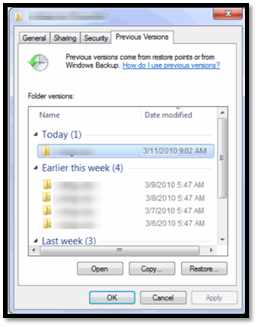
Category: Problem-solving
Q: A student saved a blank document over their files. How? Instead of ‘open’, they use the menu command ‘save-as’ and lose all their work. Is there any way to retrieve the file?
A: Absolutely. In PCs, right click on the file in Windows Explorer and select ‘Restore previous version’. Select the latest version that’s not today. Admittedly, this doesn’t always work, but it’s worth a try.
In Google Apps, simply visit the Revision History and select a version prior to the save-over.
In Macs, there may be an older copy in the Time Machine—it’s worth checking.
Sign up for a new tip each week or buy the entire 169 Real-world Ways to Put Tech into Your Classroom.
What’s your favorite tech tip in your classroom? Share it in the comments below.

What You Might Have Missed in March–What’s up in April

Here are the most-read posts for the month of March:
- 11 Online Resources About Puzzles
- Software vs. Online Tools
- 19 Tech Problems Every Student Can Fix
- 25 Sites to Add Rigor and Authenticity to Word Study
- How to Compare and Contrast Authentically
- 6 Ways to Make Classroom Typing Fun
- AI and ChatGPT in Education
- Use the SAMR Model to Energize Class Tech
- Beginning Graphs in MS Excel
- Invention Convention 2023 is coming

Subscriber Special: Holiday Projects for Easter
Every month, subscribers to our newsletter get a free/discounted resource to help their tech teaching.
Holiday Projects
4-2-23 through 4-7-23
Price slashed from $7.99 to $3.99
To get this huge savings, you must be a subscriber. If you aren’t

Copyright ©2023 askatechteacher.com – All rights reserved.

World Backup Day–March 31st Every Year

March 31st is called World Backup Day. At least once a year, backup your data files to an external drive (like a flash drive). This is one that isn’t connected to your local computer so can’t be compromised if you get a virus. It’s good to always backup data to cloud drives or a different drive on your computer but once a year, do the entire collection of data files to what is called an ‘air gap’ drive–one that is separated from any internet connection.
How to do this
There are various ways to back up your data. You can back up your data to an external device or a cloud-based backup service, or to both. You might even make more than one backup to external storage devices and keep the two copies in different places (providing protection and access to your data even if one of the backup devices is destroyed or inaccessible. Preserving your valuable documents and images for future access and use requires planning, as well as the use of automatic backup services.
To back up PC/Windows, use Windows Backup:
- Click the start button.
- Go to Control Panel
- Select ‘Backup and Restore’
- Select ‘Backup Now’
From there, select a drive with sufficient space and start. Be forewarned: If you have a lot of data, it takes a while. You can work on your computer while it’s backing up; it’ll just be slower.
Mac: Use the Time Machine tool.
Chromebook: No need. Everything is saved to the cloud. Now if you want to backup your cloud, use a service like Backupify.

Copyright ©2023 Askatechteacher.com– All rights reserved.


Invention Convention 2023 is coming

Invention Convention Worldwide is a global K-12 invention education curricular program mapped to national and state educational standards that teaches students problem-identification, problem-solving, entrepreneurship and creativity skills and builds confidence in invention, innovation and entrepreneurship for life. Signups for the annual Raytheon Technologies Invention Convention US Nationals (2023) start March 31st.
Here are websites to help you and your students learn about the excitement of inventions:
- A Guide to Inventions
- Famous Inventors
- How Inventions Change History (video)
- How the popsicle was invented (a TEDEd video)
- Invented by accident I
- Invented by accident II
- Inventions from the Military –crazy ones
Check back here for updates on this list.
More about inventions
- Teach About Inventions with PowerPoint
- 5 Ideas for Teaching Students the Most Important Skill They’ll Need
- 5 Fun Science Experiments Kids Do at Home
Copyright ©2023 Askatechteacher.com– All rights reserved.
Jacqui Murray has been teaching K-18 technology for 30 years. She is the editor/author of over a hundred tech ed resources including a K-12 technology curriculum, K-8 keyboard curriculum, K-8 Digital Citizenship curriculum. She is an adjunct professor in tech ed, Master Teacher, webmaster for four blogs, an Amazon Vine Voice, CSTA presentation reviewer, freelance journalist on tech ed topics, and author of the tech thrillers, To Hunt a Sub and Twenty-four Days. You can find her resources at Structured Learning.

17 Online Chemistry Resources

Here are popular online resources about Chemistry:
- Beaker–a digital beaker app
- Chemistry collection from Carnegie
- ChemCapers
- Chemistry instructional videos
- ChemmyBear–resources for Chemistry and AP Chemistry classes
- CK12 Chemistry simulations
- Collisions Chemistry
- Concord Consortium–chemistry, earth science, engineering, life science, physics
- Crash Course: Chemistry (videos)
- EMD PTE — periodic table
- Interactive Periodic Table
- Molecules–Molecules is an application for viewing three-dimensional renderings of molecules and manipulating them using your fingers.
- Periodic Table of Elements–interactive
- Periodic Table videos
- PhET Simulations for chemistry and physics
- Reactions–short videos on chemistry topics
- Slow Motion Chemistry — videos on chemistry
Copyright ©2023 Askatechteacher.com– All rights reserved.

#71: Beginning Graphs in MS Excel
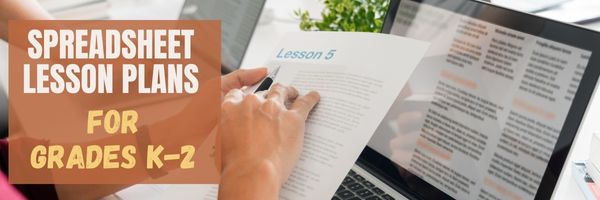
Excel makes graphs simple and easy for beginners. Even my parent helpers are amazed at how much students can do with a simple F11 shortkey and a right click. This lesson plan works just as well with Google Sheets though you may have to adapt a few of the instructions.
Over the next few months, we’ll provide a series of lessons on spreadsheet basics you can use in your K-8 classroom. Here are some of the topics we’ll cover:
- #74: Mastering Excel (for Beginners)
- #71: Beginning Graphs in MS Excel
- #70: Create a Timecard in Excel for Grade Two and Up
- #73: How to Graph in Excel
- #12: Create Simple Shapes in Excel
- #75: Tessellations in Excel
- #72: How to Check Your Math in Excel
- How to Use Excel to Teach Math Arrays
- #62: Email from Word (Or PowerPoint or Excel)
- #79: Excel Turns Data Into Information
If the lesson plans are blurry, click on them for a full size alternative. (more…)

How to Prepare for College
Succeeding in college is both easy and hard. It takes planning, drive, and dedication, but once you commit to the required changes, the payback is worth it. The first big tip: College is not like High School. Succeeding in the former in no way predicts success in the latter.
With High School graduation close, college on the horizon, one of our Ask a Tech Teacher contributors put together a list of great tips and ideas to help you prepare for one of the biggest steps you can take to build your future:

How to Prepare for College
College preparation is crucial to ensuring that your college life is successful. It helps boost your independence and self-discipline to tackle the difficulties you might encounter while giving you a holistic view of the whole preparation process. Excellent college preparation makes you self-aware and helps you evaluate what you’d love to do in school. It enables you to choose a learning institution depending on your strengths. While preparing for college can be challenging, knowing how to do it well can help make the process more successful. Here’s how to prepare for college.

Websites that add sparkle (and learning) to Spring
Spring websites, lesson plans, printables, activities:
- 7 Science Experiments that Teach About Spring
- Books from Scholastic about Spring
- Life cycle of a snake
- Life Cycle Lesson Plans
- Life Cycle resources
- Life Cycles
- Life Cycle Symbaloo
- Plant life cycle
- Spring Puzzle
- Spring Garden–click to find flowers
- Spring Games
- Spring Vocabulary (video)
- Spring Word Scramble
- Spring Word Search
- What Happens in Spring (video)
- What Happens in Spring–PS (video)
Ideas from TeacherVision:
Printables
- The Very Hungry Caterpillar Activities Booklet
- Butterfly Life Cycle Worksheet
- Baseball Fun
- May Day
- Butterfly Facts and Questions
- Butterfly Life Cycle Quiz
- The Very Hungry Caterpillar Poster & Activities
- More Spring Printables
Lesson Plans

13 Websites with Online Stories

Here are popular resources teachers are using to share stories:
- Aesop Fables—no ads
- Aesop’s Fables
- Audio stories
- Childhood Stories
- Classic Fairy Tales
- Fairy Tales and Fables
- Listen/read–Free non-fic audio books
- Owl Eyes (classics)
- Starfall
- Stories read by actors
- Stories to read for youngsters
- Storyline
- Unite for Literacy
Click for more online story resources (or to update this list)





