14 Websites for 4th Grade Culture
Here’s a list of great 4th grade websites on Culture:
- Classrooms around the world
- Clothes around the world
- Eat—food around the world
- First Thanksgiving
- Google World of Wonders
- One day around the world–video
- 360 Panorama of the world
- Language Mapper—around the globe
- Life in a Day—video (long)
- School lunches around the world
- Sleep—where children sleep around the world
- US Languages
- What we own—around the world
- World National Anthem

Happy President’s Day!
 Presidents’ Day is an American holiday celebrated on the third Monday in February. Originally established in 1885 in recognition of President George Washington, it is still officially called “Washington’s Birthday” by the federal government. Traditionally celebrated on February 22—Washington’s actual day of birth—the holiday became popularly known as Presidents’ Day after it was moved as part of 1971’s Uniform Monday Holiday Act, an attempt to create more three-day weekends for the nation’s workers. While several states still have individual holidays honoring the birthdays of Washington, Abraham Lincoln and other figures, Presidents’ Day is now popularly viewed as a day to celebrate all U.S. presidents past and present.
Here are ten websites with games, activities, songs, webquests and more:

#52: Indigenous Cultures Magazine in Publisher
Create a magazine on any topic you’re covering in class using text, pictures, diagrams, charts. Add a cover and a table of contents.
Click on each page of lesson plan.

What Happens When Technology Fails? 3 Work-Arounds
 Has this happened to you? You spend hours rewriting an old lesson plan, incorporating rich, adventurous tools available on the internet. You test it the evening before, several times, just to be sure. It’s a fun lesson with lots of activities and meandering paths students undoubtedly will adore. And it’s student-centered, self-paced. Technology enables it to differentiate authentically for the diverse group of learners that walk across your threshold daily.
Everyone who previewed it is wowed. You are ready.
Until the day of, the technology that is its foundation fails. Hours of preparation wasted because no one could get far enough to learn a d*** thing. You blame yourself–why didn’t you stick with what you’d always done? Now, everyone is disappointed.

19 Valentine Sites For Your Students
 Here are some fun Valentine sites to fill those few minutes betwixt and between lessons, projects, bathroom breaks, lunch, and everything else:
- Dress up the heart
- ‘I love you’ in languages Afrikaans to Zulu
- Line up the hearts
- More heart writing
- Valentine Day games and stories
- Valentine drag-and-drop
- Valentine match
- Valentine mouse skills
- Valentine projects from Winter Wonderland
- Valentine puppy jigsaw
- Valentine rebus game[gallery type="slideshow" ids="44901,44902,44903"]
- Valentine rebuses
- Valentine Sudoku
- Valentine tic-tac-toe
- Valentine typing
- Valentine unscramble
- Valentine’s Day apps
- Write in a heart
Do you have any I missed?
Holiday Lesson Plans
Looking for holiday lesson plans? Here’s my collection.

#51: History Trifold in Publisher–Grades 4-7
This lesson is a crowd pleaser. Students create a timeline showing what was happening around the world while they lived their lives. I’ve found this generates lots of discussion between students and their parents as they try to understand what the world events were.
Click on each page of lesson plan. (more…)

Modernizing the School Counselor
 When the first school
 guidance counselors (update: thanks to those in the profession who took the time to educate me on their title) emerged in the late 1800’s, they were almost exclusively vocational counselors, their purpose to assist students in transitioning from an educational environment to a productive piece of society. Quickly, this morphed to helping students determine the career path best-suited for their innate abilities, interests, and skills. It didn’t take long for those in the trenches to connect student success after school to the path followed during school–which included much more than grades. Counselors took on myriad tasks, such as:
- helping failing students find a remedy
- encouraging teachers to make connections between what they taught and occupational problems
- consulting student standardized tests to determine what should/could be expected of students
- urging students to stay in school
- interviewing students leaving school to validate their decision
- promoting character development
- teaching socially appropriate behavior
- assisting vocational planning
- promoting best practices in academic development (readiness to learn and achievement strategies)
- encouraging career development and planning (academic advising, school to post secondary or career transitions, and workforce effectiveness)
- ensuring appropriate social skills and self-management as well as facing challenges to school success including bullying, suicide, addictions, and abuse
- providing connectedness to school, community, state and nation
- helping students understand societal events such as Sandy Hill and Hurricane Katrina

6 Tips I Wish I’d Known When I Started Blogging
 I’ve been blogging for about six years, some professionally (for my tech ed career) and others on topics of interest to me (writing, USNA, that sort). That first post–putting myself on the line, ignoring that I had no hits, wanting to approve comments from spammers because that would look like someone loved me–I thought that was the hard part. The second post was easier and so it went.
But somewhere around the twentieth post, I figured out I had to do blogging right. I couldn’t simply show up, spout off and slink away. There was a lot more to ‘blogging’. I could have quit–it was getting to be a lot like work–but I enjoyed the camaraderie with like-minded souls. I learned a lot about writing by doing it and could transfer those lessons to my students. So I honed my skill.
Now, years later, there are a few items I wished I’d known early rather than late. Let me share them with you so you don’t have the hard lessons I did:
- only reblog 10% of someone else’s post. If you’re on WordPress and push the ‘reblog’ button, they take care of it for you. But if you copy someone’s post and give them attribution, you blew it. You have to get permission if you are reposting more than 10% of someone’s work. Where was I supposed to learn that?

65 Writing Tools for the 21st Century Classroom
Here’re a wide variety of writing tools for students. Some practice good habits, others offer options for writing requirements. See what works for you (check here for updated links):
- Character Trading Cards
- Context Clues Millionaire
- Friendly Letter Maker
- Garfield teaches Writing Skills
- Identify the Main Idea
- Letter Generator
- Main Idea Battleship
- Make another story
- Monster Project
- Newspapers, posters, comics—learn to create
- Using a table of contents
- Videos—using Sock Puppets (iPads)
- Writing games
Blogs

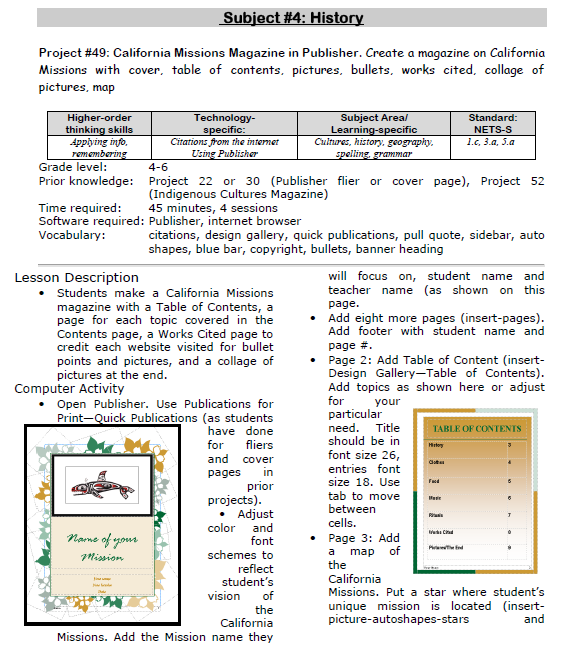
#49: California Missions Project
Millions of third graders study California missions. Here’s a great project that brings it to life with some writing, lots of pictures and a dash of creativity that will excite every student.
If the lesson plans are blurry, click on them for a full size alternative.