
Category: Websites

Weekend Website #93: 17 Natural Disasters Websites
Every Friday, I’ll send you a wonderful website (or more) that my classes and my
parents love. I think you’ll find they’ll be a favorite of your students as they are of mine.
My fourth graders just went through a unit of inquiry on natural disasters and we came up with a pretty good list of resources. I want to share them with you. Please add your own to the comment section:

Weekend Website #92: 43 Language Arts Websites for 3rd Grade
Every Friday, I’ll send you a wonderful website (or more) that my classes and my parents love. I think you’ll find they’ll be a favorite of your students as they are of mine.
Here’s a long list of Language Arts and Word Study websites for 3rd grade. I’m sure they’re fine for 4th and 5th, also. You decide, depending upon what your students are working on (check for updates).
- BBC Phonics
- BiteSize—Reading, Writing, Grammar
- Blends
- Common/Proper Noun Basketball
- Contraction Games
- Contraction Crossword
- Contraction Practice
- Create a picture with words
- Feast of Homonyms
- Flamingo Suffixes
- Funny Poetry
- Glossary of Poetry Terms
- Grammar Gorillas
- Grammaropolis
- Instant Poetry—fill in the blanks
- Jelly Fish
- Katie’s Clubhouse
- Opposites Train Game
- Parts of speech poetry
- The Patchworker
- Pick a Word
- Plural Nouns
- Poetry with a Porpoise
- Poetry Engine
- Prefix Catch
- Prefix Match
- Prefix Suffix Balloon Game
- Punctuation and Capitalization
- Punctuation Games
- Sam’s Lab
- Shaped Poems–fun
- Short Vowels
- Suffix Match
- Synonym or Antonym?
- Third Grade Poems
- Vocabulary Flood
- Vocabulary Pinball
- Web-based Mad Libs
- Word Balloons
- Word Family Sort
- Word Magnets
- Word Play
- Word Pond

Wikipedia vs Britannica–the Results May Surprise You
This infographic from Open Site–Free Internet Encyclopedia came as a huge surprise to me. I, like many teachers I know, warn students against relying on Wikipedia as a primary source for research. Imagine my surprise when I read the information below, on the heals of Britannica ending publication of their renowned and historic encyclopedia.

Weekend Website #91: 16 Word Study Websites for 2nd Grade
Every Friday, I’ll send you a wonderful website (or more) that my classes and my parents love. I think you’ll find they’ll be a favorite of your students as they are of mine.
Here’s a list of 16 Word Study websites for 2nd Grade. I’ve used all of these in my classroom. Usually, I create a ‘box of links’ on the internet start page and put them all there, let students pick. Sometimes, we all use one together. Enjoy!

44 First Grade Websites That Tie into Classroom Lessons
These are my 62 favorite first-grade websites. I sprinkle them in throughout the year, adding several each week to the class internet start page, deleting others. I make sure I have 3-4 each week that integrate with classroom lesson plans, 3-4 that deal with technology skills and a few that simply excite students about tech in education.
Here’s the list:

62 Kindergarten Websites That Tie into Classroom Lessons
These are my 62 favorite kindergarten websites. I sprinkle them in throughout the year, adding several each week to the class internet start page, deleting others. I make sure I have 3-4 each week that integrate with classroom lesson plans, 3-4 that deal with technology skills and a few that simply excite students about tech.
Here’s the list (check here for updates):
- Aesop Fables
- Aesop Fables—no ads
- Alphabet—Kerpoof Letters
- Alphabet Animals
- Alphabet Doors
- Audio stories
- Barnaby and Bellinda Bear
- Bembo’s Zoo
- Brown Bear Typing
- Build a Neighborhood
- Color US Symbols
- Counting Money
- Clocks
- Clock Talk
- Create Music
- Dinosaurs
- Dinosaurs II
- Dinosaurs III
- Dinosaurs IV
- Dinosaurs V
- Dinosaurs VI
- Dinosaur VII
- Dino Fossiles then and now
- Dr. Seuss
- Edugames at Pauly’s Playhouse
- Edugames—drag-and-drop puzzles
- Fairy Tales and Fables
- Find a dog
- Game Goo—wacky games that teach
- Games to teach mouse skills, problem-solving
- Games to teach problem-solving skills
- Geogreeting—find letters around the world
- Holiday Gingerbread house
- Interactive sites
- Kerpoof
- Kid’s Videos
- Keyboarding—Hyper Spider Typing
- Kindergarten Links—Science, etc.
- Kindergartend Math Links
- Kinder Stories
- Learn to Read
- Make a Face
- Make a Monster
- Make a Scary Spud
- Make a Story
- Math for K
- Math/LA Videos by grade level
- Math Games
- Mightybook Stories–visual
- Mr. Picasso Head
- Museum of Modern Art
- My Online Neighborhood
- Puzzle
- Shapes and colors
- Starfall
- Stories—non-text
- Storytime for Me
- The Learning Planet
- Time
- Virtual Farm
- Virtual Zoo
- Word games—k-2

Weekend Websites #79: 57 Kindergarten Websites That Tie into Classroom Lessons
Every Friday I’ll send you a wonderful website that my classes and my parents love. I think you’ll find they’ll be a favorite of your students as they are of mine.
[caption id="attachment_5559" align="aligncenter" width="614"] Here’s my internet start page for kindergarten–you’ll see the websites we focused on at the end of this school year[/caption]
(more…)

Weekend Website #77: Blackle
Every Friday I’ll send you a wonderful website that my classes and my parents love. I think you’ll find they’ll be a favorite of your students as they are of mine.
Blackle.com is a search engine. It’s pretty much like Google–in fact, it’s run by Google–but you notice right away you’re not at Google.com or Yahoo or any other search engine you’ve every used. Why?
The background is black.
That itty bitty change in surfing saves energy. In fact, Blackle had saved 2,440,165.420 Watt hours as of the hour I checked. (more…)

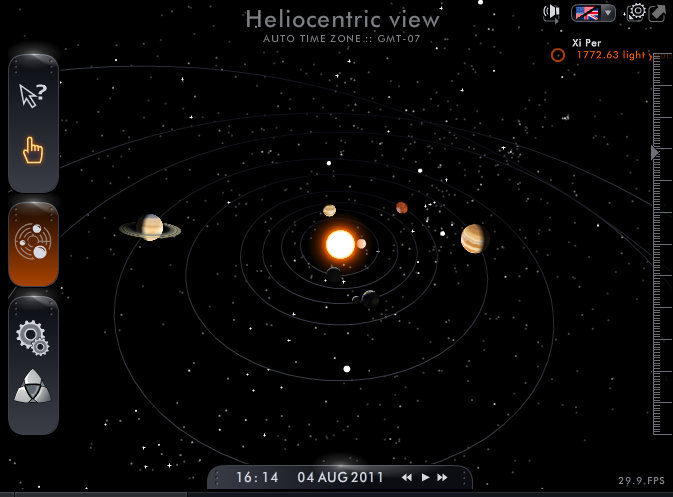
Weekend Website #75: Solar System Scope
Every Friday I’ll send you a wonderful website that my classes and my parents love. I think you’ll find they’ll be a favorite of your students as they are of mine.

Weekend Website #73: 3 Programs to Teach Architecture in First Grade
Every Friday I’ll send you a wonderful website that my classes and my parents love. I think you’ll find they’ll be a favorite of your students as they are of mine.
Age:
1st Grade
Topic:
Architecture, structures
Review:
Three projects over six weeks and your students will learn about blueprints, room layout, dimensions. Plus, they’ll understand how to think about a three-dimensional object and then spatially lay it out on paper. This is challenging, but fun for first graders.
Spend two weeks on each projects. Incorporate a discussion of spaces, neighborhoods, communities one week. Practice the drawing, then do the final project which students can save and print. Kids will love this unit.
- First, draw a picture in KidPix of the child’s home using the KidPix architecture tools (use TuxPaint if you don’t have KidPix–it’s free). Have kids think about their house, walk through it. They’ll have to think in three dimensions and will soon realize they can’t draw a two-story house. In that case, allow them to pick which rooms they wish to include and concentrate on what’s in the room. Use the ‘stamps’ tool (in KidPix) to find items.
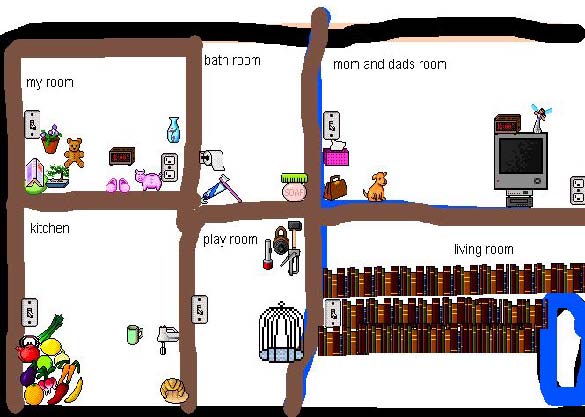 Classroom layout–through the eyes of a First Grader[/caption]





