Category: Math

#71: Beginning Graphs in MS Excel

One of the most popular applications of math is through spreadsheets (like Excel) that make those numbers relevant to everyday life. We’re going to provide a series of lessons on spreadsheet basics you can use in your K-8 classroom. Here are some of the topics we’ll cover (if the link doesn’t work, it’s because the lesson plan is not yet published here):
- #74: Mastering Excel (for Beginners)
- #71: Beginning Graphs in MS Excel
- #70: Create a Timecard in Excel for Grade Two and Up
- #73: How to Graph in Excel
- #12: Create Simple Shapes in Excel
- #75: Tessellations in Excel
- #72: How to Check Your Math in Excel
- How to Use Excel to Teach Math Arrays
- #79: Excel Turns Data Into Information
–from 55 Technology Projects for the Digital Classroom.
–5 bundled Excel lesson plans (for a fee)
If the lesson plans are blurry, click on them for a full size alternative. (more…)

Best Math Apps for iPad–9 Classroom Picks That Actually Earn iPad Time
The Ask a Tech Teacher team looked at available Math apps for students and focused on iPads to provide best picks. This article is a tad long–because of the reviews–so best to read it over lunch!
As a tech teacher, every app I add to the iPad cart has to clear a higher bar than the apps families install at home. It needs standards alignment, student data I can see, differentiation that actually differentiates, and enough staying power that a kid still opens it in week 10 without being told. Most “best math apps for iPad” lists are written for parents. This one is written for the people running centers, 1:1 programs, and interventions. (more…)

National STEM Day Nov. 8th

National STEM Day is November 8 every year, the unofficial holiday that celebrates science, technology, engineering and mathematics (STEM) education throughout the United States. Many add ‘art’ to the celebration for the acronym, STEAM.

Here are some great ideas that remind your students of the excitement that is these core subjects:
Ten Ways to Celebrate National STEM Day with NASA
National STEM Day focuses on helping students advance in STEM fields, a priority of NASA as we continue to push the boundaries of exploration and soar into the future. In celebration of National STEM Day, we challenge you to engage and inspire the Artemis generation as we go forward to the Moon and continue to innovate in Earth science and aeronautics. To help you join in on the festivities, click for 10 ways to celebrate National STEM Day.
49 STEM Activities for Students
On November 8th, we will celebrate National STEM Day to get kids excited about Science, Technology, Engineering, and Math (STEM). Together the STEM subjects represent some of the fastest-growing and most in-demand fields in the United States.
While STEM topics seem a natural fit in high schools and post-secondary curriculum, education experts are promoting a focus on STEM subjects for younger and younger children.
12 Projects for your STEAM program
Twelve favorite STEAM projects where artistic thinking becomes the engine for unpacking solutions.


How to Use Excel to Teach Math Arrays
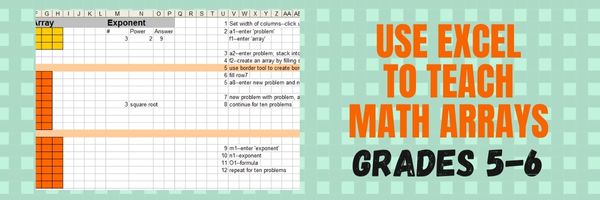 Grade Level: 5th (or whichever grade you teach arrays)
Background: None. This is an intro to MS Excel or spreadsheets
Time: About 30 minutes
Steps

10 Everyday Fun Moments That Teach Math Concepts Naturally
10 Everyday Fun Moments That Teach Math Concepts Naturally
Your child tells you math is boring, or pointless, or asks when they’ll ever use it. You know that’s wrong, but with a worksheet on the table it’s hard to say why.
Math is the one subject that never announces itself. Language is how your child talks to friends, history is stories, art is on the wall. Math just looks like symbols on a page.
It’s actually the most applicable subject they study. In a late 2025 Education Week survey, top executives said the skills young workers most lack are complex problem-solving, adaptability, and making sense of complex information. All of that is math.
You don’t have to teach it, just point at it. Below are 10 everyday moments, each with a question to ask and the answer to expect, pitched at elementary and early middle school and tagged 2–4 or 5–7. (more…)

Celebrate Pi Day and Maths Day

Two math celebrations are coming:
Pi Day and World Maths Day

Pi Day
Pi Day is an annual celebration commemorating the mathematical constant π (pi). Pi Day is observed on March 14 since 3, 1, and 4 are the three most significant digits of π in the decimal form.

Here are some websites students will enjoy to enrich the day (click for updates on this list): (more…)

Why Is Math So Hard, and How Can We Make It Easier
The age-old question that can’t be asked enough: Why is math so hard for some? How do we get past this “mathophobia”? Ask a Tech Teacher has a few ideas:

Why Is Math So Hard
and How Can We Make It Easier
Math has a special way of making smart people feel stuck. It can look like a wall of symbols that offers no hint where to begin. You might follow a lesson in the moment, then freeze when you try a similar problem alone. That gap between “I saw it” and “I can do it” is a real part of why math feels harder than many other subjects.
This article brings together practical learning strategies and insights from Melbourne maths tutors to explain why mathematics trips people up and what actually helps.
Math Builds on Itself, So Small Gaps Grow Fast
Math is cumulative. If an earlier concept is shaky, the next topic becomes harder even if you study more hours. A student who never got comfortable with fractions will struggle with algebraic manipulation. Someone who memorized steps in algebra may hit a wall in functions or calculus where reasoning matters more than pattern matching.
This is why math can feel unfair. You can do “today’s homework” by copying a method, but the underlying gap stays. Then the course moves on, and the gap becomes a bigger obstacle. At that point, students often blame themselves instead of the missing foundation.
The fix starts with diagnosis. Before you push forward, identify the smallest skill that is breaking the chain. Often it is not the chapter you are on. It is a basic skill like negative numbers, factoring, or interpreting word problems. (more…)
How to Use Excel to Teach Math Arrays
One of the most popular applications of math is through spreadsheets (like Excel) that make those numbers relevant to everyday life. We’re going to provide a series of lessons on spreadsheet basics you can use in your K-8 classroom. Here are some of the topics we’ll cover:
- #74: Mastering Excel (for Beginners)
- #71: Beginning Graphs in MS Excel
- #70: Create a Timecard in Excel for Grade Two and Up
- #73: How to Graph in Excel
- #12: Create Simple Shapes in Excel
- #75: Tessellations in Excel
- #72: How to Check Your Math in Excel
- How to Use Excel to Teach Math Arrays
- #62: Email from Word (Or PowerPoint or Excel)
- #79: Excel Turns Data Into Information
–from 55 Technology Projects for the Digital Classroom.
–5 bundled Excel lesson plans (for a fee)
Today
How to Use Excel to Teach Math Arrays
Grade Level: 5th (or whichever grade you are teaching arrays)
Background: None. This is an intro to MS Excel
Vocabulary: Excel, cell, rows, columns, paint bucket, borders, arrays, resize, formulas
Time: About 30 minutes
Steps:
#75: Tessellations in Excel
One of the most popular applications of math is through spreadsheets (like Excel) that make those numbers relevant to everyday life. We’re going to provide a series of lessons on spreadsheet basics you can use in your K-8 classroom. Here are some of the topics we’ll cover (not all links live yet):
- #74: Mastering Excel (for Beginners)
- #71: Beginning Graphs in MS Excel
- #70: Create a Timecard in Excel for Grade Two and Up
- #73: How to Graph in Excel
- #12: Create Simple Shapes in Excel
- #75: Tessellations in Excel
- #72: How to Check Your Math in Excel
- How to Use Excel to Teach Math Arrays
- #62: Email from Word (Or PowerPoint or Excel)
- #79: Excel Turns Data Into Information
Today
#75: Tessellations in Excel

–from 55 Technology Projects for the Digital Classroom. (more…)