
Author: Jacqui

August Preview at Ask a Tech Teacher
Here’s a preview of what’s coming up on Ask a Tech Teacher in August:
- Wikispaces has closed. Now what?
- 11 Back-to-school Activities for the First Month of School
- Teaching Digital Rights and Responsibilities
- Websites to teach Moune Skills
- Plan a memorable Back-to-School Night
- The Importance of a Morning Meeting
- Today’s Meet has closed. Alternatives?
- College-level learning online
- How to Teach Critical Thinking
- Tech-ed Resources for your Class
- New Ways to Gamify Learning
- Great Ways to Make Your Class Paper-free
- Differentiating with Personalized Learning
- Back-to-school Activities for teh First Month of School
- Features to make your LMS a social learning platform

Last Chance: Building Digital Citizens and Personalized Learning–Grad-level Classes

MTI 557: Building Digital Citizens
This college-credit class starts in one week–Monday, August 6th! Last chance to sign up. Click this link; scroll down to MTI 557 and click for more information and to sign up.
[gallery type="slideshow" ids="59255,59257,59261,59256,59258,59259,59260,59263"]
Kiddom Helps Administrators Manage Change
 Kiddom is an easy-to-use learning management system alternative that provides educators with an effective alternative to Google Classroom. Its pages are visual and easy-to-understand, enabling teachers to quickly create lesson plans, find targeted resources, and determine how students are doing. Click here for my full review.
What Kiddom does that few other education webtools do is provide free educator and administrator guides on topics such as Standards-based Grading, Blended Learning, and lesson planning (click for my reviews of these). Their newest is the twenty-eight-page ISTE-aligned Change Management eBook. It addresses how to create a sense of urgency, build a coalition, form and communicate your strategic vision, enable action by removing barriers and instituting change, generate short-term wins, and more.
Eric Sheniger, a Senior Fellow at the International Center for Leadership in Education, argues that when considering changes, especially in the realm of education technology, administrators should begin by naming the reasons behind our decision before doing anything else. Start by considering: What is your vision for how technology will be utilized to improve students’ learning outcomes?
In the oft-daunting world of tech-infused education, this guide provides effective strategies to lead the way from wherever you are, be it paper-and-pencil or tech comfort, to where you need to be.

Technology Turnaround Stories from Hawaii and California
All around the country, schools are turning around education through the use of technology. Here are two, one in Hawaii and one in California that show you steps that might work for you:
[caption id="attachment_59609" align="alignright" width="300"]
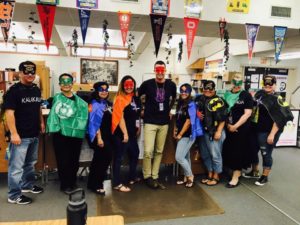 Kalakaua Middle School leadership team gets into the spirit to boost positive behavior.[/caption]
King David Kalakaua MS, Hawaii
When innovative school leaders decided to try a new technology program at King David Kalakaua Middle School this year, they hoped recognizing students’ good behavior would lessen their bad behavior. Their goal was to improve school climate and build positive relationships with everyone on campus by focusing on the positive. In less than six months, not only have they met that goal, but they also changed their peer’s perception of “trouble” students and helped boost grades.
“We feel like it’s had a major impact on students,” says MTSS Coordinator, Tiana Kamiko. She spearheaded the program with her fellow Behavioral Health Specialist Kristen Shimabukuro. “The campus itself feels happier. The kids are smiling more. Just the other day, we had a student telling Kristen that we’re part of the reason he likes to come to school now.”
The idea of rewarding students for positive behavior has a long history in schools, and numerous studies have shown the practice can improve student behavior, reduce suspensions, and even boost student achievement. It is, however, unusual for a school to see such a large jump in so many categories so quickly.

I’m traveling!
 My Army son is coming to visit from Okinawa Japan for a month. We are training it across country (I’m in California) to visit my Navy daughter in the Washington DC area. Along the way, we’re stopping in Marion Indiana to visit my sister Tina who I haven’t seen in over a decade (though we talk often). I will get to meet many of her extended family I have never met. What a trip!
I am planning to be back to blogging the last week or so of July. Really, it’s hard to keep my fingers off the keys for longer than that. As a result, I won’t be around much. I apologize in advance for missing many of your posts. I will try to drop in now and then but I’m not sure of time constraints.

Happy Fourth of July!
It’s America’s birthday and I’m celebrating. I have an Army son heading off overseas and a Navy daughter doing her thing stateside. I’m toasting both of them today and all of America’s warriors, God be with you.

Should you Teach Typing? And Does it Work?
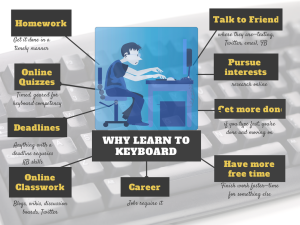 This topic that is close to my tech teacher soul. It has become a familiar argument between those who believe children intuitively learn to type (“see them on smartphones and iPads–they don’t need help”) and those of us who believe instruction makes them better, faster. Ask a Tech Teacher contributor, James Lovelock, discusses this:
Explicit typing, simulated application and practical application – Why is this not a thing?
When it comes to education, there has always been a call for approaches that are more grounded in context. For example, you could just look at a map and do some measurements, or you can get out there with a trusty surveyor’s wheel and chart a space and learn real applications. It makes perfect sense to do this, practical application proves relevance and also allows for greater engagement.
Having said that, one would not do this without first explaining the concepts and practicing the basics of measurement. Yet all too often, when it comes to touch-typing that is exactly what occurs, students are expected to just ‘pick it up’ as they go along because the work required to develop the skill correctly can be viewed as “unnecessary,” “too time-consuming,” or “artificial learning.”

169 Tech Tip #28: My Sound Doesn’t Work
 In these 169 tech-centric situations, you get an overview of pedagogy—the tech topics most important to your teaching—as well as practical strategies to address most classroom tech situations, how to scaffold these to learning, and where they provide the subtext to daily tech-infused education.
Today’s tip: #28: My Sound Doesn’t Work
Category: Hardware
Q: I can’t get any sound out of my computer. Do I need a new sound card?
A: Before you invest that kind of money, try these easy fixes:

Top Ten Education Blogs
I am honored to be selected as one of TutorFair’s Top Ten Education Blogs for 2018! Without a doubt, the credit goes to my readers. I am proud that the resources, reviews, and materials I curate for you resonate with your teaching needs.

Do check out their full article to see all ten selected blogs. It includes names of edtech experts you already follow and a few you’ll want to add to your list.
More edtech blogs:

Gamechanger: Type to Learn is Now in the Cloud!
 When I started teaching a decade ago, Type to Learn was the MS Word of typing programs–everyone used it. The game-based keyboarding program was fun, engaging, and actually worked. Students graduated from the thirty-forty lessons (that took about a year to get through) with the skills they needed to become fast and accurate typists who could use the keyboard as an effective tool in both classwork and homework.
At some point in the past, busy teachers moved away from a committed program that teaches typing to solutions that promised to automate the process with rote drills and games. With most of these freemium online programs, students log in and get started. No installation, no set-up, often little supervision, just typing. The problem is, they don’t work very well. With the push to move assessments online, students need good keyboarding skills. That means:
…fast accurate typing as a tool for writing and test-taking, not a distraction
If you’re one of the many who realize your students’ typing skills aren’t up to this standard, you’ll love Type to Learn’s game-changing update: It’s now in the cloud. No more software downloads. No more inability to sync between home and school. No more “runs only on desktops and laptops”.
Let me back up and describe Type to Learn Cloud. It’s a comprehensive typing program that teaches not just the basics but advanced skills necessary to become fast and accurate touch typists. It does this through a process of review, demonstration, practice, and assessment. Using avatar-like animation, engaging sounds, and colorful graphics, rolled out in a space-themed story, students progress through thirty-six lessons, five games per lesson, and seven assessments to complete the interactive missions that will save their world. It operates in the cloud, works on most digital devices (including Chromebooks and iPads with an external keyboard), and plays well with all browsers. Students can work from home or school and their progress syncs between the two.





