
Author: Jacqui

Tech Tip #24: How to Open A New Word Doc Without the Program
As a working technology teacher, I get hundreds of questions from parents about their home computers, how to do stuff, how to solve problems. Each Tuesday, I’ll share one of those with you. They’re always brief and always focused. Enjoy!
Q: I can’t find the Word icon that opens MS Word. What do I do?
A: Let’s say you looked on your desktop and the Word icon that usually opens MS Word has disappeared. These things happen and always at the worst time. You might have pinned it to the start menu but what if you didn’t?
No problem. All you have to do is right click on the desktop and pick New Word Doc. That’s what it does–opens a new Word doc for you without going through opening the program first.

Snazzy.

Dear Otto: How Can I Highlight a Document
 Do you have a tech question?[/caption]
Dear Otto is an occasional column where I answer questions I get from readers about teaching tech. If you have a question, please complete the form below and I’ll answer it here. For your privacy, I use only first names.
One of my readers was making a presentation and wanted to know how to highlight the screen for her audience and/or spotlight information. When she sent the question, I didn’t have a solution, but have since come across several I want to share with you.
I love this tool I discovered thanks to Rick over at What’s on my PC. This is a portable tool that presents on the Windows Desktop as a virtual pointer stick. It’s freeware, requires no log-in, and minimal installation.

Weekend Website #110: 89 Resources for Teachers
I know summer just started. You’re relaxing, reading the stack of books that collected on your nightstand, planting the flowers you were supposed to take care of in April, but, well, teaching came first.
Bookmark this page and when you’re ready to look at some teacherly resources, come back. I’ve collected 89 great resources to make your job easier–everything from grading rubrics, online quizzes, audio books, utilities, to puzzle creators and more.

Happy July 4th!
It’s America’s birthday and I’m celebrating. What I write today will be… anything I want–gibberish, a short story, guest articles on crazy topics. I have no idea. My son’s in Kuwait protecting America’s distant shores. My daughter’s in San Diego preparing her LPD for some future battle. I’m here, thanking both of them and every other service member who accepted the calling to protect our nation’s freedoms.
God be with all of you.

Tech Tip #23: I Deleted a File By Accident
As a working technology teacher, I get hundreds of questions from parents about their home computers, how to do stuff, how to solve problems. Each Tuesday, I’ll share one of those with you. They’re always brief and always focused. Enjoy!
Q: I deleted a file! I need it back! What do I do?
A. Here’s what you do:
- find the recycle bin on your desktop
- right-click on it and select ‘restore’
If it’s there, restore it. It’ll end up back where it was before you deleted it.
If you deleted it from your flash drive, it’s gone. There are programs for undeleting from external drives, but they cost money. I’ll cover those later.
Weekend Website #102: Interactive Simulations
Every Friday, I share a website (or app) that I’ve heard about, checked into, gotten excited to use. This one is a math book and app. Since ‘math’ is by far the most popular search term of readers who seek out my blog, I know you’re going to enjoy this review.
[caption id="attachment_8767" align="aligncenter" width="571"]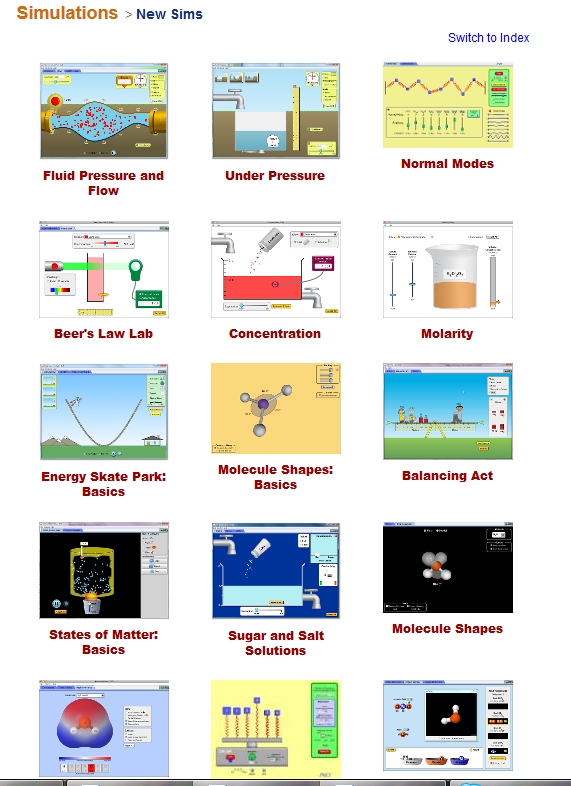 Simulations for elementary/middle school math and science[/caption]
(more…)

9 Steps to Tech Savviness This Summer
Summer is for change. Out with routine, in with spontaneity. When you were in high school, that meant relaxing, seeing friends, going to parties. In college, it likely meant a summer job to make the money that paid for college. Now, as an adult, living your future, summer is a time to rejuvenate, to enrich, to build your core–those things that make you who you are.
As a technology teacher or IT coordinator or computer specialist (or all of the above), you need as much time as you can get and more than you have during the school year to stay afloat of what’s happening in the tech ed field. The list of changes is daunting–iPads, 1:1 initiatives, technology integration, podcasts, sharing and publishing student work, embeddable widgets, Common Core State Standards, digital citizenship, keyboarding. If you’re like me, you try to do what you can during the school year, but it’s summer, with its endless days and no schedule that gives you the freedom to let your brain lose.
Here’s my bucket list for this summer:
Tech Tip #22: Quick Exit from 97% of Programs
As a working technology teacher, I get hundreds of questions from parents about their home computers, how to do stuff, how to solve problems. Each Tuesday, I’ll share one of those with you. They’re always brief and always focused. Enjoy!
Q: My child has a program on the computer and I can’t figure out how to get out of it. There’s no File-exit, no menu. What do I do?
A: Try the old standby from Windows’ earliest days–Alt+F4. It works on almost all programs. I use it on the kindergarten programs in my lab all the time.
Don’t want to wait 98 weeks for all the tech tips? Purchase 169 Tech Problems from the Classroom and How Students Can Solve Them by clicking here.
Dear Otto: Should Students Space Once or Twice After a Period?
Dear Otto is an occasional column where I answer questions I get from readers about teaching tech. If you have a question, please complete the form below and I’ll answer it here. For your privacy, I use only first names.
Here’s a great question I got from Lisa:
In teaching 5th and 6th graders (I became the tech. teacher this year), do you teach them to space once or twice after periods and colons. It seems to me that what I see on the web/business world is that there is no longer a need to space twice. Yet my students’ homeroom teachers tell them to space twice. I want to teach them what is correct but I also do not want to confuse them.
A: That’s a question I get a lot–and often people are sure they know the answer, just want me to validate their two-space conclusion.
I’m sorry to be the bearer of bad news, but two spaces is the floppy disc of keyboarding–we’ve moved past it. It’s not wrong; you don’t have to retrain yourself to go space instead of space-space, but with new keyboarders, teach them one space.
It started in published documents. They wanted to save room, which saved money, so eliminated that extra space, and the practice rolled into everyday use. Some people still teach two spaces, but preferred is one. And if you want to teach kids the approach that will get them through college, it’s one.
Thanks for this question. It’s one that always comes up. We need a great big bull horn to get the word out better.
Tech Tip #21: How to Make a Small Webpage Window Big
As a working technology teacher, I get hundreds of questions from parents about their home computers, how to do stuff, how to solve problems. Each Tuesday, I’ll share one of those with you. They’re always brief and always focused. Enjoy!
Q: When I open the internet (or a document), the window is small. It barely fills half the screen. What’s the quickest way to make it bigger?
A: There are two easy solutions, one faster than the other
- Click the maximize box in the upper right corner of the document (it looks like a hollow square and resides next to the X).
- If you have youngers whose fine motor skills aren’t quite there and aiming/clicking that tiny box is really a challenge, here’s a better way: Double click the blue title bar at the top of the document. That takes care of it without aiming at the tiny spot.





