
Year: 2026

Building Healthier Learning Environments for Diverse Student Needs
This is always a difficult topic in education–how to serve the many varied needs of students. We’ve talked about it often in the past (check out articles here and here). The Ask a Tech Teacher team has a few more ideas for you:

Building Healthier Learning Environments for Diverse Student Needs

Photo by Stephen Andrews on Unsplash
Every student walks into a classroom carrying a different story. Some learn best through visuals, others through conversation, and others through hands-on activities that let them move and explore. When schools recognize this reality and design spaces around it, something shifts. Students feel seen, engagement rises, and the whole environment becomes a place where growth actually happens.
Building healthier learning environments is not about a single policy or a trendy new framework. It is about a sustained commitment to understanding what different learners need and then making thoughtful, practical changes to meet those needs. (more…)

Happy Mother’s Day!

Mother’s Day in the United States is annually held on the second Sunday of May. This year, that’s May 11th. It celebrates motherhood and it is a time to appreciate mothers and mother figures. Many people give gifts, cards, flowers, candy, a meal in a restaurant or other treats to their mother and mother figures, including grandmothers, great-grandmothers, stepmothers, and foster mothers (click for updates to the list):.
- Mother’s Day activities
- Mother’s Day Activities from
- Mother’s Day cards
- Mother in different languages
- Mother’s Day Quotes
- Mother’s Day Sayings
- Mother’s Day Templates from Canva
Anyone have some favorite websites to share? My list isn’t terribly robust.
Enjoy your day with your children! (more…)

Simple Ways Teachers Can Integrate AI Ethically in the Classroom
No topic is more discussed in today’s education meetings than the impact of Artificial Intelligence–AI–on teaching and learning. Guest contributor to Ask a Tech Teacher, Tess Dodson, has fresh ideas on how to incorporate AI into your classroom in ways that are moral and principled:

Simple Ways Teachers Can Integrate AI Ethically in the Classroom
Artificial intelligence (AI) is already shaping modern education. From generating lesson ideas to helping students brainstorm essays, AI in the classroom is becoming increasingly common. For educators, this shift presents both exciting opportunities and important responsibilities. Teachers need a thoughtful approach and practical strategies to ethically integrate AI into everyday teaching.
Create Clear Guidelines for AI Use
Students are already using AI, and it is here to stay. A survey of more than 1,100 U.S. students found that 90% have used AI-driven tools in academic settings. As such, it is vital that the first step in using AI in the classroom is setting clear expectations. Students are already experimenting with AI tools, but they may not fully understand when or how to use them appropriately. Without guidance, misuse — intentional or not — becomes more likely.
Teachers should create a simple classroom policy around AI. It can include clear rules on when AI use is allowed for assignments and how students should acknowledge or cite AI use. For example, a teacher might allow AI for information gathering but not for generating final answers. Students may also be required to include a short explanation of how the tool was used.

Strengthen Academic Integrity in an AI-Enabled Classroom
One of the main challenges of using AI in education is the concern that students may use these tools to plagiarize or cheat academically. With tools that can instantly generate essays and solve problems, it has become easier for students to submit work that is not their own. As such, teaching practices must adapt.
Teachers can take a proactive approach by clearly defining what constitutes original work. Instead of banning AI outright, educators can guide students on acceptable use. For example, AI might be allowed for outlining ideas or checking grammar, but not for producing complete work. Another effective strategy is requiring students to document their process by providing draft submissions that show revisions over time and reflection paragraphs explaining how they completed the task. (more…)

What You Might Have Missed in April–What’s up in May

Here are the most-read posts last month:
- Why School Counseling Is Essential in Modern Education Systems
- Subscriber Special: Discounted Curricula School License
- How Teachers and Parents Can Work Together to Support Student Well-Being
- April is Financial Literacy Month
- Tech Tips
- Earth Day Class Activities
- 8 Secrets for Getting into USNA (or a Service Academy)
- 4 Ways Students Can Plan Their Writing

Here’s a preview of what’s coming up: (more…)

Subscriber Special: Double the Discount for Newsletter sign up

Every month, subscribers to our newsletter get a free/discounted resource to help their tech teaching.
Sign up for our newsletter. Get 20% off your next purchase until May 15, 2026! That’s double the usual! Use this code:
YPJY6875

May Is #Homeschool Awareness Month

Homeschool Awareness Month is celebrated in May and aims to demonstrate how homeschooling can be a better option than regular schooling for many kids and that they can have the same, if not better, growth while learning from home. Homeschooling Awareness Month wants to show parents how they too can be involved in the growth and learning of their children. This can actually help them become better parents while their kids enjoy a well-rounded upbringing and development. Parents want the best education for their children, and having a strong educational base is so important for children to be accepted for tertiary education or top-tier scholarships. (more…)

National Economics Challenge

Each year, close to 10,000 students from across the nation take the chance to shine while being tested on key micro and macroeconomic principles, as well as their knowledge of the world economy.
The National Economics Challenge provides a platform for high school students of economics to compete with their peers on a national scale and make themselves and their schools proud.
Here’s a good summary from CNBC: (more…)

4 Ways Students Can Plan Their Writing

Few people can sit down and start writing. Most of us hem and haw as we mentally walk through how to get from introduction to conclusion. It’s called ‘prewriting’ and students are no different. Where they diverge from you and I is they haven’t tested all the available methods for planning a story, constructing non-fiction, or building the evidence-based argument. It’s up to us–as their teachers–to introduce these alternatives so they can pick one best suited to their learning and communication style.
Disclaimer: These are presented in random order because what works for your students will depend upon the writing method used in your school, whether its the 6+1 Traits, Common Core Writing Standards, or the tried-and-true who-what-when-where-why.

Brainstorm/Mindmap
Brainstorming, also called ‘mindmapping’, is a collaborative visual approach to thinking through and presenting ideas. It enables students to come up with many ideas without worrying about whether it’s realistic. It’s great for collaborative writing, notetaking, or an individual effort.
Here are basics for brainstorming in the classroom:
- There are no wrong answers.
- Get as many ideas as possible.
- Don’t evaluate ideas–just record them.
- Build on the suggestions of others.
- Stress quantity over quality–get as many ideas as possible. Sort them later.
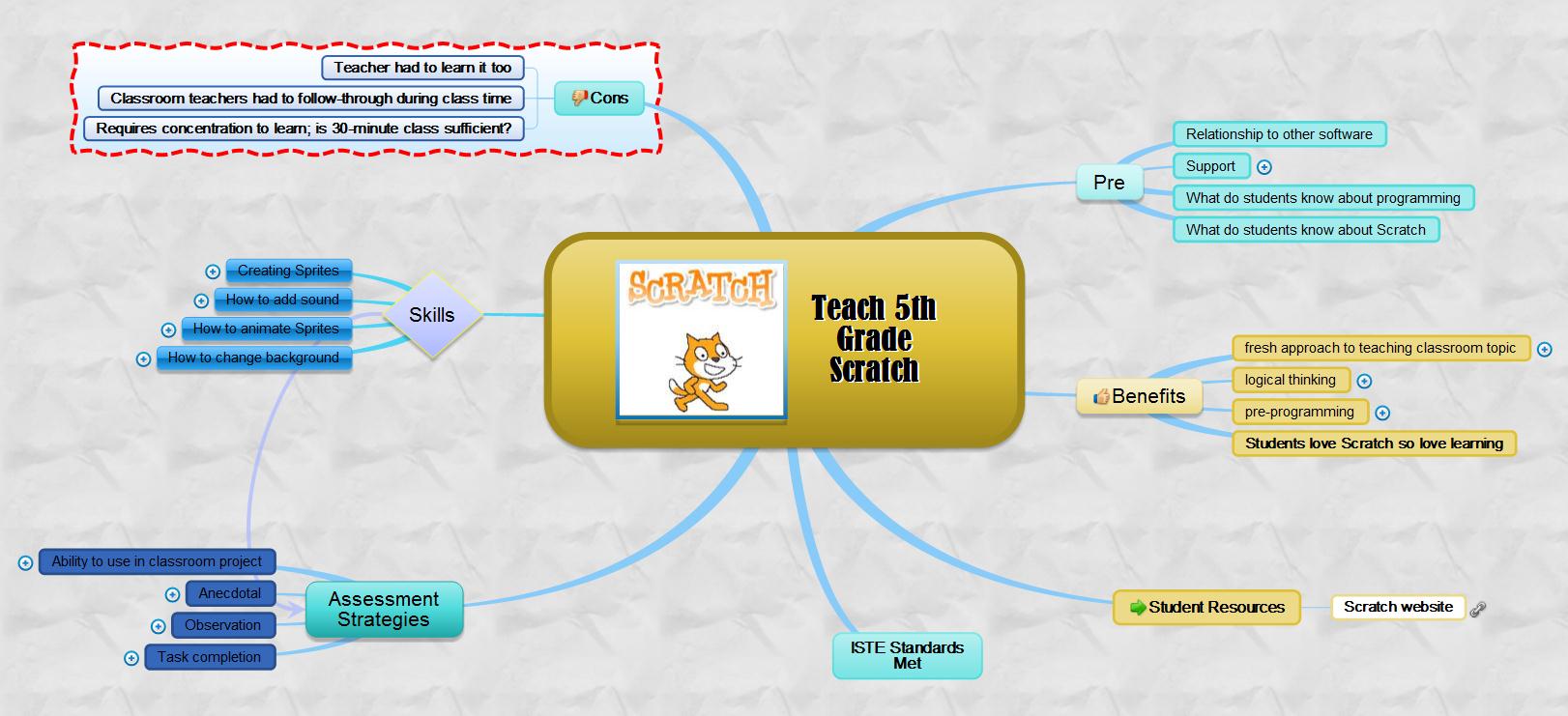
There are many online tools that facilitate this process. If you’re looking for a webtool, try one from this list. (more…)

Tech Tip #62: Email from Word (Or PowerPoint or Excel)

As a working technology teacher, I get hundreds of questions from parents about their home computers, how to do stuff, how to solve problems. I’ll share these with you. They’re always brief and focused. Enjoy!
I was helping one of the faculty at my school. She couldn’t print a document (server problems) so I suggested she email it to herself at home and print it there. She started going online to her Yahoo account and I stopped her. Click the email tool on the Word toolbar. She was so excited–an epiphany! What fun to share that with her. She was so happy about it, I’m going to email it to all the teachers in the school (I’m the tech teacher). (more…)

8 Secrets for Getting into USNA (or a Service Academy)
 The greatest accolade given the Naval Academy was by the North Vietnamese commander Major Bui to captured John Sidney McCain III, USNA class of ’58 when he said, “They have taught you too well, McCain! They have taught you too well.”
You don’t have to be a third generation applicant, son and grandson of a four-star Admiral and future presidential nominee to be one of the 10% of applicants who lands a coveted spot in the Naval Academy, but you do need a plan. That’s the first secret. Plan. Here are eight more:
- Compare yourself against the bare bones requirements here. Is that you? Now check the ‘average student’ here. Still in the running? Even if it’s not you right now, could it be in four years? If so, you’re half way there.
- Know this is where you want to go. Research your options. A good checklist for comparing schools is available in the book, or create your own. Just do it so when you’ve made a decision, you know it’s right.
- Look at the long To Do list and understand they must be done. It includes not just becoming physically/mentally fit, but getting a Congressional nomination, passing a physical examination, working with the Blue and Gold officer, filling out piles of forms, possibly attending several sessions at the Academy to be sure you’re right. Accept that. It may interfere with other High School duties, but that’s the Academy way. They want to see how many balls you can juggle at once and still come out with applause. It’s doable and you can be that person. There’s a checklist in the workbook I used (Building a Midshipman) that makes it easy to complete everything, but be ready: It’s quite long.
- Make a resume. Yes, you’re young, but if you don’t start it now, you’ll forget that when you were in eighth grade, you won the Science Fair, and when you were a freshman, you were the #1 violinist at the area orchestra competition. There’s a sample in the book that can help you.
- Are you a mix of physical/mental/verbal? You don’t have to be the best in any one category, but a Navy Officer requires all three. You have to be physically fit, mentally sharp and able to communicate your thoughts and ideas. Some schools just want one or two. The Navy challenge: You must have all three.
- Keep trying. The Naval Academy values people who follow through even when they’re failing, even when there isn’t enough time (think about preparing for Pearl Harbor–did they have as much time as they needed), especially if it means working under pressure (like every battle America has ever been in). That ability to work through problems and stress is as important as the 4.0 and ASB President that Ivy Leagues want.
- Follow through. Once you’re in the application stage, send the information the Admissions Office requests, then follow through to be sure it got there. They have a handy update feature you can check or use the one in the workbook. Your goal is to be sure they think you’re in the same spot you think you are.
- Start now.
The biggest secret: Believe you can do it. Anything you can believe and conceive, you can achieve. Set your GPS to ‘USNA’ and get going. (more…)





