
Category: 3rd Grade

#87: Use MS Word’s Diagrams to Teach Animal Characteristics
Use MS Word to organize an animal group (reptiles, mammals, amphibians, etc.) and their traits. This project is a favorite with my students, mostly because of the stunning animal picture they get to embed into the background. (more…)

#21: A Holiday Card in Publisher
Publisher cards are easy enough for second graders–even early readers. Pick a template, add a picture to personalize, add their name–and they’re done. It takes about 15 minutes. Kids always feel great about creating these greeting cards: (more…)

Weekend Website #10: Google Mars
Drop by every weekend to discover what wonderful website my classes and parents loved this week. I think you’ll find they’ll be a favorite of yours as they are of mine. (more…)
How to Use MS Word to Teach Geography
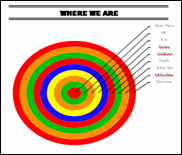 Sample diagram[/caption]
Grade Level: 3-5
Background: Using MS Word.
Vocabulary: diagram, graphic organizer, solar system
Time: About 30 minutes
Steps:
- Open MS Word. Add a heading to the top.
- Add a title–Where We Are–centered, bold and font 14. Use this to point out the tool bar with the four alignment tools, bold, fonts and font size (more…)
#17: A Holiday Story in MS Word for Grades 2-7
Reinforce fiction writing–characters, plot, setting, climax–with a short story in MS Word. Then use color, borders, pictures to enhance the words. (more…)
How to Teach Kids Email
Online communication include faxes, instant messages, blogs, and email. Of the four, email is the most popular—so popular, it has transformed the way the world communicates. According to the Radicati Group, in 2008, 1.3 billion people had email accounts and sent 210 billion messages daily.
Why so popular? First, email is paperless, appealing to our global need to conserve resources. On a more basic level, email is a faster alternative to most other forms of communication by combining the telephone’s speed and efficiency with a user’s need to transfer files and documents. Email has no time or place barriers. You can write and respond (with an amazing level of anonymity) whenever you choose – day or night with multiple contacts, keeping many people in the loop with the click of a few keys. And, email is stored and retrieved quickly at almost no cost. (more…)

#70: How to Keep a Timecard in Excel
This project hides Excel’s power behind a template you create and students fill out at home. If they’re older and more familiar with Excel, involve them in creating the template. (more…)





